
HP Compaq nc8430 LCD Screen Replacement

crwdns2959932:0crwdnd2959932:0Corey Nickerson IIcrwdnd2959932:0crwdnd2959932:0crwdnd2959932:03crwdnd2959932:0crwdne2959932:0
crwdns2959936:0Mud 7, 2024crwdne2959936:0
crwdns2869540:0crwdne2869540:0: 1299
crwdns2959988:0crwdne2959988:0
- crwdns2959990:0crwdne2959990:0
- 2
- crwdns2959992:0crwdne2959992:0
- 28
- crwdns2959994:0crwdne2959994:0
- 99
- crwdns2959996:0crwdne2959996:0
- 1,299
crwdns2955950:0crwdne2955950:0: 1
crwdns2960006:01crwdne2960006:0
crwdns2960000:0crwdne2960000:0crwdns2959984:0crwdne2959984:0: 1 2
crwdns2959972:01crwdne2959972:0
crwdns2959970:02crwdne2959970:0
crwdns2959986:0crwdne2959986:0: 0 1
crwdns2959958:0crwdne2959958:0
crwdns2959976:01crwdne2959976:0
crwdns2862611:0crwdne2862611:0
crwdns2862612:0crwdne2862612:0
crwdns2862615:0crwdne2862615:0
crwdns2862616:0crwdne2862616:0
crwdns2890100:0crwdne2890100:0
crwdns2944378:0crwdne2944378:0
crwdns2915892:0crwdne2915892:0
crwdns2959928:0crwdne2959928:0 ↓This guide will provide information on how to replace the LCD screen if you ever experience black out screen issues.
crwdns2959930:0crwdne2959930:0
crwdns2943215:0crwdne2943215:0
-
-
Spudger4.9
-


-
-
-
Carefully flip the device over so that the bottom is facing up.
-
Slide both of the latches to the left.
 crwdns2952109:0crwdne2952109:0
-
-
-
Slide up against the three lines the battery has.
-
-
-
Slide the battery up and away from the laptop.
-
-
-
-
-
Remove the four 1.2mm Phillip #1 screws circled.
-
The laptop may have rubber covers over the screws,. Remove them using a pointed tool to pry them out.
-
-
-
-
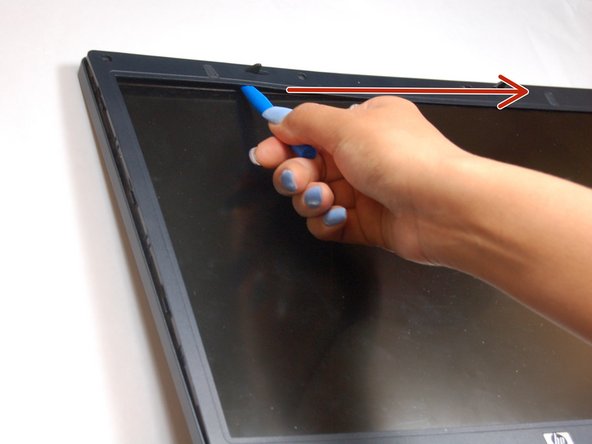
Pry up the plastic screen cover with the pry tool.
-
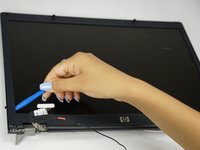
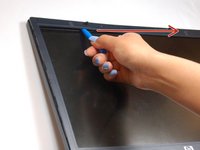
Once a corner of the plastic screen cover is lifted, slide the pry tool around the entire screen until the screen is completely lifted from the base.
-
-
-
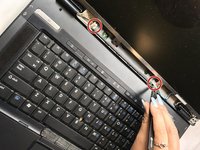
Remove the 1.2 Phillips screws circled.
-
-
-
Remove the four 1.2mm Phillip screws circled.
-
-
-
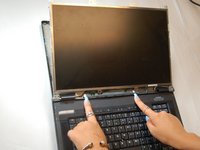
Gently lift the monitor, from the base of the laptop.
-
The laptop will still be connected to the monitor wires located at the bottom of the screen.
-
-
crwdns2935267:0crwdne2935267:0Tweezers$4.99
-
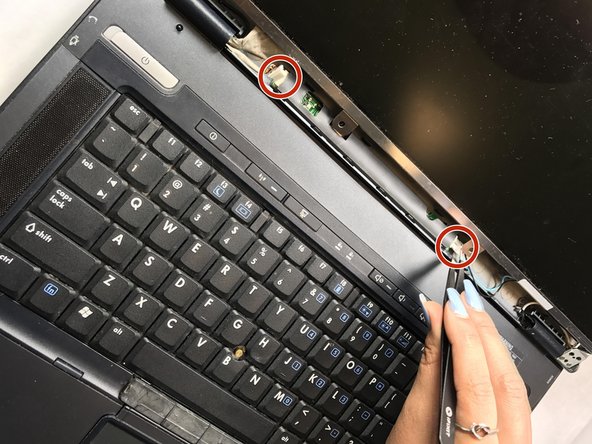
Locate the video cable wires.
-
Gently remove the video cables from the sensor board with tweezers.
-
-
-
All cables should be disconnected from the sensor board. Remove the eight 2mm Phillip screws attaching the bezel to the side of the monitor.
-
Attach the bezel to the new replacement screen.
-
-





To reassemble your device, follow these instructions in reverse order.
crwdns2935221:0crwdne2935221:0
crwdns2935227:0crwdne2935227:0

crwdns2935287:0crwdne2935287:0

Texas Tech, Team S13-G4, Bennett Spring 2017 crwdns2935289:0Texas Tech, Team S13-G4, Bennett Spring 2017crwdne2935289:0
TTU-BENNETT-S17S13G4
crwdns2931471:05crwdne2931471:0
crwdns2935297:060crwdne2935297:0
crwdns2947410:01crwdne2947410:0
Could you please charge it using USB.
Cato Nicolai Lund - crwdns2934203:0crwdne2934203:0 crwdns2950251:0crwdne2950251:0
