crwdns2933423:0crwdne2933423:0
crwdns2947577:0crwdnd2947577:0crwdne2947577:0

HP Compaq nc6400 RAM Replacement

crwdns2942213:0crwdne2942213:0

    1. HP Compaq nc6400 RAM Replacement, Battery: crwdns2935265:01crwdnd2935265:01crwdnd2935265:01crwdne2935265:0
      • Turn off and unplug laptop.

      crwdns2952109:0crwdne2952109:0

      crwdns2917038:0crwdne2917038:0

    2. HP Compaq nc6400 RAM Replacement: crwdns2935265:02crwdnd2935265:01crwdnd2935265:01crwdne2935265:0
      • Locate the battery lock below the battery labeled one.

      • Slide the lock all the way to the left to release the left lock of the battery.

      crwdns2952109:0crwdne2952109:0

      crwdns2917038:0crwdne2917038:0

    3. HP Compaq nc6400 RAM Replacement: crwdns2935265:03crwdnd2935265:01crwdnd2935265:01crwdne2935265:0
      • Locate the lock labeled two at the bottom right corner below the battery.

      • Slide and hold the lock to the left.

      crwdns2952109:0crwdne2952109:0

      crwdns2917038:0crwdne2917038:0

    4. HP Compaq nc6400 RAM Replacement: crwdns2935265:04crwdnd2935265:01crwdnd2935265:01crwdne2935265:0
      • Once both the battery locks are unlocked, slide the battery out to remove.

      crwdns2952109:0crwdne2952109:0

      crwdns2917038:0crwdne2917038:0

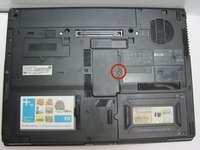
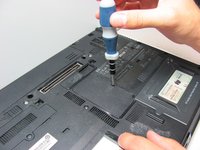
    1. HP Compaq nc6400 RAM Replacement, RAM: crwdns2935265:05crwdnd2935265:01crwdnd2935265:02crwdne2935265:0 HP Compaq nc6400 RAM Replacement, RAM: crwdns2935265:05crwdnd2935265:02crwdnd2935265:02crwdne2935265:0
      • Remove the 1.2 Philips #1 screw holding down the RAM cover to the body.

      crwdns2952109:0crwdne2952109:0

      crwdns2917038:0crwdne2917038:0

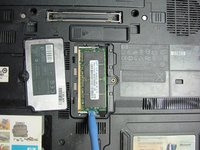
    2. HP Compaq nc6400 RAM Replacement: crwdns2935265:06crwdnd2935265:01crwdnd2935265:01crwdne2935265:0
      • Once the screw is removed, use a spudger to pry open the case covering the RAM chip.

      crwdns2952109:0crwdne2952109:0

      crwdns2917038:0crwdne2917038:0

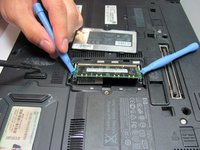
    3. HP Compaq nc6400 RAM Replacement: crwdns2935265:07crwdnd2935265:01crwdnd2935265:02crwdne2935265:0 HP Compaq nc6400 RAM Replacement: crwdns2935265:07crwdnd2935265:02crwdnd2935265:02crwdne2935265:0
      • Use a plastic opening tool to pull back the white clip holding the RAM chip in place.

      • Once the plastic opening tool has disengaged the clip from the RAM chip, keep the plastic opening tool locked into place.

      crwdns2952109:0crwdne2952109:0

      crwdns2917038:0crwdne2917038:0

    4. HP Compaq nc6400 RAM Replacement: crwdns2935265:08crwdnd2935265:01crwdnd2935265:01crwdne2935265:0
      • With a second plastic opening tool,repeat the above process

      • After both plastic opening tools have been locked in place, the RAM chip should pop out about 1/4 of a inch.

      crwdns2952109:0crwdne2952109:0

      crwdns2917038:0crwdne2917038:0

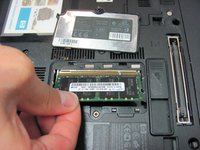
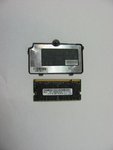
    5. HP Compaq nc6400 RAM Replacement: crwdns2935265:09crwdnd2935265:01crwdnd2935265:02crwdne2935265:0 HP Compaq nc6400 RAM Replacement: crwdns2935265:09crwdnd2935265:02crwdnd2935265:02crwdne2935265:0
      • The RAM chip is susceptible to static electricity. Before grabbing the RAM chip, make sure you have discharged the electricity from your hands by touching a metal surface other than your computer.

      • Grab the RAM chip with your thumb and index finger

      • Carefully pull the RAM chip out

      crwdns2952109:0crwdne2952109:0

      crwdns2917038:0crwdne2917038:0

crwdns2915888:0crwdne2915888:0

To reassemble your device, follow these instructions in reverse order.

crwdns2935221:0crwdne2935221:0

crwdns2935229:05crwdne2935229:0

Luis Vazquez

crwdns2935283:009/24/13crwdne2935283:0

401 crwdns2915208:0crwdne2915208:0

crwdns2935297:02crwdne2935297:0

crwdns2935287:0crwdne2935287:0

Cal Poly, Team 14-6, Forte Fall 2013 crwdns2935289:0Cal Poly, Team 14-6, Forte Fall 2013crwdne2935289:0

CPSU-FORTE-F13S14G6

crwdns2931471:05crwdne2931471:0

crwdns2935297:060crwdne2935297:0

crwdns2947412:00crwdne2947412:0

crwdns2917038:0crwdne2917038:0

crwdns2936625:0crwdne2936625:0:

crwdns2936751:024crwdne2936751:0 0

crwdns2936753:07crwdne2936753:0 7

crwdns2936753:030crwdne2936753:0 38

crwdns2942667:0crwdne2942667:0 4,907