
HP Compaq nc6400 Optical Drive Replacement

crwdns2959932:0crwdnd2959932:0Chad Williamscrwdnd2959932:0crwdnd2959932:0crwdnd2959932:07crwdnd2959932:0crwdne2959932:0
crwdns2959936:0Sun 3, 2024crwdne2959936:0
crwdns2869540:0crwdne2869540:0: 5,2 mil
crwdns2959988:0crwdne2959988:0
- crwdns2959990:0crwdne2959990:0
- 2
- crwdns2959992:0crwdne2959992:0
- 27
- crwdns2959994:0crwdne2959994:0
- 93
- crwdns2959996:0crwdne2959996:0
- 5.245
crwdns2955950:0crwdne2955950:0: 3
crwdns2960004:03crwdne2960004:0.
crwdns2959984:0crwdne2959984:0: 2 3
crwdns2959974:02crwdne2959974:0
crwdns2959970:03crwdne2959970:0
crwdns2959986:0crwdne2959986:0: 1 2
crwdns2959980:01crwdne2959980:0
crwdns2959978:02crwdne2959978:0
crwdns2915892:0crwdne2915892:0
crwdns2959928:0crwdne2959928:0 ↓This guide will take you through the process of replacing the optical drive in a HP Compaq nc6400 Laptop. You will need the correct replacement optical drive for your laptop to complete the installation.
crwdns2959930:0crwdne2959930:0
crwdns2943215:0crwdne2943215:0
-
Spudger4.9


-
-
 crwdns2952109:0crwdne2952109:0
-
-
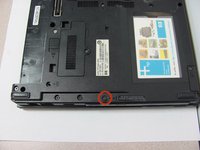
Locate the battery lock below the battery labeled one.
-
Slide the lock all the way to the left to release the left lock of the battery.
-
-
-
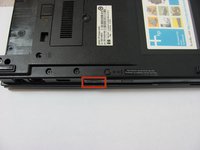
Locate the lock labeled two at the bottom right corner below the battery.
-
Slide and hold the lock to the left.
-
-
-
-
Once both the battery locks are unlocked, slide the battery out to remove.
-
-
-
-
-
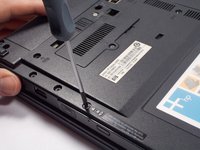
Remove the 4 mm P0 Phillips-head screw indicated by the icon of a lock and disk.
-
-
-
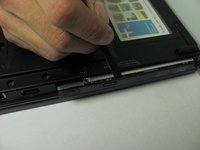
Press and release the eject icon to partially eject the optical drive.
-
Use of a spudger may be necessary to pry open the optical drive.
-
-
-
Grasp the sides and pull the optical drive out.
-
-





To reassemble your device, follow these instructions in reverse order.
crwdns2935221:0crwdne2935221:0
crwdns2935229:02crwdne2935229:0

crwdns2935287:0crwdne2935287:0

Cal Poly, Team 14-6, Forte Fall 2013 crwdns2935289:0Cal Poly, Team 14-6, Forte Fall 2013crwdne2935289:0
CPSU-FORTE-F13S14G6
crwdns2931471:05crwdne2931471:0
crwdns2935297:060crwdne2935297:0
