crwdns2933423:0crwdne2933423:0
crwdns2947577:0crwdnd2947577:0crwdne2947577:0

HP Compaq C700 Fan Replacement

crwdns2942213:0crwdne2942213:0

    1. HP Compaq C700 Fan Replacement, Keyboard: crwdns2935265:01crwdnd2935265:01crwdnd2935265:01crwdne2935265:0
      • It is advised to work on the device only when it is powered off so as to avoid electrocution risks.

      • Turn off computer by pressing and holding the power button.

      crwdns2952109:0crwdne2952109:0

      crwdns2917038:0crwdne2917038:0

    2. HP Compaq C700 Fan Replacement: crwdns2935265:02crwdnd2935265:01crwdnd2935265:03crwdne2935265:0 HP Compaq C700 Fan Replacement: crwdns2935265:02crwdnd2935265:02crwdnd2935265:03crwdne2935265:0 HP Compaq C700 Fan Replacement: crwdns2935265:02crwdnd2935265:03crwdnd2935265:03crwdne2935265:0
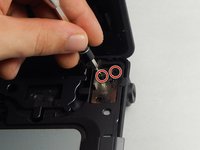
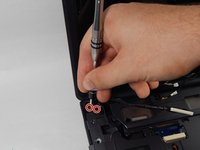
      • Locate and unscrew the two screws on the back marked with a small keyboard. These screws hold the keyboard in place.

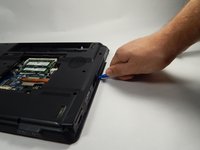
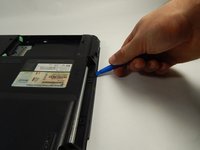
      • Locate the metal hooks where the keyboard connects to the laptop and use a metal spudger to gently pry up the keyboard.

      crwdns2952109:0crwdne2952109:0

      crwdns2917038:0crwdne2917038:0

    3. HP Compaq C700 Fan Replacement: crwdns2935265:03crwdnd2935265:01crwdnd2935265:01crwdne2935265:0
      • Gently lift up and remove the keyboard.

      crwdns2952109:0crwdne2952109:0

      crwdns2917038:0crwdne2917038:0

    1. HP Compaq C700 Fan Replacement, Fan: crwdns2935265:04crwdnd2935265:01crwdnd2935265:01crwdne2935265:0
      • Turn the laptop over so that you see the bottom.

      • Locate the twenty 3 mm Phillips head screws.

      • Unscrew them using the PH0 screwdriver

      crwdns2952109:0crwdne2952109:0

      crwdns2917038:0crwdne2917038:0

    2. HP Compaq C700 Fan Replacement: crwdns2935265:05crwdnd2935265:01crwdnd2935265:01crwdne2935265:0
      • After unscrewing the 3 mm screws, remove the hard drive covering by lifting upward.

      crwdns2952109:0crwdne2952109:0

      crwdns2917038:0crwdne2917038:0

    3. HP Compaq C700 Fan Replacement: crwdns2935265:06crwdnd2935265:01crwdnd2935265:01crwdne2935265:0
      • Remove the hard drive by pulling on the plastic tab and lifting upward.

      crwdns2952109:0crwdne2952109:0

      crwdns2917038:0crwdne2917038:0

    4. HP Compaq C700 Fan Replacement: crwdns2935265:07crwdnd2935265:01crwdnd2935265:01crwdne2935265:0
      • Remove the covering that houses the RAM modules.

      crwdns2952109:0crwdne2952109:0

      crwdns2917038:0crwdne2917038:0

    5. HP Compaq C700 Fan Replacement: crwdns2935265:08crwdnd2935265:01crwdnd2935265:01crwdne2935265:0
      • Locate and unscrew the two Phillips head 3 mm screws on the wireless card.

      crwdns2952109:0crwdne2952109:0

      crwdns2917038:0crwdne2917038:0

    6. HP Compaq C700 Fan Replacement: crwdns2935265:09crwdnd2935265:01crwdnd2935265:01crwdne2935265:0
      • Unhook the two wires connecting to the wireless card by gently pulling them out.

      crwdns2952109:0crwdne2952109:0

      crwdns2917038:0crwdne2917038:0

    7. HP Compaq C700 Fan Replacement: crwdns2935265:010crwdnd2935265:01crwdnd2935265:01crwdne2935265:0
      • Gently lift and pull out the card.

      crwdns2952109:0crwdne2952109:0

      crwdns2917038:0crwdne2917038:0

    8. HP Compaq C700 Fan Replacement: crwdns2935265:011crwdnd2935265:01crwdnd2935265:01crwdne2935265:0
      crwdns2935267:0crwdne2935267:0
      Tweezers
      $4.99
      • Locate the power button connector wire. (This can be found where the keyboard sits.)

      • Using the tweezers, unhook the wire.

      crwdns2952109:0crwdne2952109:0

      crwdns2917038:0crwdne2917038:0

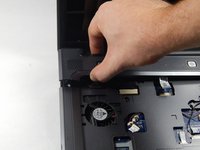
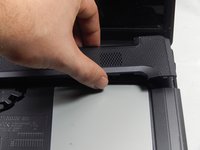
    9. HP Compaq C700 Fan Replacement: crwdns2935265:012crwdnd2935265:01crwdnd2935265:02crwdne2935265:0 HP Compaq C700 Fan Replacement: crwdns2935265:012crwdnd2935265:02crwdnd2935265:02crwdne2935265:0
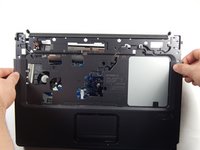
      • Press and hold the lock to pop the panel piece above the keyboard and pull up to remove it.

      crwdns2952109:0crwdne2952109:0

      crwdns2917038:0crwdne2917038:0

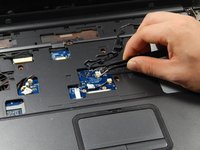
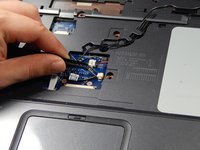
    10. HP Compaq C700 Fan Replacement: crwdns2935265:013crwdnd2935265:01crwdnd2935265:02crwdne2935265:0 HP Compaq C700 Fan Replacement: crwdns2935265:013crwdnd2935265:02crwdnd2935265:02crwdne2935265:0
      • Unplug the remaining wires using the tweezers.

      crwdns2952109:0crwdne2952109:0

      crwdns2917038:0crwdne2917038:0

    11. HP Compaq C700 Fan Replacement: crwdns2935265:014crwdnd2935265:01crwdnd2935265:01crwdne2935265:0
      • Gently pull out the three wires.

      crwdns2952109:0crwdne2952109:0

      crwdns2917038:0crwdne2917038:0

    12. HP Compaq C700 Fan Replacement: crwdns2935265:015crwdnd2935265:01crwdnd2935265:02crwdne2935265:0 HP Compaq C700 Fan Replacement: crwdns2935265:015crwdnd2935265:02crwdnd2935265:02crwdne2935265:0
      • Locate the four 3 mm Phillips head screws.

      • Unscrew them using the PH0 screwdriver.

      crwdns2952109:0crwdne2952109:0

      crwdns2917038:0crwdne2917038:0

    13. HP Compaq C700 Fan Replacement: crwdns2935265:016crwdnd2935265:01crwdnd2935265:01crwdne2935265:0
      • Unhook the display connector wire.

      crwdns2952109:0crwdne2952109:0

      crwdns2917038:0crwdne2917038:0

    14. HP Compaq C700 Fan Replacement: crwdns2935265:017crwdnd2935265:01crwdnd2935265:01crwdne2935265:0
      • Gently disconnect the display by pulling it upwards.

      crwdns2952109:0crwdne2952109:0

      crwdns2917038:0crwdne2917038:0

    15. HP Compaq C700 Fan Replacement: crwdns2935265:018crwdnd2935265:01crwdnd2935265:01crwdne2935265:0
      • Locate the disk drive on the side of the device.

      • Remove it by pulling it all the way out.

      crwdns2952109:0crwdne2952109:0

      crwdns2917038:0crwdne2917038:0

    16. HP Compaq C700 Fan Replacement: crwdns2935265:019crwdnd2935265:01crwdnd2935265:01crwdne2935265:0
      • Use the PH0 screwdriver to remove the two 3 mm Phillips head screws in the disk drive port.

      crwdns2952109:0crwdne2952109:0

      crwdns2917038:0crwdne2917038:0

    17. HP Compaq C700 Fan Replacement: crwdns2935265:020crwdnd2935265:01crwdnd2935265:01crwdne2935265:0
      • Locate and unplug the touchpad connection using the tweezers.

      crwdns2952109:0crwdne2952109:0

      crwdns2917038:0crwdne2917038:0

    18. HP Compaq C700 Fan Replacement: crwdns2935265:021crwdnd2935265:01crwdnd2935265:03crwdne2935265:0 HP Compaq C700 Fan Replacement: crwdns2935265:021crwdnd2935265:02crwdnd2935265:03crwdne2935265:0 HP Compaq C700 Fan Replacement: crwdns2935265:021crwdnd2935265:03crwdnd2935265:03crwdne2935265:0
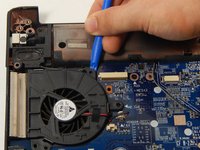
      • Using the Opening tool, gently pry up the cover and remove it.

      crwdns2952109:0crwdne2952109:0

      crwdns2917038:0crwdne2917038:0

    19. HP Compaq C700 Fan Replacement: crwdns2935265:022crwdnd2935265:01crwdnd2935265:01crwdne2935265:0
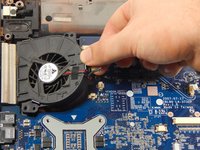
      • Unplug the fan wire connection using the tweezers.

      crwdns2952109:0crwdne2952109:0

      crwdns2917038:0crwdne2917038:0

    20. HP Compaq C700 Fan Replacement: crwdns2935265:023crwdnd2935265:01crwdnd2935265:01crwdne2935265:0
      • Locate the 3 mm Phillips head screw.

      • Unscrew it using the PH0 screwdriver.

      crwdns2952109:0crwdne2952109:0

      crwdns2917038:0crwdne2917038:0

    21. HP Compaq C700 Fan Replacement: crwdns2935265:024crwdnd2935265:01crwdnd2935265:02crwdne2935265:0 HP Compaq C700 Fan Replacement: crwdns2935265:024crwdnd2935265:02crwdnd2935265:02crwdne2935265:0
      • Using the opening tool, gently pry up and remove the fan.

      crwdns2952109:0crwdne2952109:0

      crwdns2917038:0crwdne2917038:0

crwdns2915888:0crwdne2915888:0

To reassemble your device, follow these instructions in reverse order.

crwdns2935221:0crwdne2935221:0

crwdns2935227:0crwdne2935227:0

Taylor Johansen

crwdns2935283:010/20/16crwdne2935283:0

711 crwdns2915208:0crwdne2915208:0

crwdns2935297:05crwdne2935297:0

crwdns2935287:0crwdne2935287:0

UMass Dartmouth, Team 5-6, Martin Fall 2016 crwdns2935289:0UMass Dartmouth, Team 5-6, Martin Fall 2016crwdne2935289:0

UMASSD-MARTIN-F16S5G6

crwdns2931471:03crwdne2931471:0

crwdns2935297:071crwdne2935297:0

crwdns2947412:00crwdne2947412:0

crwdns2917038:0crwdne2917038:0

crwdns2936625:0crwdne2936625:0:

crwdns2936751:024crwdne2936751:0 8

crwdns2936753:07crwdne2936753:0 21

crwdns2936753:030crwdne2936753:0 40

crwdns2942667:0crwdne2942667:0 1,790