crwdns2933423:0crwdne2933423:0
crwdns2947577:0crwdnd2947577:0crwdne2947577:0

HP Compaq 6710b Keyboard Replacement

crwdns2942213:0crwdne2942213:0

    1. HP Compaq 6710b Keyboard Replacement, Keyboard: crwdns2935265:01crwdnd2935265:01crwdnd2935265:03crwdne2935265:0 HP Compaq 6710b Keyboard Replacement, Keyboard: crwdns2935265:01crwdnd2935265:02crwdnd2935265:03crwdne2935265:0 HP Compaq 6710b Keyboard Replacement, Keyboard: crwdns2935265:01crwdnd2935265:03crwdnd2935265:03crwdne2935265:0
      • Turn off computer before starting.

      • Flip to the backside of the laptop.

      • Using a Phillips #1 screwdriver, unscrew the 5mm screw and take off the shown cover.

      • Using the same screwdriver, unscrew the 8mm screws.

      • The screws may not completely fall out of the laptop, just ensure they are unscrewed as far as they will go.

      crwdns2952109:0crwdne2952109:0

      crwdns2917038:0crwdne2917038:0

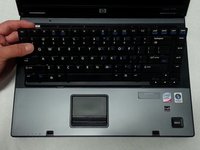
    2. HP Compaq 6710b Keyboard Replacement: crwdns2935265:02crwdnd2935265:01crwdnd2935265:01crwdne2935265:0
      • Flip over the laptop to the top side, and open the laptop.

      • Slide the locking tabs down using a blue plastic opening tool or your fingernail.

      crwdns2952109:0crwdne2952109:0

      crwdns2917038:0crwdne2917038:0

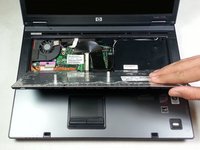
    3. HP Compaq 6710b Keyboard Replacement: crwdns2935265:03crwdnd2935265:01crwdnd2935265:02crwdne2935265:0 HP Compaq 6710b Keyboard Replacement: crwdns2935265:03crwdnd2935265:02crwdnd2935265:02crwdne2935265:0
      • Using the plastic prying tool, lift the keyboard gently towards you.

      • Don't take the keyboard completely off because it is still attached with a ribbon cable to the computer.

      crwdns2952109:0crwdne2952109:0

      crwdns2917038:0crwdne2917038:0

    4. HP Compaq 6710b Keyboard Replacement: crwdns2935265:04crwdnd2935265:01crwdnd2935265:01crwdne2935265:0
      • Pull up on both sides of the black locking tab of the connector.

      • The keyboard should now be free of the computer.

      crwdns2952109:0crwdne2952109:0

      crwdns2917038:0crwdne2917038:0

crwdns2915888:0crwdne2915888:0

To reassemble your device, follow these instructions in reverse order.

crwdns2935221:0crwdne2935221:0

crwdns2935229:04crwdne2935229:0

Khulan Orgil

crwdns2935283:004/14/15crwdne2935283:0

1,186 crwdns2915208:0crwdne2915208:0

crwdns2935297:06crwdne2935297:0

crwdns2935287:0crwdne2935287:0

Cal Poly, Team 4-2, Maness Spring 2015 crwdns2935289:0Cal Poly, Team 4-2, Maness Spring 2015crwdne2935289:0

CPSU-MANESS-S15S4G2

crwdns2931471:04crwdne2931471:0

crwdns2935297:072crwdne2935297:0

crwdns2947412:02crwdne2947412:0

No parts required to *replace* the keyboard?

David - crwdns2934203:0crwdne2934203:0 crwdns2950251:0crwdne2950251:0

Did you really need to be told to get a keyboard part to do a keyboard replacement?

Thanks for the guide

Victor Izquierdo Quesada - crwdns2934203:0crwdne2934203:0 crwdns2950251:0crwdne2950251:0

crwdns2917038:0crwdne2917038:0

crwdns2936625:0crwdne2936625:0:

crwdns2936751:024crwdne2936751:0 3

crwdns2936753:07crwdne2936753:0 15

crwdns2936753:030crwdne2936753:0 44

crwdns2942667:0crwdne2942667:0 5,788