crwdns2933423:0crwdne2933423:0
crwdns2947577:0crwdnd2947577:0crwdne2947577:0

HP 7 1800 Display Replacement

crwdns2869540:0crwdne2869540:0: 2.6K

crwdns2959988:0crwdne2959988:0

crwdns2959990:0crwdne2959990:0
2
crwdns2959992:0crwdne2959992:0
12
crwdns2959994:0crwdne2959994:0
90
crwdns2959996:0crwdne2959996:0
2,550
crwdns2955950:0crwdne2955950:0: 2

crwdns2960008:02crwdne2960008:0

crwdns2960000:0crwdne2960000:0
crwdns2959984:0crwdne2959984:0: 5

crwdns2959974:05crwdne2959974:0

crwdns2959986:0crwdne2959986:0: 1

crwdns2959980:01crwdne2959980:0

crwdns2955944:0crwdne2955944:0: 15 - 20 crwdns2931279:0crwdne2931279:0
crwdns2955970:0crwdne2955970:0: crwdns2937803:0crwdne2937803:0
HP 7 1800 Display Replacement

crwdns2959930:0crwdne2959930:0

crwdns2943215:0crwdne2943215:0

crwdns2915892:0crwdne2915892:0

crwdns2959928:0crwdne2959928:0 ↓

This guide requires you to take apart nearly the entire tablet to get to the display. Be sure to keep track of the screws.

    1. HP 7 1800 Display Replacement, Remove the back panel: crwdns2935265:01crwdnd2935265:01crwdnd2935265:02crwdne2935265:0 HP 7 1800 Display Replacement, Remove the back panel: crwdns2935265:01crwdnd2935265:02crwdnd2935265:02crwdne2935265:0
      • Carefully insert a Spudger into one of the corners of the tablet.

      • Slide the Spudger along the edge popping the tabs out along the way.

      • Be careful not to break the tabs.

      crwdns2952109:0crwdne2952109:0

      crwdns2917038:0crwdne2917038:0

    2. HP 7 1800 Display Replacement, Remove the battery: crwdns2935265:02crwdnd2935265:01crwdnd2935265:03crwdne2935265:0 HP 7 1800 Display Replacement, Remove the battery: crwdns2935265:02crwdnd2935265:02crwdnd2935265:03crwdne2935265:0 HP 7 1800 Display Replacement, Remove the battery: crwdns2935265:02crwdnd2935265:03crwdnd2935265:03crwdne2935265:0
      crwdns2935267:0crwdne2935267:0
      Tweezers
      $4.99
      • Slide the Spudger under the battery to lift it off the adhesive.

      • Gently pull the cable connection from the motherboard using tweezers.

      crwdns2952109:0crwdne2952109:0

      crwdns2917038:0crwdne2917038:0

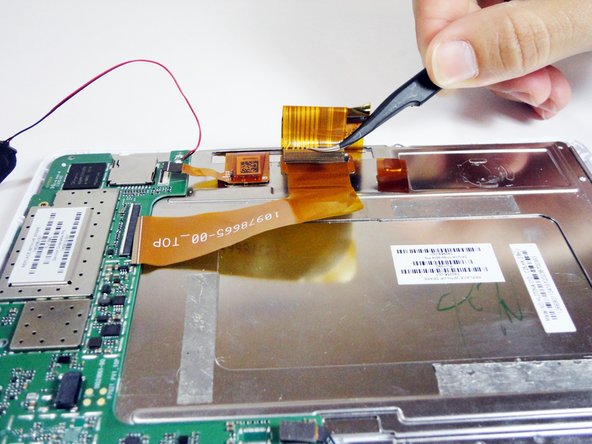
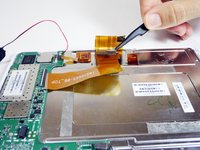
    1. HP 7 1800 Display Replacement, Remove the large ribbon cable: crwdns2935265:03crwdnd2935265:01crwdnd2935265:02crwdne2935265:0 HP 7 1800 Display Replacement, Remove the large ribbon cable: crwdns2935265:03crwdnd2935265:02crwdnd2935265:02crwdne2935265:0
      crwdns2935267:0crwdne2935267:0
      Tweezers
      $4.99
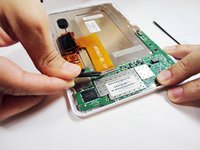
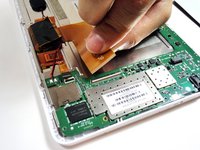
      • Remove the larger ribbon cable by gently flipping the beige latch and pulling it out with tweezers.

      crwdns2952109:0crwdne2952109:0

      crwdns2917038:0crwdne2917038:0

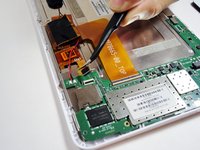
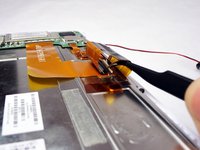
    2. HP 7 1800 Display Replacement, Remove the smaller ribbon cable: crwdns2935265:04crwdnd2935265:01crwdnd2935265:02crwdne2935265:0 HP 7 1800 Display Replacement, Remove the smaller ribbon cable: crwdns2935265:04crwdnd2935265:02crwdnd2935265:02crwdne2935265:0
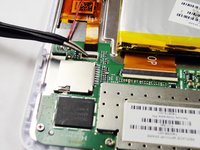
      • Remove the smaller ribbon cable by gently flipping the black latch and pulling it out with tweezers.

      crwdns2952109:0crwdne2952109:0

      crwdns2917038:0crwdne2917038:0

    3. HP 7 1800 Display Replacement, Unscrew the 7 silver screws from the logic board: crwdns2935265:05crwdnd2935265:01crwdnd2935265:01crwdne2935265:0
      • Remove the following 7 screws:

      • Six 4.17mm Phillips #00 around the motherboard.

      • One 2.67mm Phillips #00 next to the front facing camera.

      • The 2.67mm screw circled in yellow is notably shorter than the other 6 screws circled in red.

      crwdns2952109:0crwdne2952109:0

      crwdns2917038:0crwdne2917038:0

    4. HP 7 1800 Display Replacement, Unplug the front facing camera from the logic board: crwdns2935265:06crwdnd2935265:01crwdnd2935265:01crwdne2935265:0
      • Gently pry the front facing camera plug up and off of the motherboard.

      crwdns2952109:0crwdne2952109:0

      crwdns2917038:0crwdne2917038:0

    5. HP 7 1800 Display Replacement, Remove the logic board: crwdns2935265:07crwdnd2935265:01crwdnd2935265:01crwdne2935265:0
      • Carefully lift the motherboard directly up.

      crwdns2952109:0crwdne2952109:0

      crwdns2917038:0crwdne2917038:0

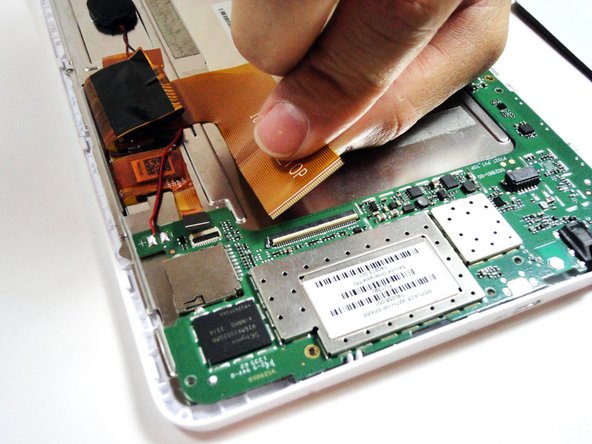
    1. HP 7 1800 Display Replacement, Remove the ribbon cable attached to the metal plate: crwdns2935265:08crwdnd2935265:01crwdnd2935265:02crwdne2935265:0 HP 7 1800 Display Replacement, Remove the ribbon cable attached to the metal plate: crwdns2935265:08crwdnd2935265:02crwdnd2935265:02crwdne2935265:0
      • On the metal plate inside of the device, there is a ribbon cable in a loop. Flip the white tab and pull the cable out.

      crwdns2952109:0crwdne2952109:0

      crwdns2917038:0crwdne2917038:0

    2. HP 7 1800 Display Replacement, Unscrew the 7 black screws on the metal plate: crwdns2935265:09crwdnd2935265:01crwdnd2935265:01crwdne2935265:0
      • Unscrew the following black screws:

      • Seven 2.82mm Phillips #00 around the metal casing.

      crwdns2952109:0crwdne2952109:0

      crwdns2917038:0crwdne2917038:0

    3. HP 7 1800 Display Replacement, Remove the metal plate: crwdns2935265:010crwdnd2935265:01crwdnd2935265:01crwdne2935265:0
      • Gently lift the metal plate directly up.

      crwdns2952109:0crwdne2952109:0

      crwdns2917038:0crwdne2917038:0

    4. HP 7 1800 Display Replacement, Remove the display: crwdns2935265:011crwdnd2935265:01crwdnd2935265:01crwdne2935265:0
      • Gently lift the display directly up.

      crwdns2952109:0crwdne2952109:0

      crwdns2917038:0crwdne2917038:0

crwdns2915888:0crwdne2915888:0

To reassemble your device, follow these instructions in reverse order.

crwdns2935221:0crwdne2935221:0

crwdns2935229:05crwdne2935229:0

crwdns2862417:0crwdne2862417:0

crwdns2935293:0crwdne2935293:0

TMD

crwdns2935283:001/21/15crwdne2935283:0

792 crwdns2915208:0crwdne2915208:0

crwdns2935297:05crwdne2935297:0

crwdns2935287:0crwdne2935287:0

USF Tampa, Team 4-1, Brown Winter 2015 crwdns2935289:0USF Tampa, Team 4-1, Brown Winter 2015crwdne2935289:0

USFT-BROWN-W15S4G1

crwdns2931471:04crwdne2931471:0

crwdns2935297:084crwdne2935297:0

crwdns2947412:02crwdne2947412:0

I have this same tablet but I cannot find a replacement screen. Do you know where I could find one?

Karen Porter - crwdns2934203:0crwdne2934203:0 crwdns2950251:0crwdne2950251:0

crwdns2917038:0crwdne2917038:0

crwdns2936625:0crwdne2936625:0:

crwdns2936751:024crwdne2936751:0 2

crwdns2936753:07crwdne2936753:0 12

crwdns2936753:030crwdne2936753:0 90

crwdns2959996:0crwdne2959996:0 2,550