crwdns2933423:0crwdne2933423:0
crwdns2947577:0crwdnd2947577:0crwdne2947577:0

HMD Barbie Keypad Replacement

crwdns2942213:0crwdne2942213:0

  1. HMD Barbie Keypad Replacement, Battery: crwdns2935265:01crwdnd2935265:01crwdnd2935265:03crwdne2935265:0 HMD Barbie Keypad Replacement, Battery: crwdns2935265:01crwdnd2935265:02crwdnd2935265:03crwdne2935265:0 HMD Barbie Keypad Replacement, Battery: crwdns2935265:01crwdnd2935265:03crwdnd2935265:03crwdne2935265:0
    • Fully power off the phone.

    • Remove the backplate by gripping it around the edges and pulling away from the phone.

    crwdns2952109:0crwdne2952109:0

    crwdns2917038:0crwdne2917038:0

  2. HMD Barbie Keypad Replacement: crwdns2935265:02crwdnd2935265:01crwdnd2935265:03crwdne2935265:0 HMD Barbie Keypad Replacement: crwdns2935265:02crwdnd2935265:02crwdnd2935265:03crwdne2935265:0 HMD Barbie Keypad Replacement: crwdns2935265:02crwdnd2935265:03crwdnd2935265:03crwdne2935265:0
    • Grip the battery from the top and pull away from the phone.

    • Ensure there is no swelling or damage to the battery. A swollen or damaged battery can be a fire hazard.

    crwdns2952109:0crwdne2952109:0

    crwdns2917038:0crwdne2917038:0

  3. HMD Barbie Keypad Replacement, Inner Backplate: crwdns2935265:03crwdnd2935265:01crwdnd2935265:01crwdne2935265:0
    • Remove the six 5mm screws using the T5 Torx screwdriver.

    crwdns2952109:0crwdne2952109:0

    crwdns2917038:0crwdne2917038:0

  4. HMD Barbie Keypad Replacement: crwdns2935265:04crwdnd2935265:01crwdnd2935265:02crwdne2935265:0 HMD Barbie Keypad Replacement: crwdns2935265:04crwdnd2935265:02crwdnd2935265:02crwdne2935265:0
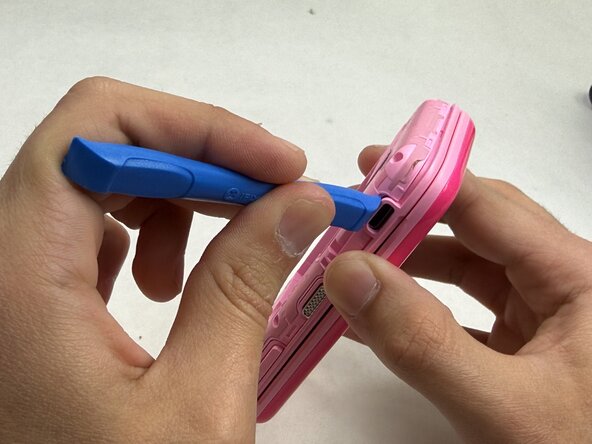
    • Remove the backplate using an opening tool.

    • Find an opening on the phone that makes it easiest to remove the backplate. Any side of the phone will work.

    crwdns2952109:0crwdne2952109:0

    crwdns2917038:0crwdne2917038:0

  5. HMD Barbie Keypad Replacement, Motherboard: crwdns2935265:05crwdnd2935265:01crwdnd2935265:03crwdne2935265:0 HMD Barbie Keypad Replacement, Motherboard: crwdns2935265:05crwdnd2935265:02crwdnd2935265:03crwdne2935265:0 HMD Barbie Keypad Replacement, Motherboard: crwdns2935265:05crwdnd2935265:03crwdnd2935265:03crwdne2935265:0
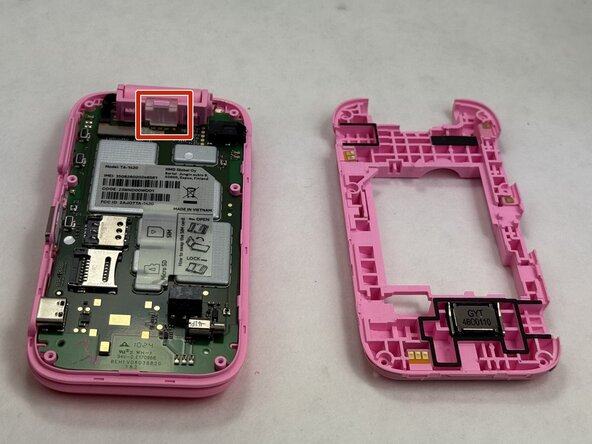
    • Use the opening tool to remove the clear plastic clip near the hinge of the phone securing the motherboard.

    crwdns2952109:0crwdne2952109:0

    crwdns2917038:0crwdne2917038:0

  6. HMD Barbie Keypad Replacement: crwdns2935265:06crwdnd2935265:01crwdnd2935265:03crwdne2935265:0 HMD Barbie Keypad Replacement: crwdns2935265:06crwdnd2935265:02crwdnd2935265:03crwdne2935265:0 HMD Barbie Keypad Replacement: crwdns2935265:06crwdnd2935265:03crwdnd2935265:03crwdne2935265:0
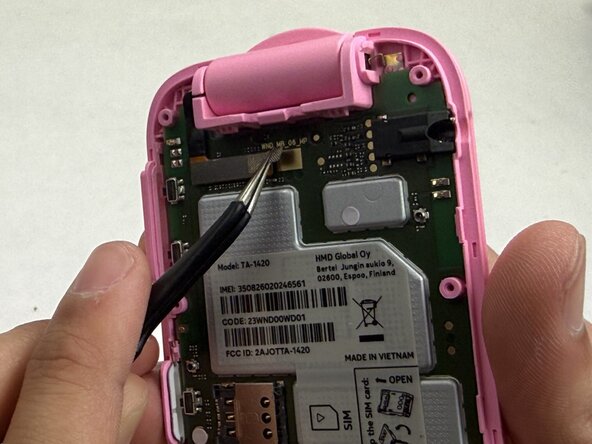
    • The video ribbon is connected to the motherboard with a flat-topped, low profile connector. It is also secured with a piece of tape.

    • Use the tweezers to gently unstick the tape from the motherboard, leaving it stuck to the connector.

    • Use the tweezers to gently pull up on the connector until it disconnects from the motherboard.

    • Be gentle as you apply pressure on the tape and connector. These parts shouldn't take too much force to remove.

    crwdns2952109:0crwdne2952109:0

    crwdns2917038:0crwdne2917038:0

  7. HMD Barbie Keypad Replacement: crwdns2935265:07crwdnd2935265:01crwdnd2935265:03crwdne2935265:0 HMD Barbie Keypad Replacement: crwdns2935265:07crwdnd2935265:02crwdnd2935265:03crwdne2935265:0 HMD Barbie Keypad Replacement: crwdns2935265:07crwdnd2935265:03crwdnd2935265:03crwdne2935265:0
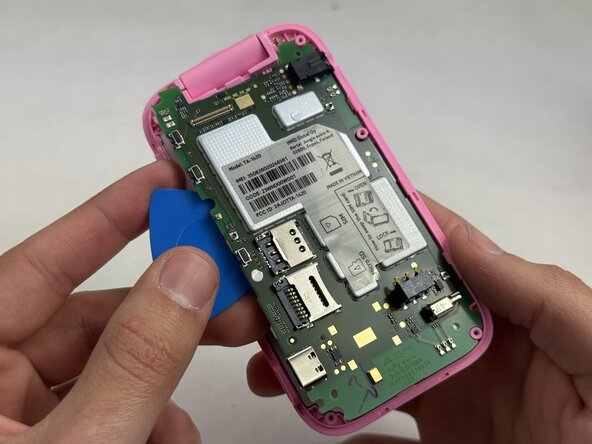
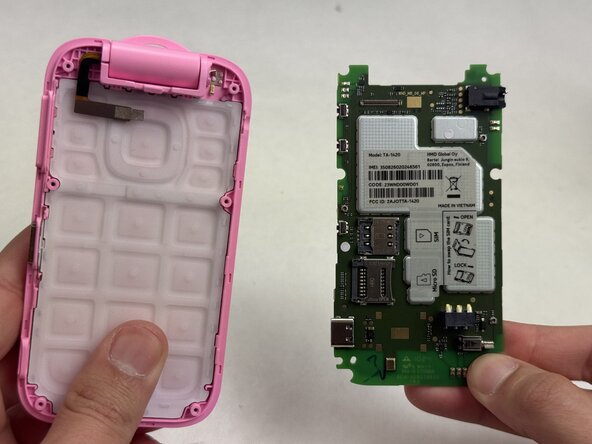
    • Beginning at the corner near where the video ribbon is located, insert an opening pick between the green motherboard and the pink housing.

    • Slowly work your way around the motherboard until it loosens enough that you can use your fingers to remove it.

    crwdns2952109:0crwdne2952109:0

    crwdns2917038:0crwdne2917038:0

  8. HMD Barbie Keypad Replacement, Keypad: crwdns2935265:08crwdnd2935265:01crwdnd2935265:03crwdne2935265:0 HMD Barbie Keypad Replacement, Keypad: crwdns2935265:08crwdnd2935265:02crwdnd2935265:03crwdne2935265:0 HMD Barbie Keypad Replacement, Keypad: crwdns2935265:08crwdnd2935265:03crwdnd2935265:03crwdne2935265:0
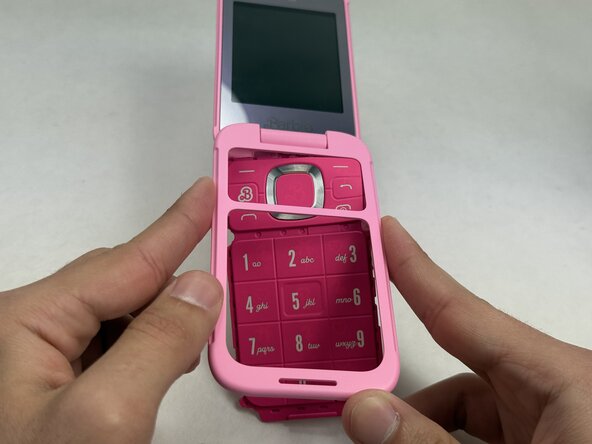
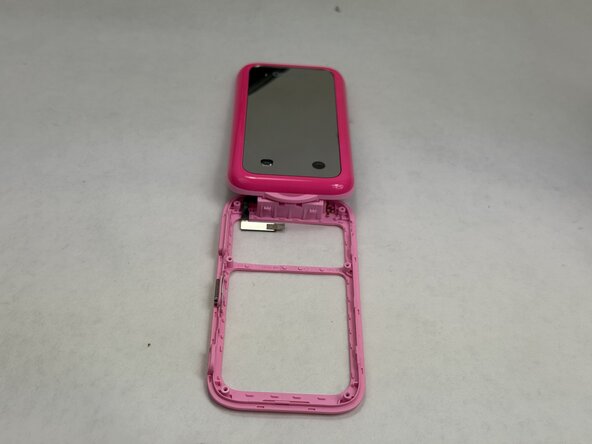
    • Push the keypad out of the outer casing from the front of the phone, outward.

    • You may now replace the keypad with a new one, inserting it where the old keypad was. Make sure to not obstruct any of the holes for screws with the keypad.

    crwdns2952109:0crwdne2952109:0

    crwdns2917038:0crwdne2917038:0

crwdns2915888:0crwdne2915888:0

To reassemble your device, follow these instructions in reverse order.

crwdns2935221:0crwdne2935221:0

Hannah Carvalho

crwdns2935283:003/09/26crwdne2935283:0

571 crwdns2915208:0crwdne2915208:0

crwdns2935297:05crwdne2935297:0

crwdns2935287:0crwdne2935287:0

UMass Dartmouth, Team 6-2, Botvin Spring 2026 crwdns2935289:0UMass Dartmouth, Team 6-2, Botvin Spring 2026crwdne2935289:0

UMASSD-BOTVIN-S26S6G2

crwdns2931471:03crwdne2931471:0

crwdns2935297:05crwdne2935297:0

crwdns2947412:00crwdne2947412:0

crwdns2917038:0crwdne2917038:0

crwdns2936625:0crwdne2936625:0:

crwdns2936751:024crwdne2936751:0 0

crwdns2936753:07crwdne2936753:0 6

crwdns2936753:030crwdne2936753:0 24

crwdns2942667:0crwdne2942667:0 58