crwdns2933423:0crwdne2933423:0
crwdns2947577:0crwdnd2947577:0crwdne2947577:0

GravityLight Mounting Post Replacement and Spring Replacement

crwdns2942213:0crwdne2942213:0

  1. GravityLight Mounting Post Replacement and Spring Replacement, Removing the Front Panel: crwdns2935265:01crwdnd2935265:01crwdnd2935265:02crwdne2935265:0 GravityLight Mounting Post Replacement and Spring Replacement, Removing the Front Panel: crwdns2935265:01crwdnd2935265:02crwdnd2935265:02crwdne2935265:0
    • Flip the GravityLight on its back and place it on a sturdy surface.

    • Unscrew the three 2cm Phillips #00 screws on the back of the GravityLight’s body.

    crwdns2952109:0crwdne2952109:0

    crwdns2917038:0crwdne2917038:0

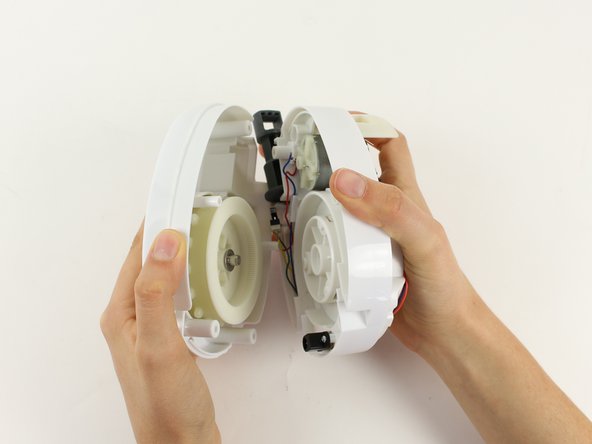
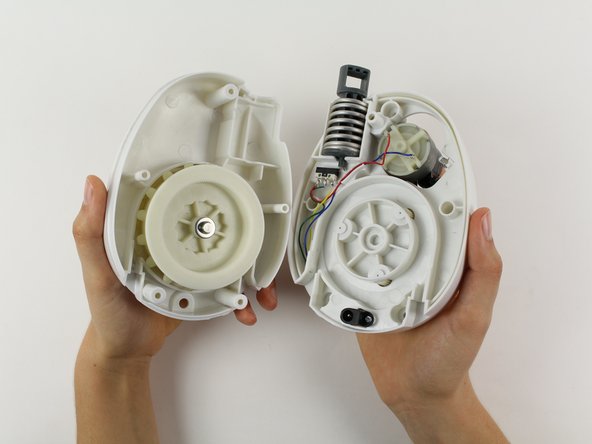
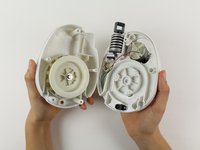
  2. GravityLight Mounting Post Replacement and Spring Replacement, Opening the Device Housing: crwdns2935265:02crwdnd2935265:01crwdnd2935265:01crwdne2935265:0
    • Some of the internal pieces may loosen or fall out during disassembly.

    • Firmly grasp both parts of the GravityLight body and pull them apart.

    crwdns2952109:0crwdne2952109:0

    crwdns2917038:0crwdne2917038:0

  3. GravityLight Mounting Post Replacement and Spring Replacement, Removing the Back Panel Screws: crwdns2935265:03crwdnd2935265:01crwdnd2935265:01crwdne2935265:0
    • Place the back panel, the larger of the two pieces, on a sturdy surface with its back down.

    • Unscrew the two 2cm Phillips 00 screws on the inside of the back panel.

    crwdns2952109:0crwdne2952109:0

    crwdns2917038:0crwdne2917038:0

  4. GravityLight Mounting Post Replacement and Spring Replacement, Separating the Back Panel Housing: crwdns2935265:04crwdnd2935265:01crwdnd2935265:03crwdne2935265:0 GravityLight Mounting Post Replacement and Spring Replacement, Separating the Back Panel Housing: crwdns2935265:04crwdnd2935265:02crwdnd2935265:03crwdne2935265:0 GravityLight Mounting Post Replacement and Spring Replacement, Separating the Back Panel Housing: crwdns2935265:04crwdnd2935265:03crwdnd2935265:03crwdne2935265:0
    • Some of the internal pieces may loosen or fall out during disassembly.

    • Firmly grasp both parts of the back panel and pull them apart.

    crwdns2952109:0crwdne2952109:0

    crwdns2917038:0crwdne2917038:0

  5. GravityLight Mounting Post Replacement and Spring Replacement, Orienting the Middle Section: crwdns2935265:05crwdnd2935265:01crwdnd2935265:01crwdne2935265:0
    • Place the middle section on a sturdy surface.

    • Move any wires in front of the mounting post.

    crwdns2952109:0crwdne2952109:0

    crwdns2917038:0crwdne2917038:0

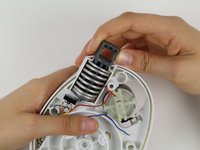
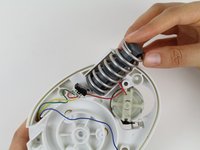
  6. GravityLight Mounting Post Replacement and Spring Replacement, Removing the Mounting Post from the Middle Section.: crwdns2935265:06crwdnd2935265:01crwdnd2935265:02crwdne2935265:0 GravityLight Mounting Post Replacement and Spring Replacement, Removing the Mounting Post from the Middle Section.: crwdns2935265:06crwdnd2935265:02crwdnd2935265:02crwdne2935265:0
    • Push down on the spring.

    • The spring is very stiff. Compressing the spring requires a moderate amount of force.

    • Push the spring and the mounting post away from the middle section and remove them from the pocket.

    crwdns2952109:0crwdne2952109:0

    crwdns2917038:0crwdne2917038:0

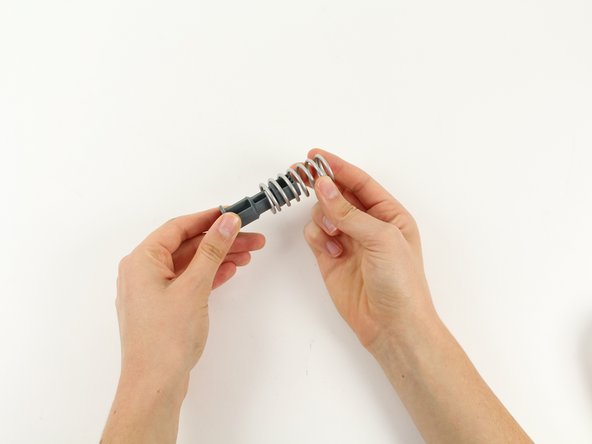
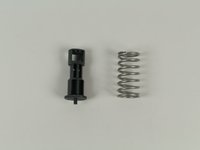
  7. GravityLight Mounting Post Replacement and Spring Replacement, Separate Mounting Post and Spring: crwdns2935265:07crwdnd2935265:01crwdnd2935265:02crwdne2935265:0 GravityLight Mounting Post Replacement and Spring Replacement, Separate Mounting Post and Spring: crwdns2935265:07crwdnd2935265:02crwdnd2935265:02crwdne2935265:0
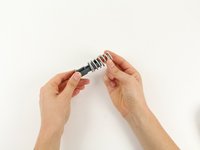
    • Pull the mounting post out of the inside of the spring

    crwdns2952109:0crwdne2952109:0

    crwdns2917038:0crwdne2917038:0

crwdns2915888:0crwdne2915888:0

To reassemble your device, follow these instructions in reverse order.

crwdns2935221:0crwdne2935221:0

Jamie Forslin

crwdns2935283:009/26/14crwdne2935283:0

143 crwdns2915208:0crwdne2915208:0

crwdns2935295:0crwdne2935295:0

crwdns2935287:0crwdne2935287:0

Cal Poly, Team 12-2, Forte Fall 2014 crwdns2935289:0Cal Poly, Team 12-2, Forte Fall 2014crwdne2935289:0

CPSU-FORTE-F14S12G2

crwdns2931471:05crwdne2931471:0

crwdns2935297:07crwdne2935297:0

crwdns2947412:00crwdne2947412:0

crwdns2917038:0crwdne2917038:0

crwdns2936625:0crwdne2936625:0:

crwdns2936751:024crwdne2936751:0 2

crwdns2936753:07crwdne2936753:0 6

crwdns2936753:030crwdne2936753:0 27

crwdns2942667:0crwdne2942667:0 1,050