crwdns2933423:0crwdne2933423:0
crwdns2947577:0crwdnd2947577:0crwdne2947577:0

GoPro Hero3+ Silver Edition Camera Lens Replacement

crwdns2942213:0crwdne2942213:0

    1. GoPro Hero3+ Silver Edition Camera Lens Replacement, Battery: crwdns2935265:01crwdnd2935265:01crwdnd2935265:02crwdne2935265:0 GoPro Hero3+ Silver Edition Camera Lens Replacement, Battery: crwdns2935265:01crwdnd2935265:02crwdnd2935265:02crwdne2935265:0
      • Push the tab on the back of the device left to remove the plate covering the battery.

      crwdns2952109:0crwdne2952109:0

      crwdns2917038:0crwdne2917038:0

    2. GoPro Hero3+ Silver Edition Camera Lens Replacement: crwdns2935265:02crwdnd2935265:01crwdnd2935265:01crwdne2935265:0
      • Use the strip of tape on the battery to remove the battery from the housing.

      crwdns2952109:0crwdne2952109:0

      crwdns2917038:0crwdne2917038:0

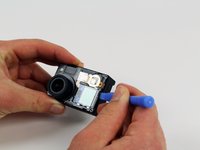
    1. GoPro Hero3+ Silver Edition Camera Lens Replacement, Front Panel: crwdns2935265:03crwdnd2935265:01crwdnd2935265:01crwdne2935265:0
      • Insert a plastic opening tool in between the front face plate and the black housing.

      • Make sure you insert the plastic opening tool next to the microSD card slot. There is a small gap that will help separate the face plate.

      crwdns2952109:0crwdne2952109:0

      crwdns2917038:0crwdne2917038:0

    2. GoPro Hero3+ Silver Edition Camera Lens Replacement: crwdns2935265:04crwdnd2935265:01crwdnd2935265:01crwdne2935265:0
      • Continue to use the plastic opening tool and separate the front face plate from the rest of the device.

      • There is adhesive that helps attach the front face plate. Some extra prying may be required to separate the face plate, but do not use excessive force.

      crwdns2952109:0crwdne2952109:0

      crwdns2917038:0crwdne2917038:0

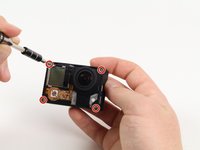
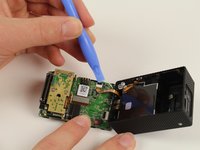
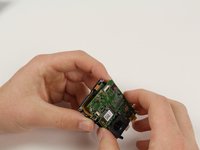
    1. GoPro Hero3+ Silver Edition Camera Lens Replacement, Image Sensor: crwdns2935265:05crwdnd2935265:01crwdnd2935265:03crwdne2935265:0 GoPro Hero3+ Silver Edition Camera Lens Replacement, Image Sensor: crwdns2935265:05crwdnd2935265:02crwdnd2935265:03crwdne2935265:0 GoPro Hero3+ Silver Edition Camera Lens Replacement, Image Sensor: crwdns2935265:05crwdnd2935265:03crwdnd2935265:03crwdne2935265:0
      • Locate the four 8.1mm PH00 screws on the corners of the GoPro and unscrew them using the phillips screwdriver.

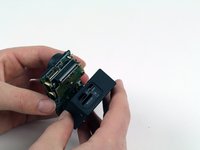
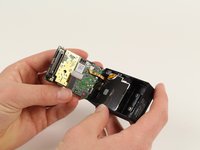
      • Gently remove the motherboard by using a plastic opening tool to pry it out of the housing.

      • Be careful not to damage the ribbon cable connected to the GoPro housing and motherboard.

      crwdns2952109:0crwdne2952109:0

      crwdns2917038:0crwdne2917038:0

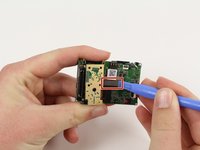
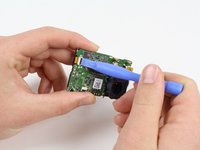
    2. GoPro Hero3+ Silver Edition Camera Lens Replacement: crwdns2935265:06crwdnd2935265:01crwdnd2935265:02crwdne2935265:0 GoPro Hero3+ Silver Edition Camera Lens Replacement: crwdns2935265:06crwdnd2935265:02crwdnd2935265:02crwdne2935265:0
      • Remove the ribbon cable by carefully flipping the black clip up with the plastic opening tool and pulling the cable out.

      crwdns2952109:0crwdne2952109:0

      crwdns2917038:0crwdne2917038:0

    3. GoPro Hero3+ Silver Edition Camera Lens Replacement: crwdns2935265:07crwdnd2935265:01crwdnd2935265:01crwdne2935265:0
      • Remove the four 4mm PH00 screws attaching the image sensor to the motherboard with your screwdriver.

      crwdns2952109:0crwdne2952109:0

      crwdns2917038:0crwdne2917038:0

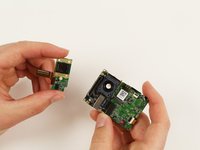
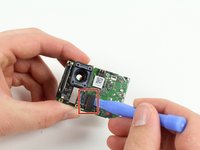
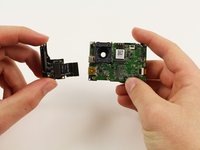
    4. GoPro Hero3+ Silver Edition Camera Lens Replacement: crwdns2935265:08crwdnd2935265:01crwdnd2935265:02crwdne2935265:0 GoPro Hero3+ Silver Edition Camera Lens Replacement: crwdns2935265:08crwdnd2935265:02crwdnd2935265:02crwdne2935265:0
      • Pry off the last ribbon cable with a plastic opening tool.

      • Remove the image sensor from the motherboard.

      crwdns2952109:0crwdne2952109:0

      crwdns2917038:0crwdne2917038:0

    1. GoPro Hero3+ Silver Edition Camera Lens Replacement, microSD/Expansion Port Assembly: crwdns2935265:09crwdnd2935265:01crwdnd2935265:01crwdne2935265:0
      • Using your screwdriver, unscrew three 4mm PH00 screws that will free the metal plate.

      • A small plate will become separated when the rightmost screw is removed. Just place it to the side.

      crwdns2952109:0crwdne2952109:0

      crwdns2917038:0crwdne2917038:0

    2. GoPro Hero3+ Silver Edition Camera Lens Replacement: crwdns2935265:010crwdnd2935265:01crwdnd2935265:02crwdne2935265:0 GoPro Hero3+ Silver Edition Camera Lens Replacement: crwdns2935265:010crwdnd2935265:02crwdnd2935265:02crwdne2935265:0
      • Use the plastic opening tool to pry off the referenced ribbon cable from the motherboard.

      • The microSD and Accessory Board is now ready for removal.

      crwdns2952109:0crwdne2952109:0

      crwdns2917038:0crwdne2917038:0

    1. GoPro Hero3+ Silver Edition Camera Lens Replacement, Motherboard: crwdns2935265:011crwdnd2935265:01crwdnd2935265:01crwdne2935265:0
      • Remove the single 3.2mm PH00 screw with your screwdriver to detach the motherboard from the mid frame.

      crwdns2952109:0crwdne2952109:0

      crwdns2917038:0crwdne2917038:0

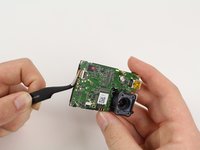
    2. GoPro Hero3+ Silver Edition Camera Lens Replacement: crwdns2935265:012crwdnd2935265:01crwdnd2935265:03crwdne2935265:0 GoPro Hero3+ Silver Edition Camera Lens Replacement: crwdns2935265:012crwdnd2935265:02crwdnd2935265:03crwdne2935265:0 GoPro Hero3+ Silver Edition Camera Lens Replacement: crwdns2935265:012crwdnd2935265:03crwdnd2935265:03crwdne2935265:0
      crwdns2935267:0crwdne2935267:0
      Tweezers
      $4.99
      • Use a plastic opening tool to gently separate the LCD ribbon cable from the motherboard.

      • Gently remove the motherboard from the midframe using tweezers.

      • Remove motherboard by lifting from the edges. This will reduce the chance of damaging components on the motherboard.

      crwdns2952109:0crwdne2952109:0

      crwdns2917038:0crwdne2917038:0

    1. GoPro Hero3+ Silver Edition Camera Lens Replacement, Camera Lens: crwdns2935265:013crwdnd2935265:01crwdnd2935265:01crwdne2935265:0
      • Use your PH00 screwdriver to remove the last three screws from the mid frame. This will release the lens housing from the mid frame.

      crwdns2952109:0crwdne2952109:0

      crwdns2917038:0crwdne2917038:0

    2. GoPro Hero3+ Silver Edition Camera Lens Replacement: crwdns2935265:014crwdnd2935265:01crwdnd2935265:01crwdne2935265:0
      • Carefully remove the lens from the font housing.

      crwdns2952109:0crwdne2952109:0

      crwdns2917038:0crwdne2917038:0

crwdns2915888:0crwdne2915888:0

To reassemble your device, follow these instructions in reverse order.

crwdns2935221:0crwdne2935221:0

crwdns2935229:09crwdne2935229:0

Patrick Cook

crwdns2935283:010/01/15crwdne2935283:0

699 crwdns2915208:0crwdne2915208:0

crwdns2935297:03crwdne2935297:0

crwdns2935287:0crwdne2935287:0

Cal Poly, Team 5-8, Maness Fall 2015 crwdns2935289:0Cal Poly, Team 5-8, Maness Fall 2015crwdne2935289:0

CPSU-MANESS-F15S5G8

crwdns2931471:04crwdne2931471:0

crwdns2935297:072crwdne2935297:0

crwdns2947412:00crwdne2947412:0

crwdns2917038:0crwdne2917038:0

crwdns2936625:0crwdne2936625:0:

crwdns2936751:024crwdne2936751:0 4

crwdns2936753:07crwdne2936753:0 12

crwdns2936753:030crwdne2936753:0 29

crwdns2942667:0crwdne2942667:0 2,623