crwdns2933423:0crwdne2933423:0
crwdns2947577:0crwdnd2947577:0crwdne2947577:0

GoPro Hero+ LCD Image Sensor Replacement

crwdns2942213:0crwdne2942213:0

    1. GoPro Hero+ LCD Image Sensor Replacement, Back Panel: crwdns2935265:01crwdnd2935265:01crwdnd2935265:02crwdne2935265:0 GoPro Hero+ LCD Image Sensor Replacement, Back Panel: crwdns2935265:01crwdnd2935265:02crwdnd2935265:02crwdne2935265:0
      • Be sure to power off the GoPro before you start disassembly.

      • Pop up and pull back on the clip to remove the screen cover and expose the back panel with the touchscreen.

      crwdns2952109:0crwdne2952109:0

      crwdns2917038:0crwdne2917038:0

    2. GoPro Hero+ LCD Image Sensor Replacement: crwdns2935265:02crwdnd2935265:01crwdnd2935265:02crwdne2935265:0 GoPro Hero+ LCD Image Sensor Replacement: crwdns2935265:02crwdnd2935265:02crwdnd2935265:02crwdne2935265:0
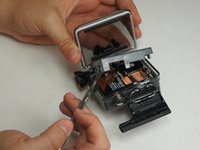
      • Use the metal spudger to pry around the perimeter of the panel.

      • Pry the panel upwards by inserting the metal spudger into the corner crease between the panel and camera shell.

      crwdns2952109:0crwdne2952109:0

      crwdns2917038:0crwdne2917038:0

    3. GoPro Hero+ LCD Image Sensor Replacement: crwdns2935265:03crwdnd2935265:01crwdnd2935265:02crwdne2935265:0 GoPro Hero+ LCD Image Sensor Replacement: crwdns2935265:03crwdnd2935265:02crwdnd2935265:02crwdne2935265:0
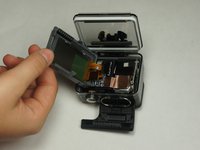
      • Pry around the panel to ensure it is not attached to the device.

      • Move the panel to the side so you can access the internal components.

      • The panel is still attached to the rest of the device with a ribbon cable, so be sure to not tear or damage the cable.

      crwdns2952109:0crwdne2952109:0

      crwdns2917038:0crwdne2917038:0

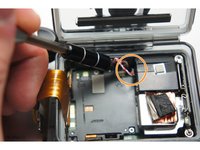
    1. GoPro Hero+ LCD Image Sensor Replacement, Battery: crwdns2935265:04crwdnd2935265:01crwdnd2935265:01crwdne2935265:0
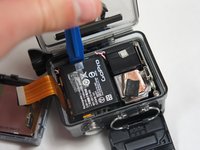
      • Peel back the rear panel ribbon cable that is adhered to the battery until it is completely separated from the battery.

      • Be careful of metal contacts on strip; they can be sharp.

      crwdns2952109:0crwdne2952109:0

      crwdns2917038:0crwdne2917038:0

    2. GoPro Hero+ LCD Image Sensor Replacement: crwdns2935265:05crwdnd2935265:01crwdnd2935265:01crwdne2935265:0
      crwdns2935267:0crwdne2935267:0
      Tweezers
      $4.99
      • Using tweezers, peel off the copper tape on the right side of the battery.

      crwdns2952109:0crwdne2952109:0

      crwdns2917038:0crwdne2917038:0

    3. GoPro Hero+ LCD Image Sensor Replacement: crwdns2935265:06crwdnd2935265:01crwdnd2935265:02crwdne2935265:0 GoPro Hero+ LCD Image Sensor Replacement: crwdns2935265:06crwdnd2935265:02crwdnd2935265:02crwdne2935265:0
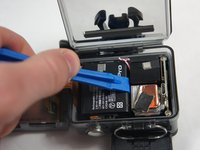
      • Place the plastic opening tool at one of the edges of the battery then pry until the battery is removed from the GoPro.

      crwdns2952109:0crwdne2952109:0

      crwdns2917038:0crwdne2917038:0

    4. GoPro Hero+ LCD Image Sensor Replacement: crwdns2935265:07crwdnd2935265:01crwdnd2935265:01crwdne2935265:0
      • Use a pair of tweezers to disconnect the battery connector from the motherboard.

      • Gently pull the battery off the motherboard. Pulling vertically off the motherboard will give a clean release.

      crwdns2952109:0crwdne2952109:0

      crwdns2917038:0crwdne2917038:0

    1. GoPro Hero+ LCD Image Sensor Replacement, MicroSD/Micro USB Port Assembly: crwdns2935265:08crwdnd2935265:01crwdnd2935265:03crwdne2935265:0 GoPro Hero+ LCD Image Sensor Replacement, MicroSD/Micro USB Port Assembly: crwdns2935265:08crwdnd2935265:02crwdnd2935265:03crwdne2935265:0 GoPro Hero+ LCD Image Sensor Replacement, MicroSD/Micro USB Port Assembly: crwdns2935265:08crwdnd2935265:03crwdnd2935265:03crwdne2935265:0
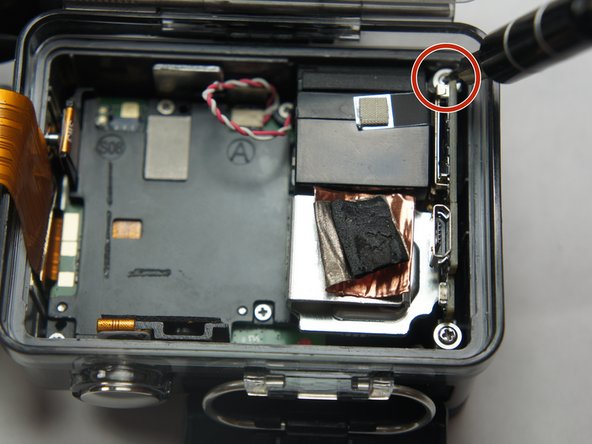
      • Remove the two 6 mm Phillips #00 screws.

      • Remove the single 4 mm Phillips #000 screws.

      crwdns2952109:0crwdne2952109:0

      crwdns2917038:0crwdne2917038:0

    2. GoPro Hero+ LCD Image Sensor Replacement: crwdns2935265:09crwdnd2935265:01crwdnd2935265:01crwdne2935265:0
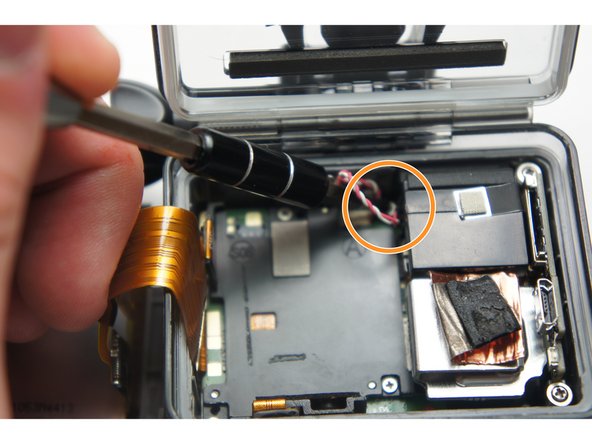
      • Remove the image sensor from the camera.

      • You do not have to unplug the black box to remove the USB/SD chip.

      crwdns2952109:0crwdne2952109:0

      crwdns2917038:0crwdne2917038:0

    3. GoPro Hero+ LCD Image Sensor Replacement: crwdns2935265:010crwdnd2935265:01crwdnd2935265:01crwdne2935265:0
      crwdns2935267:0crwdne2935267:0
      Tweezers
      $4.99
      • Grab the edge of the ribbon cable with the tweezers and gently pull until the cable is disconnected from the motherboard.

      • Be careful when removing the ribbon cable. You must pull gently or you can rip the ribbon off of its contacts.

      crwdns2952109:0crwdne2952109:0

      crwdns2917038:0crwdne2917038:0

    4. GoPro Hero+ LCD Image Sensor Replacement: crwdns2935265:011crwdnd2935265:01crwdnd2935265:01crwdne2935265:0
      • Gently lift the microSD/Micro USB assembly up and out of the device.

      crwdns2952109:0crwdne2952109:0

      crwdns2917038:0crwdne2917038:0

    1. GoPro Hero+ LCD Image Sensor Replacement, Image Sensor: crwdns2935265:012crwdnd2935265:01crwdnd2935265:01crwdne2935265:0
      • Use your fingers and gently pull out the sensor from the motherboard by slowly and gradually pulling up on the image sensor box.

      • Do not yank on the image sensor, it can rip out the wiring or damage the motherboard.

      crwdns2952109:0crwdne2952109:0

      crwdns2917038:0crwdne2917038:0

crwdns2915888:0crwdne2915888:0

To reassemble your device, follow these instructions in reverse order.

crwdns2935221:0crwdne2935221:0

Matthew Tinkey

crwdns2935283:008/27/15crwdne2935283:0

922 crwdns2915208:0crwdne2915208:0

crwdns2935297:04crwdne2935297:0

crwdns2935287:0crwdne2935287:0

USF Tampa, Team 2-4, Blackwell Fall 2015 crwdns2935289:0USF Tampa, Team 2-4, Blackwell Fall 2015crwdne2935289:0

USFT-BLACKWELL-F15S2G4

crwdns2931471:04crwdne2931471:0

crwdns2935297:020crwdne2935297:0

crwdns2947412:00crwdne2947412:0

crwdns2917038:0crwdne2917038:0

crwdns2936625:0crwdne2936625:0:

crwdns2936751:024crwdne2936751:0 1

crwdns2936753:07crwdne2936753:0 11

crwdns2936753:030crwdne2936753:0 36

crwdns2942667:0crwdne2942667:0 2,184