crwdns2933423:0crwdne2933423:0
crwdns2947577:0crwdnd2947577:0crwdne2947577:0

Gateway P-6831FX Keyboard Replacement

crwdns2869540:0crwdne2869540:0: 598

crwdns2942659:0crwdne2942659:0

crwdns2942661:0crwdne2942661:0
2
crwdns2942663:0crwdne2942663:0
11
crwdns2942665:0crwdne2942665:0
60
crwdns2942667:0crwdne2942667:0
598
crwdns2955950:0crwdne2955950:0: 0

crwdns2942685:0crwdne2942685:0

crwdns2947416:0crwdne2947416:0
Completed: 0

crwdns2942687:0crwdne2942687:0

Favorites: 0

crwdns2942689:0crwdne2942689:0

crwdns2955944:0crwdne2955944:0: 10 - 15 crwdns2931279:0crwdne2931279:0
crwdns2955970:0crwdne2955970:0: crwdns2937801:0crwdne2937801:0
Gateway P-6831FX Keyboard Replacement

crwdns2915892:0crwdne2915892:0

crwdns2942287:0crwdne2942287:0 ↓

The keyboard is a component that will allow you to type and input commands on your device. This guide will go over how to remove and replace the keyboard for the P-6831FX.

crwdns2942213:0crwdne2942213:0

crwdns2943215:0crwdne2943215:0

    1. Gateway P-6831FX Keyboard Replacement, Keyboard: crwdns2935265:01crwdnd2935265:01crwdnd2935265:01crwdne2935265:0
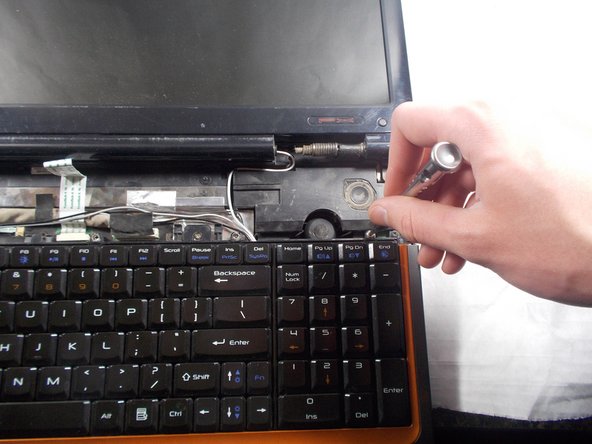
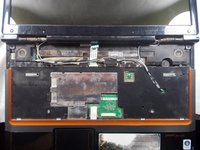
      • Open your laptop and lay it flat

      • Locate the speaker grill/interaction bar.

      crwdns2952109:0crwdne2952109:0

      crwdns2917038:0crwdne2917038:0

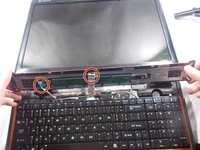
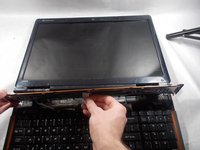
    2. Gateway P-6831FX Keyboard Replacement: crwdns2935265:02crwdnd2935265:01crwdnd2935265:03crwdne2935265:0 Gateway P-6831FX Keyboard Replacement: crwdns2935265:02crwdnd2935265:02crwdnd2935265:03crwdne2935265:0 Gateway P-6831FX Keyboard Replacement: crwdns2935265:02crwdnd2935265:03crwdnd2935265:03crwdne2935265:0
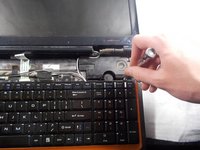
      • Remove the speaker grill/interaction bar by pulling up at both edges.

      crwdns2952109:0crwdne2952109:0

      crwdns2917038:0crwdne2917038:0

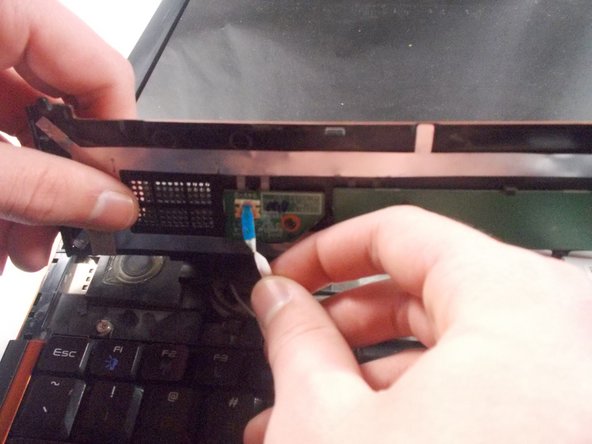
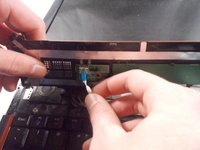
    3. Gateway P-6831FX Keyboard Replacement: crwdns2935265:03crwdnd2935265:01crwdnd2935265:03crwdne2935265:0 Gateway P-6831FX Keyboard Replacement: crwdns2935265:03crwdnd2935265:02crwdnd2935265:03crwdne2935265:0 Gateway P-6831FX Keyboard Replacement: crwdns2935265:03crwdnd2935265:03crwdnd2935265:03crwdne2935265:0
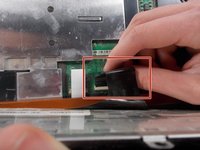
      • Detach the two ribbon cables on the underside of the keyboard.

      crwdns2952109:0crwdne2952109:0

      crwdns2917038:0crwdne2917038:0

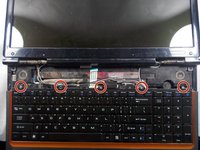
    4. Gateway P-6831FX Keyboard Replacement: crwdns2935265:04crwdnd2935265:01crwdnd2935265:02crwdne2935265:0 Gateway P-6831FX Keyboard Replacement: crwdns2935265:04crwdnd2935265:02crwdnd2935265:02crwdne2935265:0
      • Remove the five Philips #0 (3mm) screws securing the keyboard in place.

      crwdns2952109:0crwdne2952109:0

      crwdns2917038:0crwdne2917038:0

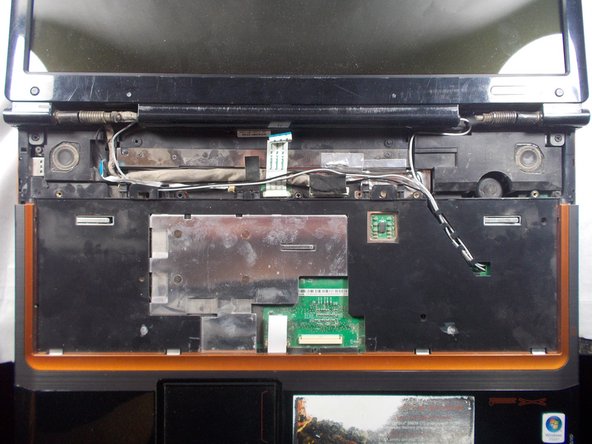
    5. Gateway P-6831FX Keyboard Replacement: crwdns2935265:05crwdnd2935265:01crwdnd2935265:01crwdne2935265:0
      • Pull the keyboard up and away from you.

      crwdns2952109:0crwdne2952109:0

      crwdns2917038:0crwdne2917038:0

    6. Gateway P-6831FX Keyboard Replacement: crwdns2935265:06crwdnd2935265:01crwdnd2935265:02crwdne2935265:0 Gateway P-6831FX Keyboard Replacement: crwdns2935265:06crwdnd2935265:02crwdnd2935265:02crwdne2935265:0
      • Remove the ribbon cable attached underneath to the keyboard.

      crwdns2952109:0crwdne2952109:0

      crwdns2917038:0crwdne2917038:0

crwdns2915888:0crwdne2915888:0

To reassemble your device, follow these instructions in reverse order.

crwdns2935221:0crwdne2935221:0

Justin Freitas

crwdns2935283:003/19/18crwdne2935283:0

294 crwdns2915208:0crwdne2915208:0

crwdns2935297:02crwdne2935297:0

crwdns2935287:0crwdne2935287:0

UMass Dartmouth, Team S3-G5, Peak Spring 2018 crwdns2935289:0UMass Dartmouth, Team S3-G5, Peak Spring 2018crwdne2935289:0

UMASSD-PEAK-S18S3G5

crwdns2931471:02crwdne2931471:0

crwdns2935297:072crwdne2935297:0

crwdns2947412:00crwdne2947412:0

crwdns2917038:0crwdne2917038:0

crwdns2936625:0crwdne2936625:0:

crwdns2936751:024crwdne2936751:0 2

crwdns2936753:07crwdne2936753:0 11

crwdns2936753:030crwdne2936753:0 60

crwdns2942667:0crwdne2942667:0 598