
Gateway NV59C66u RAM Replacement

crwdns2959932:0crwdnd2959932:0Jackson Gandeecrwdnd2959932:0crwdnd2959932:0crwdnd2959932:03crwdnd2959932:0crwdne2959932:0
crwdns2959936:0Maw 27, 2020crwdne2959936:0
crwdns2869540:0crwdne2869540:0: 518
crwdns2959988:0crwdne2959988:0
- crwdns2959990:0crwdne2959990:0
- 2
- crwdns2959992:0crwdne2959992:0
- 13
- crwdns2959994:0crwdne2959994:0
- 61
- crwdns2959996:0crwdne2959996:0
- 518
crwdns2955950:0crwdne2955950:0: 0
crwdns2959998:0crwdne2959998:0
crwdns2960000:0crwdne2960000:0crwdns2959984:0crwdne2959984:0: 0 1
crwdns2959956:0crwdne2959956:0
crwdns2959968:01crwdne2959968:0
crwdns2959986:0crwdne2959986:0: 0 1
crwdns2959958:0crwdne2959958:0
crwdns2959976:01crwdne2959976:0
crwdns2915892:0crwdne2915892:0
crwdns2959928:0crwdne2959928:0 ↓If your computer has slowed down, RAM can be replaced or upgraded to increase performance. This guide will help you to replace the RAM in the Gateway NV59C66u laptop.
crwdns2959930:0crwdne2959930:0
crwdns2943215:0crwdne2943215:0
-
Spudger4.9


-
-
-
Remove the four Phillips #0 screws from the back cover.
 crwdns2952109:0crwdne2952109:0
-
-
-
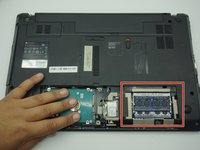
Gently remove the cover with a plastic opening tool to gain access to the RAM.
-
-
-
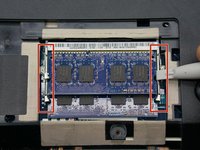
Free the RAM by unlatching the holders. The two arms on either side of the RAM card should be pried away from one another.
-
-
-
Slide the RAM out from the port.
-
-
-
-
Follow the previous steps in reverse to replace the RAM card.
-
-



To reassemble your device, follow these instructions in reverse order.

crwdns2935287:0crwdne2935287:0

ETECH Holdings crwdns2935289:0ETECH Holdingscrwdne2935289:0
Community
crwdns2931471:02crwdne2931471:0
crwdns2935297:048crwdne2935297:0
