
Gateway NV52 Hard Drive Replacement

crwdns2959932:0crwdnd2959932:0Irma Marincrwdnd2959932:0crwdnd2959932:0crwdnd2959932:03crwdnd2959932:0crwdne2959932:0
crwdns2959936:0Kho 4, 2014crwdne2959936:0
crwdns2869540:0crwdne2869540:0: 4.3K
crwdns2959988:0crwdne2959988:0
- crwdns2959990:0crwdne2959990:0
- 3
- crwdns2959992:0crwdne2959992:0
- 20
- crwdns2959994:0crwdne2959994:0
- 98
- crwdns2959996:0crwdne2959996:0
- 4,296
crwdns2955950:0crwdne2955950:0: 0
crwdns2959998:0crwdne2959998:0
crwdns2960000:0crwdne2960000:0crwdns2959984:0crwdne2959984:0: 0 1
crwdns2959956:0crwdne2959956:0
crwdns2959968:01crwdne2959968:0
crwdns2959986:0crwdne2959986:0: 1 2
crwdns2959980:01crwdne2959980:0
crwdns2959978:02crwdne2959978:0
crwdns2862617:0crwdne2862617:0
crwdns2862618:0crwdne2862618:0
crwdns2915892:0crwdne2915892:0
crwdns2959928:0crwdne2959928:0 ↓There will be prerequisites that you need to be complete before displacing the Hard Drive. The prerequisites are available to you in the repair guide manual.
crwdns2959930:0crwdne2959930:0
crwdns2943215:0crwdne2943215:0

-
-
-
Remove the five identical 3/16" Phillips screws that secures the hard drive and memory cover using a Phillips #0 Screwdriver.
 crwdns2952109:0crwdne2952109:0
-
-
-
Lift up the base cover from the the top with your hands to a 90 degree angle.
-
Remove the base cover and place it in a safe and dry place.
-
-
-
-
-
Remove the 1/4" Phillip screw located at the top right of the Hard Drive using a Phillips #0 Screwdriver .
-
-
-
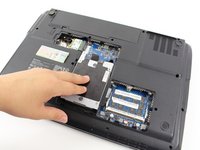
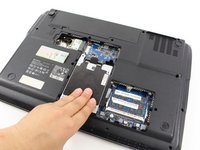
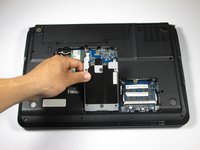
Remove the Hard Drive component from its compartment. To do so, slide the component downward away from the battery pack.
-
Lift the Hard Drive to a 90 degree angle and out of its slot.
-
Place the Hard Drive in a designated zone.
-
-
-
-
-
-
Remove the four identical 1/8" Phillip screws located in every corner of the Hard Drive using the Phillips #0 Screwdriver.
-
-
-
Access to the Hard drive by gently sliding the metal cover away from the Hard Drive.
-
-




To reassemble your device, follow these instructions in reverse order.

crwdns2935287:0crwdne2935287:0

Cal Poly, Team 7-24, Regan Spring 2014 crwdns2935289:0Cal Poly, Team 7-24, Regan Spring 2014crwdne2935289:0
CPSU-REGAN-S14S7G24
crwdns2931471:04crwdne2931471:0
crwdns2935297:0108crwdne2935297:0
