crwdns2933423:0crwdne2933423:0
crwdns2947577:0crwdnd2947577:0crwdne2947577:0

Gateway MA6 Laptop Wireless Card Replacement

crwdns2869540:0crwdne2869540:0: 1288

crwdns2959988:0crwdne2959988:0

crwdns2959990:0crwdne2959990:0
2
crwdns2959992:0crwdne2959992:0
16
crwdns2959994:0crwdne2959994:0
82
crwdns2959996:0crwdne2959996:0
1,288
crwdns2955950:0crwdne2955950:0: 0

crwdns2959998:0crwdne2959998:0

crwdns2960000:0crwdne2960000:0
crwdns2959984:0crwdne2959984:0: 0

crwdns2959956:0crwdne2959956:0

crwdns2959986:0crwdne2959986:0: 1

crwdns2959980:01crwdne2959980:0

crwdns2955944:0crwdne2955944:0: crwdns2931287:05crwdne2931287:0
crwdns2955970:0crwdne2955970:0: crwdns2937799:0crwdne2937799:0
Gateway MA6 Laptop Wireless Card Replacement

crwdns2915892:0crwdne2915892:0

crwdns2959928:0crwdne2959928:0 ↓

The wireless card regulates laptop connectivity to wireless networks for internet access. If your laptop has trouble connecting to a working wireless network, the wireless card may be damaged and may have to be replaced.

crwdns2959930:0crwdne2959930:0

crwdns2943215:0crwdne2943215:0

    1. Gateway MA6 Laptop Wireless Card Replacement, Battery: crwdns2935265:01crwdnd2935265:01crwdnd2935265:01crwdne2935265:0
      • To prevent injury, make sure the laptop is unplugged before removing the battery.

      • Make sure the switch in the upper right corner of the laptop is switched to the "unlock" position (toward the unlocked padlock icon).

      crwdns2952109:0crwdne2952109:0

      crwdns2917038:0crwdne2917038:0

    2. Gateway MA6 Laptop Wireless Card Replacement: crwdns2935265:02crwdnd2935265:01crwdnd2935265:03crwdne2935265:0 Gateway MA6 Laptop Wireless Card Replacement: crwdns2935265:02crwdnd2935265:02crwdnd2935265:03crwdne2935265:0 Gateway MA6 Laptop Wireless Card Replacement: crwdns2935265:02crwdnd2935265:03crwdnd2935265:03crwdne2935265:0
      • Pull the switch on the upper lefthand corner of the laptop towards the unlocked padlock icon.

      • Firmly pull the battery outwards and away from the laptop.

      crwdns2952109:0crwdne2952109:0

      crwdns2917038:0crwdne2917038:0

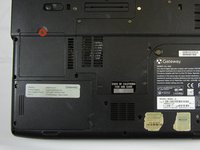
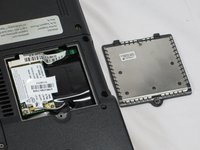
    1. Gateway MA6 Laptop Wireless Card Replacement, Wireless Card: crwdns2935265:03crwdnd2935265:01crwdnd2935265:02crwdne2935265:0 Gateway MA6 Laptop Wireless Card Replacement, Wireless Card: crwdns2935265:03crwdnd2935265:02crwdnd2935265:02crwdne2935265:0
      • Loosen the 3mm Phillips #0 screw from the back of the WiFi card backplate.

      • The screw will remain in the backplate.

      • Lift upwards on the back plate to remove it.

      crwdns2952109:0crwdne2952109:0

      crwdns2917038:0crwdne2917038:0

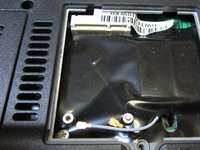
    2. Gateway MA6 Laptop Wireless Card Replacement: crwdns2935265:04crwdnd2935265:01crwdnd2935265:01crwdne2935265:0
      • Use the plastic opening tool to gently pry upwards on the two connecting cables to remove them.

      crwdns2952109:0crwdne2952109:0

      crwdns2917038:0crwdne2917038:0

    3. Gateway MA6 Laptop Wireless Card Replacement: crwdns2935265:05crwdnd2935265:01crwdnd2935265:01crwdne2935265:0
      • Remove the 2 mm Phillips #0 screw.

      • The card will lift itself up 30° after the screw has been removed.

      crwdns2952109:0crwdne2952109:0

      crwdns2917038:0crwdne2917038:0

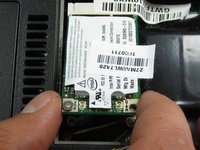
    4. Gateway MA6 Laptop Wireless Card Replacement: crwdns2935265:06crwdnd2935265:01crwdnd2935265:02crwdne2935265:0 Gateway MA6 Laptop Wireless Card Replacement: crwdns2935265:06crwdnd2935265:02crwdnd2935265:02crwdne2935265:0
      • Hold the WiFi card on both sides and pull outwards to remove it.

      crwdns2952109:0crwdne2952109:0

      crwdns2917038:0crwdne2917038:0

crwdns2915888:0crwdne2915888:0

To reassemble your device, follow these instructions in reverse order.

crwdns2935221:0crwdne2935221:0

Chris Naughton

crwdns2935283:004/07/14crwdne2935283:0

727 crwdns2915208:0crwdne2915208:0

crwdns2935297:05crwdne2935297:0

crwdns2935287:0crwdne2935287:0

Cal Poly, Team 6-2, Forte Spring 2014 crwdns2935289:0Cal Poly, Team 6-2, Forte Spring 2014crwdne2935289:0

CPSU-FORTE-S14S6G2

crwdns2931471:05crwdne2931471:0

crwdns2935297:0132crwdne2935297:0

crwdns2947412:00crwdne2947412:0

crwdns2917038:0crwdne2917038:0

crwdns2936625:0crwdne2936625:0:

crwdns2936751:024crwdne2936751:0 2

crwdns2936753:07crwdne2936753:0 16

crwdns2936753:030crwdne2936753:0 82

crwdns2959996:0crwdne2959996:0 1,288