
Gateway LT2104u RAM Replacement Guide

crwdns2959932:0crwdnd2959932:0Chris Sullivancrwdnd2959932:0crwdnd2959932:0crwdnd2959932:06crwdnd2959932:0crwdne2959932:0
crwdns2959936:0Dzi 28, 2019crwdne2959936:0
crwdns2869540:0crwdne2869540:0: 784
crwdns2959988:0crwdne2959988:0
- crwdns2959990:0crwdne2959990:0
- 3
- crwdns2959992:0crwdne2959992:0
- 21
- crwdns2959994:0crwdne2959994:0
- 89
- crwdns2959996:0crwdne2959996:0
- 784
crwdns2955950:0crwdne2955950:0: 0
crwdns2959998:0crwdne2959998:0
crwdns2960000:0crwdne2960000:0crwdns2959984:0crwdne2959984:0: 1 2
crwdns2959972:01crwdne2959972:0
crwdns2959970:02crwdne2959970:0
crwdns2959986:0crwdne2959986:0: 0 1
crwdns2959958:0crwdne2959958:0
crwdns2959976:01crwdne2959976:0
crwdns2915892:0crwdne2915892:0
crwdns2959928:0crwdne2959928:0 ↓This guide demonstrates how to safely remove and replace the RAM stick of a Gateway LT2104u.
crwdns2959930:0crwdne2959930:0
crwdns2943215:0crwdne2943215:0

-
-
-
Locate the the "L" shaped cover on the back, lower right hand side the device. Using a Philips screwdriver, remove the screw holding it in.
 crwdns2952109:0crwdne2952109:0
-
-
-
Gently lift the cover until it detaches from the device.
-
-
-
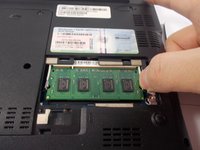
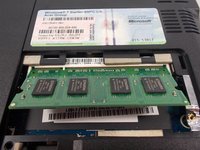
Gently push the levers on each side of the stick of RAM away from each other until the RAM springs into a 45° angle.
-
-
-
Carefully remove the stick of RAM by pulling at the same 45° angle the RAM is currently at until it detaches from the device.
-
-
-




To reassemble your device, follow these instructions in reverse order.
crwdns2935221:0crwdne2935221:0
crwdns2935227:0crwdne2935227:0

crwdns2935287:0crwdne2935287:0

UMass Dartmouth, Team 7-5, Catania Spring 2016 crwdns2935289:0UMass Dartmouth, Team 7-5, Catania Spring 2016crwdne2935289:0
UMASSD-CATANIA-S16S7G5
crwdns2931471:03crwdne2931471:0
crwdns2935297:060crwdne2935297:0
