crwdns2933423:0crwdne2933423:0
crwdns2947577:0crwdnd2947577:0crwdne2947577:0

Garmin GPSmap 60CSx Keypad Buttons Replacement

crwdns2869540:0crwdne2869540:0: 3,6 тыс.

crwdns2959988:0crwdne2959988:0

crwdns2959990:0crwdne2959990:0
5
crwdns2959992:0crwdne2959992:0
30
crwdns2959994:0crwdne2959994:0
79
crwdns2959996:0crwdne2959996:0
3 592
crwdns2955950:0crwdne2955950:0: 1

crwdns2960002:01crwdne2960002:0.

crwdns2959984:0crwdne2959984:0: 3

crwdns2959974:03crwdne2959974:0

crwdns2959986:0crwdne2959986:0: 0

crwdns2959958:0crwdne2959958:0

crwdns2955944:0crwdne2955944:0: crwdns2931287:030crwdne2931287:0
crwdns2955970:0crwdne2955970:0: crwdns2937801:0crwdne2937801:0
Garmin GPSmap 60CSx Keypad Buttons Replacement

crwdns2915892:0crwdne2915892:0

crwdns2959928:0crwdne2959928:0 ↓

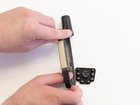
If the buttons are unresponsive or sticking, the keypad may be compromised and need to be replaced. This is a guide to replace the keypad buttons of the Garmin GPSmap 60CSx.

crwdns2959930:0crwdne2959930:0

crwdns2943215:0crwdne2943215:0

    1. Garmin GPSmap 60CSx Keypad Buttons Replacement, Back Cover and AA Batteries: crwdns2935265:01crwdnd2935265:01crwdnd2935265:01crwdne2935265:0
      • Lift and twist the battery cover release 90 degrees counterclockwise on the back of the device.

      crwdns2952109:0crwdne2952109:0

      crwdns2917038:0crwdne2917038:0

    2. Garmin GPSmap 60CSx Keypad Buttons Replacement: crwdns2935265:02crwdnd2935265:01crwdnd2935265:01crwdne2935265:0
      • Lift battery release up to remove battery cover.

      crwdns2952109:0crwdne2952109:0

      crwdns2917038:0crwdne2917038:0

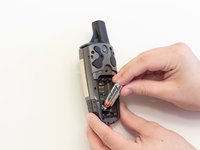
    3. Garmin GPSmap 60CSx Keypad Buttons Replacement: crwdns2935265:03crwdnd2935265:01crwdnd2935265:02crwdne2935265:0 Garmin GPSmap 60CSx Keypad Buttons Replacement: crwdns2935265:03crwdnd2935265:02crwdnd2935265:02crwdne2935265:0
      • Pull AA batteries out.

      crwdns2952109:0crwdne2952109:0

      crwdns2917038:0crwdne2917038:0

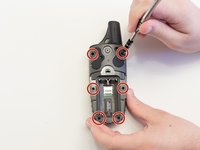
    1. Garmin GPSmap 60CSx Keypad Buttons Replacement, Keypad Buttons: crwdns2935265:04crwdnd2935265:01crwdnd2935265:02crwdne2935265:0 Garmin GPSmap 60CSx Keypad Buttons Replacement, Keypad Buttons: crwdns2935265:04crwdnd2935265:02crwdnd2935265:02crwdne2935265:0
      • Remove the six 10 mm screws on the back of the device with a Phillips #0 screwdriver.

      • Flip the back panel over to view the green electronics board (the PCB) and the PCB covering.

      • Remove the black, yellow, blue, and red wires connected to the PCB with light force.

      crwdns2952109:0crwdne2952109:0

      crwdns2917038:0crwdne2917038:0

    2. Garmin GPSmap 60CSx Keypad Buttons Replacement: crwdns2935265:05crwdnd2935265:01crwdnd2935265:01crwdne2935265:0
      • Place the spudger in the bottom right corner of the black PCB cover and pry the corner out.

      • The previous step will need to be done to the other three corners.

      • It is best to do the two bottom corners first.

      • Pull the black PCB board out of the GPSMap 60 CSx.

      crwdns2952109:0crwdne2952109:0

      crwdns2917038:0crwdne2917038:0

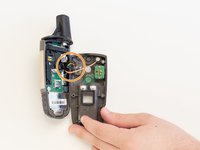
    3. Garmin GPSmap 60CSx Keypad Buttons Replacement: crwdns2935265:06crwdnd2935265:01crwdnd2935265:02crwdne2935265:0 Garmin GPSmap 60CSx Keypad Buttons Replacement: crwdns2935265:06crwdnd2935265:02crwdnd2935265:02crwdne2935265:0
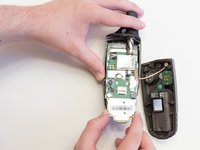
      • Carefully use a spudger to lift the PCB a few centimeters.

      • Pull the PCB out towards the bottom of the GPSMap 60CSx.

      • This will pull out all the main components including the antenna and the screen.

      crwdns2952109:0crwdne2952109:0

      crwdns2917038:0crwdne2917038:0

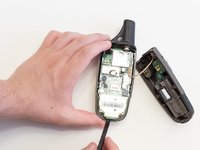
    4. Garmin GPSmap 60CSx Keypad Buttons Replacement: crwdns2935265:07crwdnd2935265:01crwdnd2935265:02crwdne2935265:0 Garmin GPSmap 60CSx Keypad Buttons Replacement: crwdns2935265:07crwdnd2935265:02crwdnd2935265:02crwdne2935265:0
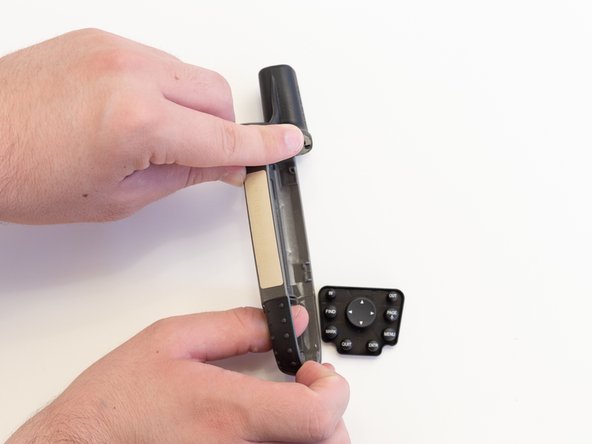
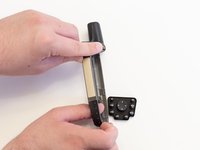
      • Take the front panel and apply light force to the buttons.

      • The buttons are part of one unit and should all pop out at once.

      crwdns2952109:0crwdne2952109:0

      crwdns2917038:0crwdne2917038:0

crwdns2915888:0crwdne2915888:0

To reassemble your device, follow these instructions in reverse order.

crwdns2935221:0crwdne2935221:0

crwdns2935229:03crwdne2935229:0

crwdns2862417:0crwdne2862417:0

crwdns2935293:0crwdne2935293:0

Thomas Humphrey

crwdns2935283:004/05/18crwdne2935283:0

549 crwdns2915208:0crwdne2915208:0

crwdns2935297:04crwdne2935297:0

crwdns2935287:0crwdne2935287:0

Linn Benton Community College, Team S2-G5, Johnson Spring 2018 crwdns2935289:0Linn Benton Community College, Team S2-G5, Johnson Spring 2018crwdne2935289:0

LBCC-JOHNSON-S18S2G5

crwdns2931471:05crwdne2931471:0

crwdns2935297:060crwdne2935297:0

crwdns2947412:00crwdne2947412:0

crwdns2917038:0crwdne2917038:0

crwdns2936625:0crwdne2936625:0:

crwdns2936751:024crwdne2936751:0 5

crwdns2936753:07crwdne2936753:0 30

crwdns2936753:030crwdne2936753:0 79

crwdns2959996:0crwdne2959996:0 3,592