crwdns2933423:0crwdne2933423:0
crwdns2947577:0crwdnd2947577:0crwdne2947577:0

Garmin Approach S2 Screen Replacement

crwdns2942213:0crwdne2942213:0

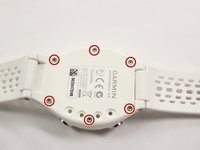
    1. Garmin Approach S2 Screen Replacement, Back Cover: crwdns2935265:01crwdnd2935265:01crwdnd2935265:02crwdne2935265:0 Garmin Approach S2 Screen Replacement, Back Cover: crwdns2935265:01crwdnd2935265:02crwdnd2935265:02crwdne2935265:0
      • Remove the six T5 Torx 6.32mm screws securing the back cover to the watch.

      crwdns2952109:0crwdne2952109:0

      crwdns2917038:0crwdne2917038:0

    2. Garmin Approach S2 Screen Replacement: crwdns2935265:02crwdnd2935265:01crwdnd2935265:01crwdne2935265:0
      • Remove the back cover carefully.

      • Even after the screws have been removed, the back cover can still be quite difficult to take off. Moderate to extensive prying may be required. Be gentle, but firm.

      crwdns2952109:0crwdne2952109:0

      crwdns2917038:0crwdne2917038:0

    1. Garmin Approach S2 Screen Replacement, Water Proof Gasket: crwdns2935265:03crwdnd2935265:01crwdnd2935265:01crwdne2935265:0
      • Remove the orange gasket.

      crwdns2952109:0crwdne2952109:0

      crwdns2917038:0crwdne2917038:0

    1. Garmin Approach S2 Screen Replacement, Screen: crwdns2935265:04crwdnd2935265:01crwdnd2935265:01crwdne2935265:0
      • Remove the screen and motherboard assembly from the case.

      crwdns2952109:0crwdne2952109:0

      crwdns2917038:0crwdne2917038:0

    2. Garmin Approach S2 Screen Replacement: crwdns2935265:05crwdnd2935265:01crwdnd2935265:01crwdne2935265:0
      • Use a metal spudger to remove the golden retaining clip from the screen. There will be some adhesive to break.

      crwdns2952109:0crwdne2952109:0

      crwdns2917038:0crwdne2917038:0

    3. Garmin Approach S2 Screen Replacement: crwdns2935265:06crwdnd2935265:01crwdnd2935265:01crwdne2935265:0
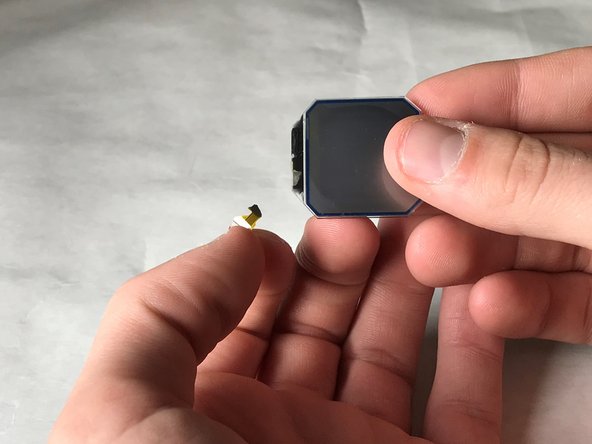
      • Remove the screen from the golden metal clip.

      crwdns2952109:0crwdne2952109:0

      crwdns2917038:0crwdne2917038:0

    4. Garmin Approach S2 Screen Replacement: crwdns2935265:07crwdnd2935265:01crwdnd2935265:01crwdne2935265:0
      • Unhinge the black retaining hinge by prying it open with the metal spudger; Your fingernails will work as well.

      crwdns2952109:0crwdne2952109:0

      crwdns2917038:0crwdne2917038:0

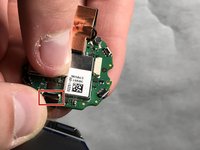
    5. Garmin Approach S2 Screen Replacement: crwdns2935265:08crwdnd2935265:01crwdnd2935265:02crwdne2935265:0 Garmin Approach S2 Screen Replacement: crwdns2935265:08crwdnd2935265:02crwdnd2935265:02crwdne2935265:0
      • Remove the connector from the motherboard by pulling it free at the base.

      • Make sure to pull from the base of the connector wire, as it is very easy to rip the wire from the screen.

      crwdns2952109:0crwdne2952109:0

      crwdns2917038:0crwdne2917038:0

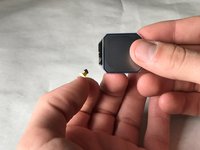
    6. Garmin Approach S2 Screen Replacement: crwdns2935265:09crwdnd2935265:01crwdnd2935265:01crwdne2935265:0
      • Remove the screen from the motherboard.

      • Notice our tape retaining the connector to the screen. This is so easy to rip!

      crwdns2952109:0crwdne2952109:0

      crwdns2917038:0crwdne2917038:0

crwdns2915888:0crwdne2915888:0

To reassemble your device, follow these instructions in reverse order.

crwdns2935221:0crwdne2935221:0

crwdns2935227:0crwdne2935227:0

Evan Miller

crwdns2935283:003/21/18crwdne2935283:0

250 crwdns2915208:0crwdne2915208:0

crwdns2935297:02crwdne2935297:0

crwdns2935287:0crwdne2935287:0

IUPUI, Team S4-G1, Baechle Spring 2018 crwdns2935289:0IUPUI, Team S4-G1, Baechle Spring 2018crwdne2935289:0

IUPUI-BAECHLE-S18S4G1

crwdns2931471:03crwdne2931471:0

crwdns2935297:012crwdne2935297:0

crwdns2947412:00crwdne2947412:0

crwdns2917038:0crwdne2917038:0

crwdns2936625:0crwdne2936625:0:

crwdns2936751:024crwdne2936751:0 0

crwdns2936753:07crwdne2936753:0 3

crwdns2936753:030crwdne2936753:0 17

crwdns2942667:0crwdne2942667:0 1,142