crwdns2933423:0crwdne2933423:0
crwdns2947577:0crwdnd2947577:0crwdne2947577:0

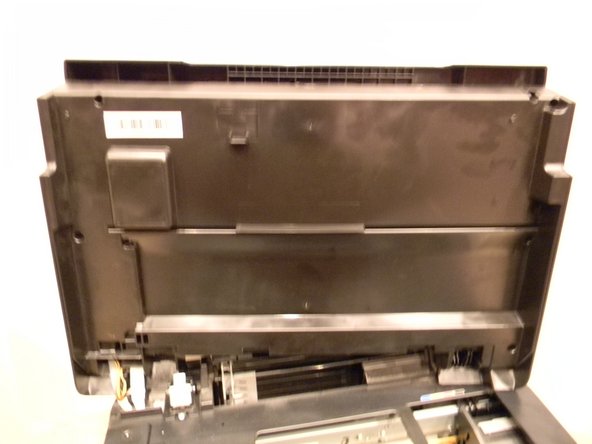
Epson Stylus NX305 Scanner Motor Replacement

crwdns2942213:0crwdne2942213:0

    1. Epson Stylus NX305 Scanner Motor Replacement, Scanner Motor: crwdns2935265:01crwdnd2935265:01crwdnd2935265:01crwdne2935265:0
      • Make sure that the printer is not plugged in before working on it.

      • Orient the printer so that the back of it is facing you.

      crwdns2952109:0crwdne2952109:0

      crwdns2917038:0crwdne2917038:0

    2. Epson Stylus NX305 Scanner Motor Replacement: crwdns2935265:02crwdnd2935265:01crwdnd2935265:01crwdne2935265:0
      • Locate the 3mm Phillips #0 screw that is on the right-hand side of the printer.

      • Using a Phillips head screwdriver, remove the screw.

      crwdns2952109:0crwdne2952109:0

      crwdns2917038:0crwdne2917038:0

    3. Epson Stylus NX305 Scanner Motor Replacement: crwdns2935265:03crwdnd2935265:01crwdnd2935265:02crwdne2935265:0 Epson Stylus NX305 Scanner Motor Replacement: crwdns2935265:03crwdnd2935265:02crwdnd2935265:02crwdne2935265:0
      • Open up the lid of the printer.

      • With the printer facing away from you, lift up on the right hand side of the lid of the printer and slide it to the left to remove it.

      • Be careful not to remove the white ribbon and wires that are connected.

      crwdns2952109:0crwdne2952109:0

      crwdns2917038:0crwdne2917038:0

    4. Epson Stylus NX305 Scanner Motor Replacement: crwdns2935265:04crwdnd2935265:01crwdnd2935265:01crwdne2935265:0
      • With the printer facing you, open the lid of the scanner to expose the 3mm Phillips #0 screw at the top left of the scanner.

      • Using a Phillips head screwdriver, remove the screw.

      crwdns2952109:0crwdne2952109:0

      crwdns2917038:0crwdne2917038:0

    5. Epson Stylus NX305 Scanner Motor Replacement: crwdns2935265:05crwdnd2935265:01crwdnd2935265:01crwdne2935265:0
      • Locate the six 3mm Phillips #2 screws under the lid of the printer and remove them.

      crwdns2952109:0crwdne2952109:0

      crwdns2917038:0crwdne2917038:0

    6. Epson Stylus NX305 Scanner Motor Replacement: crwdns2935265:06crwdnd2935265:01crwdnd2935265:01crwdne2935265:0
      • Locate the three clips on the front side of the printer lid.

      • Use the plastic opening tool to release the clips and carefully pry open the lid.

      crwdns2952109:0crwdne2952109:0

      crwdns2917038:0crwdne2917038:0

    7. Epson Stylus NX305 Scanner Motor Replacement: crwdns2935265:07crwdnd2935265:01crwdnd2935265:01crwdne2935265:0
      • Locate the belt that is attached to the scanner motor and remove it by carefully stretching off of the gear.

      crwdns2952109:0crwdne2952109:0

      crwdns2917038:0crwdne2917038:0

    8. Epson Stylus NX305 Scanner Motor Replacement: crwdns2935265:08crwdnd2935265:01crwdnd2935265:01crwdne2935265:0
      • Remove the two 3mm Phillips #2 screws from the scanner motor assembly.

      • Carefully lift the scanner motor assembly out of the housing making sure not to damage the wiring.

      crwdns2952109:0crwdne2952109:0

      crwdns2917038:0crwdne2917038:0

    9. Epson Stylus NX305 Scanner Motor Replacement: crwdns2935265:09crwdnd2935265:01crwdnd2935265:01crwdne2935265:0
      • Flip over the scanner motor assembly to expose the scanner motor.

      • Remove the two 3mm Phillips #2 screws from the assembly and remove the motor.

      crwdns2952109:0crwdne2952109:0

      crwdns2917038:0crwdne2917038:0

crwdns2915888:0crwdne2915888:0

To reassemble your device, follow these instructions in reverse order.

crwdns2935221:0crwdne2935221:0

Jeffrey Barnett

crwdns2935283:009/21/14crwdne2935283:0

101 crwdns2915208:0crwdne2915208:0

crwdns2935295:0crwdne2935295:0

crwdns2935287:0crwdne2935287:0

USF Tampa, Team 1-2, Donnelly Fall 2014 crwdns2935289:0USF Tampa, Team 1-2, Donnelly Fall 2014crwdne2935289:0

USFT-DONNELLY-F14S1G2

crwdns2934841:01crwdne2934841:0

crwdns2935297:012crwdne2935297:0

crwdns2947412:00crwdne2947412:0

crwdns2917038:0crwdne2917038:0

crwdns2936625:0crwdne2936625:0:

crwdns2936751:024crwdne2936751:0 2

crwdns2936753:07crwdne2936753:0 25

crwdns2936753:030crwdne2936753:0 86

crwdns2942667:0crwdne2942667:0 871