
Emerson EM744 Camera Replacement

crwdns2959932:0crwdnd2959932:0Micalle Marincrwdnd2959932:0crwdnd2959932:0crwdne2959932:0
crwdns2959936:0Mud 7, 2024crwdne2959936:0
crwdns2869540:0crwdne2869540:0: 751
crwdns2959988:0crwdne2959988:0
- crwdns2959990:0crwdne2959990:0
- 3
- crwdns2959992:0crwdne2959992:0
- 15
- crwdns2959994:0crwdne2959994:0
- 73
- crwdns2959996:0crwdne2959996:0
- 751
crwdns2955950:0crwdne2955950:0: 0
crwdns2959998:0crwdne2959998:0
crwdns2960000:0crwdne2960000:0crwdns2959984:0crwdne2959984:0: 0 1
crwdns2959956:0crwdne2959956:0
crwdns2959968:01crwdne2959968:0
crwdns2959986:0crwdne2959986:0: 0 1
crwdns2959958:0crwdne2959958:0
crwdns2959976:01crwdne2959976:0
crwdns2959930:0crwdne2959930:0
crwdns2943215:0crwdne2943215:0
-
Spudger4.9
-


crwdns2915892:0crwdne2915892:0
crwdns2959928:0crwdne2959928:0 ↓If the tablet has out of focus pictures or doesn't take them at all, this guide will show you how to replace the camera. Tools that are needed will include a Phillips Head screwdriver with a #00 3mm screw, spudger, plastic opening tool, as well as a pair of tweezers to properly remove the broken equipment.
-
-
-
Use a Phillips 00 bit to remove two 3mm screws from the bottom of the tablet.
 crwdns2952109:0crwdne2952109:0
-
-
-
Insert the nylon spudger into the bottom of the tablet, and gently slide it up the side.
-
Pull apart the two sides of the tablet, exposing the circuit board, battery, and other components of the tablet.
-
-
-
-
-
-
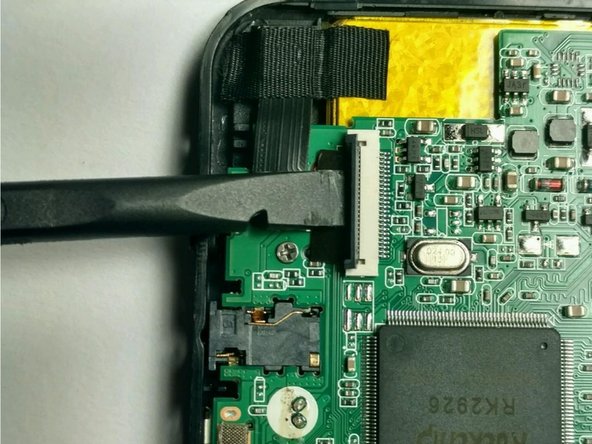
Using the spudger to raise the zero insertion force (ZIF) connector to freely release the ribbon.
-
-
crwdns2935267:0crwdne2935267:0Tweezers$4.99
-
Using tweezers gently pull the ribbon off of the enclosure.
-
Remove the camera.
-
-



To reassemble your device, follow these instructions in reverse order.

crwdns2935287:0crwdne2935287:0

USF Tampa, Team 2-5, Blackwell Fall 2016 crwdns2935289:0USF Tampa, Team 2-5, Blackwell Fall 2016crwdne2935289:0
USFT-BLACKWELL-F16S2G5
crwdns2931471:04crwdne2931471:0
crwdns2935297:072crwdne2935297:0
