crwdns2933423:0crwdne2933423:0
crwdns2947577:0crwdnd2947577:0crwdne2947577:0

Ematic Genesis Battery Replacement

crwdns2942213:0crwdne2942213:0

  1. Ematic Genesis Battery Replacement, Ematic Genesis Casing: crwdns2935265:01crwdnd2935265:01crwdnd2935265:03crwdne2935265:0 Ematic Genesis Battery Replacement, Ematic Genesis Casing: crwdns2935265:01crwdnd2935265:02crwdnd2935265:03crwdne2935265:0 Ematic Genesis Battery Replacement, Ematic Genesis Casing: crwdns2935265:01crwdnd2935265:03crwdnd2935265:03crwdne2935265:0
    • Unscrew the two (2) 1.3mm Phillips #00 screws found on the bottom edge of the tablet, where the power and volume buttons are located.

    crwdns2952109:0crwdne2952109:0
  2. Ematic Genesis Battery Replacement: crwdns2935265:02crwdnd2935265:01crwdnd2935265:03crwdne2935265:0 Ematic Genesis Battery Replacement: crwdns2935265:02crwdnd2935265:02crwdnd2935265:03crwdne2935265:0 Ematic Genesis Battery Replacement: crwdns2935265:02crwdnd2935265:03crwdnd2935265:03crwdne2935265:0
    • Insert plastic opening tool into the edge between the screen plate and the back plate to create a separation between the casings.

    • Insert the flat end of the spudger next to the plastic opening tool and carefully pry the edges apart. Continue this all around the edges until the casings separate.

    • There may be cracking sounds when prying them apart. If carefully done, this is only the locks coming apart and is not harmful.

    • Be careful when separating the two plates as they are connected by the speaker wires and could be disconnected during this process.

    crwdns2952109:0crwdne2952109:0
  3. Ematic Genesis Battery Replacement: crwdns2935265:03crwdnd2935265:01crwdnd2935265:01crwdne2935265:0
    • Remove back plate from screen plate and lay both down flat next to each other.

    • Be careful when separating the two plates as they are connected by the speaker wires and could be disconnected during this process.

    crwdns2952109:0crwdne2952109:0
  4. Ematic Genesis Battery Replacement, Battery: crwdns2935265:04crwdnd2935265:01crwdnd2935265:03crwdne2935265:0 Ematic Genesis Battery Replacement, Battery: crwdns2935265:04crwdnd2935265:02crwdnd2935265:03crwdne2935265:0 Ematic Genesis Battery Replacement, Battery: crwdns2935265:04crwdnd2935265:03crwdnd2935265:03crwdne2935265:0
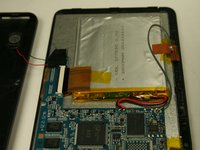
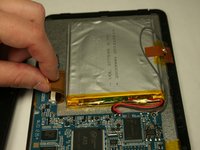
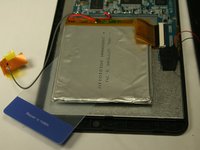
    • Lift up the two pieces of tape holding the copper plate and the connector ribbon to the battery. Gently hold or place away from the battery.

    crwdns2952109:0crwdne2952109:0
  5. Ematic Genesis Battery Replacement: crwdns2935265:05crwdnd2935265:01crwdnd2935265:03crwdne2935265:0 Ematic Genesis Battery Replacement: crwdns2935265:05crwdnd2935265:02crwdnd2935265:03crwdne2935265:0 Ematic Genesis Battery Replacement: crwdns2935265:05crwdnd2935265:03crwdnd2935265:03crwdne2935265:0
    crwdns2935267:0crwdne2935267:0
    Plastic Cards
    $2.99
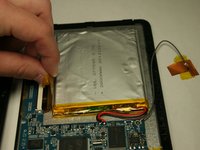
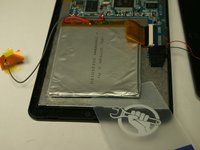
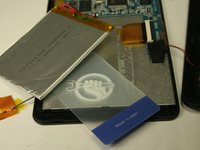
    • Using a plastic card, gently break the adhesive that holds the battery to the metal screen plate.

    • The battery is very bendable. Although it may not be working, there are still dangerous contents inside batteries.

    crwdns2952109:0crwdne2952109:0
  6. Ematic Genesis Battery Replacement: crwdns2935265:06crwdnd2935265:01crwdnd2935265:01crwdne2935265:0
    • If replacing the battery, disconnect the wires that connect the battery to the motherboard.

    • If not replacing the battery, do NOT disconnect the wires.

    • To reconnect the new battery, a soldering kit will be necessary. Use the iFixit soldering guide to gain further information on how to complete this step.

    • How To Solder and Desolder Connections

    crwdns2952109:0crwdne2952109:0
crwdns2915888:0crwdne2915888:0

To reassemble your device, follow these instructions in reverse order.

Justin Rohrman

crwdns2935283:003/23/15crwdne2935283:0

745 crwdns2915208:0crwdne2915208:0

crwdns2935297:06crwdne2935297:0

crwdns2935287:0crwdne2935287:0

Baylor, Team 4-3, Williams Spring 2015 crwdns2935289:0Baylor, Team 4-3, Williams Spring 2015crwdne2935289:0

BU-WILLIAMS-S15S4G3

crwdns2931471:03crwdne2931471:0

crwdns2935297:012crwdne2935297:0

crwdns2947410:01crwdne2947410:0

crwdns2917038:0crwdne2917038:0

crwdns2936625:0crwdne2936625:0:

crwdns2936751:024crwdne2936751:0 2

crwdns2936753:07crwdne2936753:0 16

crwdns2936753:030crwdne2936753:0 82

crwdns2942667:0crwdne2942667:0 1,430