crwdns2915892:0crwdne2915892:0
This guide covers a Livebox router teardown. This guide helps you differentiate the components more easily and know their functions. It is not recommended to use this guide to repair the router.
-
-
-
This is the Livebox router we will dismantle.
 crwdns2952109:0crwdne2952109:0
-
-
-
First we use an appropriate Phillips screwdriver to remove the four screws on the bottom and open the case.
-
-
-
In the photos we can see switches, push-buttons and various connecting points. They are used to provide access or block it; to power on or off and to reset the Wi-Fi.
-
-
-
Inside the Router you can see some green PCBs, some are soldered while others are held in place by sockets.
-
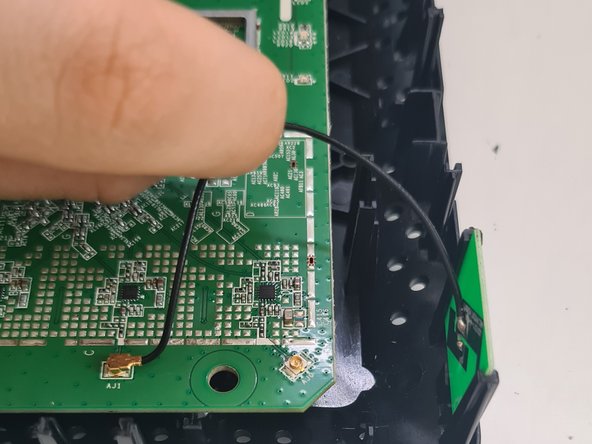
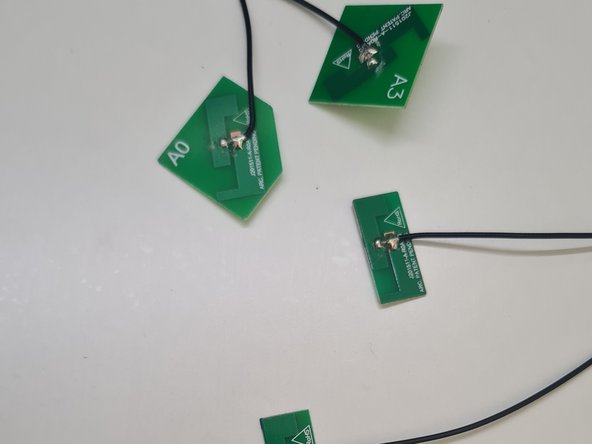
The small socketed PCBs are antennas, they allow the transfer speed to be increased by allowing the data transfer in parallel. These antennas make it unnecessary to install external antennas as on other routers, which benefits users when installing the device on a table or shelf.
-
To extract them, we can remove the ones in sockets, if we want to remove the cable also we unplug them from the main PCB.
-
-
-
-
In the center we can see a small black "card" connected by metal projections that are soldered to the board. I do not recommend extracting it because it is very difficult to do without damage so unless you are skilled and have good reason, such as salvaging for re-use, is pointless.
-
It is a read-only-memory (ROM) chip that stores instructions and data permanently. It contains the router's firmware.
-
-
-
Next to the chip that we have just analyzed is the processor or CPU of the router. It is a Broadcom brand processor.
-
It is responsible for managing the work of the device and is key to maintaining good performance in intensive tasks that use a lot of bandwidth.
-
-
-
On the other side of the chip that we analyzed previously is a metal plate that we can easily lift. It contains RAM and a WiFi chip.
-
RAM (Random Access Memory) memory temporarily stores information you use in applications open on the computer, but only while it is powered on.
-
-
-
Above what we just analyzed, there is an electrolytic capacitor that stands out around the rest of the components that make up the power supply.
-
This capacitor with polarity is responsible for storing electrical charge.
-
-
-
To the right of the power supply area are two transformer modules with a large number of pins.
-
These modules are responsible for optimizing the use of resources, avoiding possible breakdowns and scheduling the maintenance cycle, extending the life of the device.
-
-
-
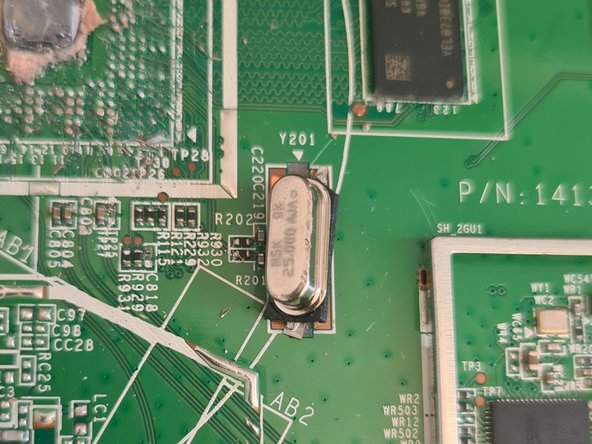
An oscillator is located near the processor.
-
Oscillators, from my point of view, are circuits that generate a periodic signal at the output without having any periodic input.
-
-
-
Finally, you can disassemble the rest of the Router's parts, such as the semiconductor located to the right of the processor, which in my opinion is related to the RAM memory and the processor.
-
The rest of the electrolytic capacitors, with a lower capacity than the one already analyzed, can also be dismantled.
-
The rest of the components can also be disassembled, although some smaller ones are complicated, such as some connectors, ports or chips, which serve for correct functioning of the device and the Wifi.
-
-







To reassemble your device, follow these instructions in reverse order.
crwdns2934873:0crwdne2934873:0
100%

crwdns2934883:0Juan Garciacrwdne2934883:0 crwdns2934875:0crwdne2934875:0
crwdns2934877:0crwdne2934877:0 ›

