crwdns2933423:0crwdne2933423:0
crwdns2947577:0crwdnd2947577:0crwdne2947577:0

Disassembling the HP Pavilion tx2500 Bezel

crwdns2942213:0crwdne2942213:0

    1. Disassembling the HP Pavilion tx2500 Bezel, Screen Rotator: crwdns2935265:01crwdnd2935265:01crwdnd2935265:01crwdne2935265:0
      • Completely turn off and unplug device. Lay the device bottom side up on a soft surface.

      crwdns2952109:0crwdne2952109:0

      crwdns2917038:0crwdne2917038:0

    2. Disassembling the HP Pavilion tx2500 Bezel: crwdns2935265:02crwdnd2935265:01crwdnd2935265:02crwdne2935265:0 Disassembling the HP Pavilion tx2500 Bezel: crwdns2935265:02crwdnd2935265:02crwdnd2935265:02crwdne2935265:0
      • Squeeze the latches on the battery until you hear a click. Slide out the battery.

      crwdns2952109:0crwdne2952109:0

      crwdns2917038:0crwdne2917038:0

    3. Disassembling the HP Pavilion tx2500 Bezel: crwdns2935265:03crwdnd2935265:01crwdnd2935265:01crwdne2935265:0
      • Using the Phillips #0 screwdriver, remove the 4.5 mm screw from the WLAN model screen.

      • Once unscrewed, lift the right side of the WLAN module compartment cover and swing it to the left.

      crwdns2952109:0crwdne2952109:0

      crwdns2917038:0crwdne2917038:0

    4. Disassembling the HP Pavilion tx2500 Bezel: crwdns2935265:04crwdnd2935265:01crwdnd2935265:01crwdne2935265:0
      • Using the plastic opening tool, disconnect the WLAN antenna cables from the WLAN module.

      crwdns2952109:0crwdne2952109:0

      crwdns2917038:0crwdne2917038:0

    5. Disassembling the HP Pavilion tx2500 Bezel: crwdns2935265:05crwdnd2935265:01crwdnd2935265:01crwdne2935265:0
      • Using the Phillips #0 screwdriver, unscrew the 4.5 mm screw from the middle section in the battery compartment.

      crwdns2952109:0crwdne2952109:0

      crwdns2917038:0crwdne2917038:0

    6. Disassembling the HP Pavilion tx2500 Bezel: crwdns2935265:06crwdnd2935265:01crwdnd2935265:01crwdne2935265:0
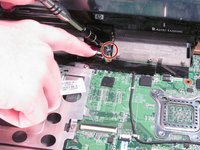
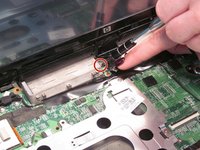
      • Use the plastic opening tool to disconnect the wires in the upper corners.

      crwdns2952109:0crwdne2952109:0

      crwdns2917038:0crwdne2917038:0

    7. Disassembling the HP Pavilion tx2500 Bezel: crwdns2935265:07crwdnd2935265:01crwdnd2935265:01crwdne2935265:0
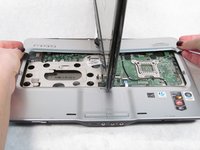
      • Flip the laptop front side up and then use your fingers to lift up the keyboard.

      crwdns2952109:0crwdne2952109:0

      crwdns2917038:0crwdne2917038:0

    8. Disassembling the HP Pavilion tx2500 Bezel: crwdns2935265:08crwdnd2935265:01crwdnd2935265:01crwdne2935265:0
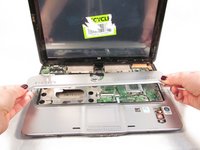
      • Lift up the black latch that connects the film strip to the base of the computer.

      • Use the plastic opening tool to disconnect the film strip from the base of the computer.

      crwdns2952109:0crwdne2952109:0

      crwdns2917038:0crwdne2917038:0

    9. Disassembling the HP Pavilion tx2500 Bezel: crwdns2935265:09crwdnd2935265:01crwdnd2935265:02crwdne2935265:0 Disassembling the HP Pavilion tx2500 Bezel: crwdns2935265:09crwdnd2935265:02crwdnd2935265:02crwdne2935265:0
      • Rotate the screen 90 degrees and remove the base under the screen.

      crwdns2952109:0crwdne2952109:0

      crwdns2917038:0crwdne2917038:0

    10. Disassembling the HP Pavilion tx2500 Bezel: crwdns2935265:010crwdnd2935265:01crwdnd2935265:01crwdne2935265:0
      • Rotate the screen back towards you.

      • Lift up the convertible hinge to unclip it from the base of the computer.

      crwdns2952109:0crwdne2952109:0

      crwdns2917038:0crwdne2917038:0

    11. Disassembling the HP Pavilion tx2500 Bezel: crwdns2935265:011crwdnd2935265:01crwdnd2935265:02crwdne2935265:0 Disassembling the HP Pavilion tx2500 Bezel: crwdns2935265:011crwdnd2935265:02crwdnd2935265:02crwdne2935265:0
      • Using the Phillips #0 screwdriver, remove both of the 5.0 mm screws on the base of the rotator.

      crwdns2952109:0crwdne2952109:0

      crwdns2917038:0crwdne2917038:0

    12. Disassembling the HP Pavilion tx2500 Bezel: crwdns2935265:012crwdnd2935265:01crwdnd2935265:01crwdne2935265:0
      • Gently lift up and remove the screen.

      crwdns2952109:0crwdne2952109:0

      crwdns2917038:0crwdne2917038:0

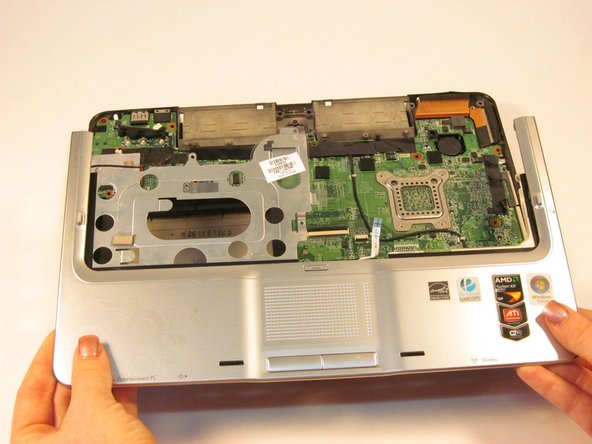
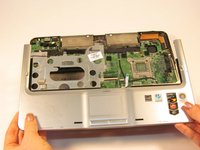
    1. Disassembling the HP Pavilion tx2500 Bezel, Bezel: crwdns2935265:013crwdnd2935265:01crwdnd2935265:03crwdne2935265:0 Disassembling the HP Pavilion tx2500 Bezel, Bezel: crwdns2935265:013crwdnd2935265:02crwdnd2935265:03crwdne2935265:0 Disassembling the HP Pavilion tx2500 Bezel, Bezel: crwdns2935265:013crwdnd2935265:03crwdnd2935265:03crwdne2935265:0
      • Disconnect the wire from the system board using the plastic opening tool.

      • Disconnect the wire from the optical drive using the plastic opening tool.

      • Gently lift the top cover from the tablet.

      crwdns2952109:0crwdne2952109:0

      crwdns2917038:0crwdne2917038:0

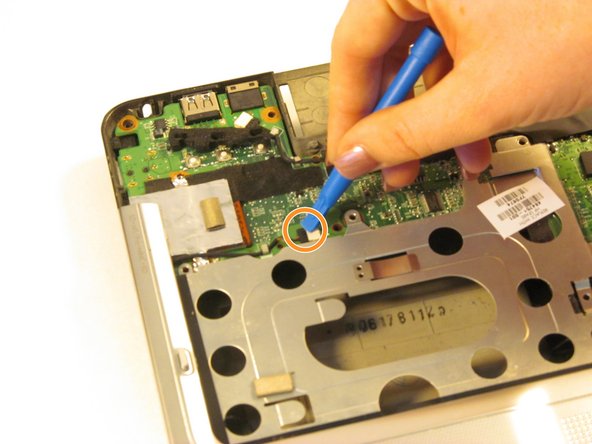
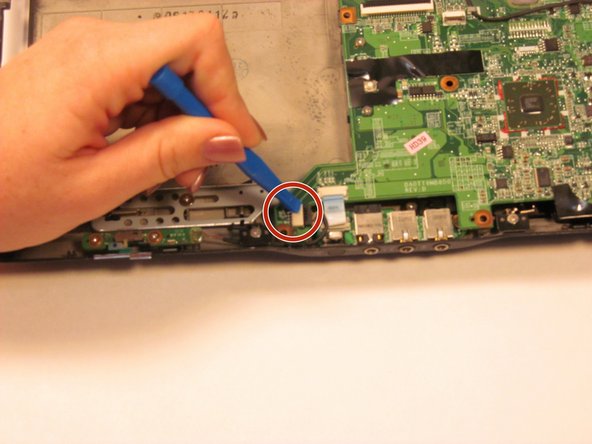
    2. Disassembling the HP Pavilion tx2500 Bezel: crwdns2935265:014crwdnd2935265:01crwdnd2935265:02crwdne2935265:0 Disassembling the HP Pavilion tx2500 Bezel: crwdns2935265:014crwdnd2935265:02crwdnd2935265:02crwdne2935265:0
      • Using the plastic opening tool, disconnect the plastic blue film from the tablet.

      • Disconnect the wire using the plastic opening tool.

      crwdns2952109:0crwdne2952109:0

      crwdns2917038:0crwdne2917038:0

    3. Disassembling the HP Pavilion tx2500 Bezel: crwdns2935265:015crwdnd2935265:01crwdnd2935265:02crwdne2935265:0 Disassembling the HP Pavilion tx2500 Bezel: crwdns2935265:015crwdnd2935265:02crwdnd2935265:02crwdne2935265:0
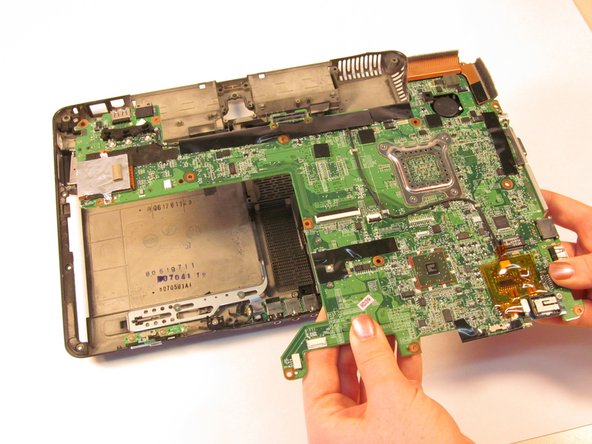
      • Lift the system board from the tablet.

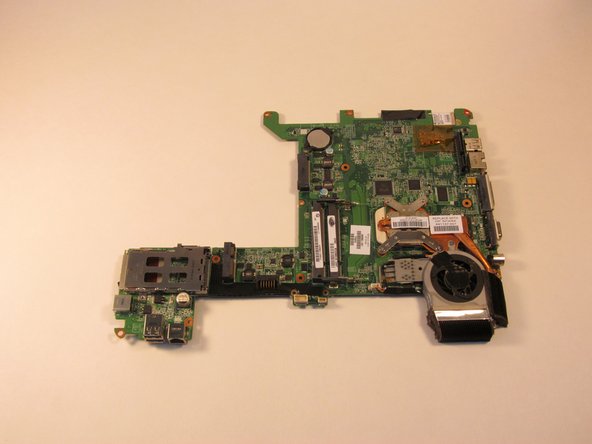
      • Turn the system board over and lay it flat on a soft surface.

      crwdns2952109:0crwdne2952109:0

      crwdns2917038:0crwdne2917038:0

    4. Disassembling the HP Pavilion tx2500 Bezel: crwdns2935265:016crwdnd2935265:01crwdnd2935265:01crwdne2935265:0
      • Gently remove the bezel from the system board.

      crwdns2952109:0crwdne2952109:0

      crwdns2917038:0crwdne2917038:0

crwdns2915888:0crwdne2915888:0

To reassemble your device, follow these instructions in reverse order.

crwdns2935221:0crwdne2935221:0

Sarah Naiser

crwdns2935283:010/13/15crwdne2935283:0

336 crwdns2915208:0crwdne2915208:0

crwdns2935297:02crwdne2935297:0

crwdns2935287:0crwdne2935287:0

Sam Houston State, Team 1-4, Blackburne Fall 2015 crwdns2935289:0Sam Houston State, Team 1-4, Blackburne Fall 2015crwdne2935289:0

SHSU-BLACKBURNE-F15S1G4

crwdns2931471:04crwdne2931471:0

crwdns2935297:05crwdne2935297:0

crwdns2947412:00crwdne2947412:0

crwdns2917038:0crwdne2917038:0

crwdns2936625:0crwdne2936625:0:

crwdns2936751:024crwdne2936751:0 1

crwdns2936753:07crwdne2936753:0 5

crwdns2936753:030crwdne2936753:0 16

crwdns2942667:0crwdne2942667:0 1,050