
Disassembling Optoma HD20 Cover

crwdns2959932:0crwdnd2959932:0Trevercrwdnd2959932:0crwdnd2959932:0crwdnd2959932:06crwdnd2959932:0crwdne2959932:0
crwdns2959936:0Huk 14, 2019crwdne2959936:0
crwdns2869540:0crwdne2869540:0: 4081
crwdns2959988:0crwdne2959988:0
- crwdns2959990:0crwdne2959990:0
- 2
- crwdns2959992:0crwdne2959992:0
- 23
- crwdns2959994:0crwdne2959994:0
- 118
- crwdns2959996:0crwdne2959996:0
- 4,081
crwdns2955950:0crwdne2955950:0: 8
crwdns2960004:08crwdne2960004:0.
crwdns2959984:0crwdne2959984:0: 9 10
crwdns2959974:09crwdne2959974:0
crwdns2959970:010crwdne2959970:0
crwdns2959986:0crwdne2959986:0: 0 1
crwdns2959958:0crwdne2959958:0
crwdns2959976:01crwdne2959976:0
crwdns2915892:0crwdne2915892:0
crwdns2959928:0crwdne2959928:0 ↓Use this guide to remove the cover from your Optoma HD20.
crwdns2959930:0crwdne2959930:0
crwdns2943215:0crwdne2943215:0


-
-
-
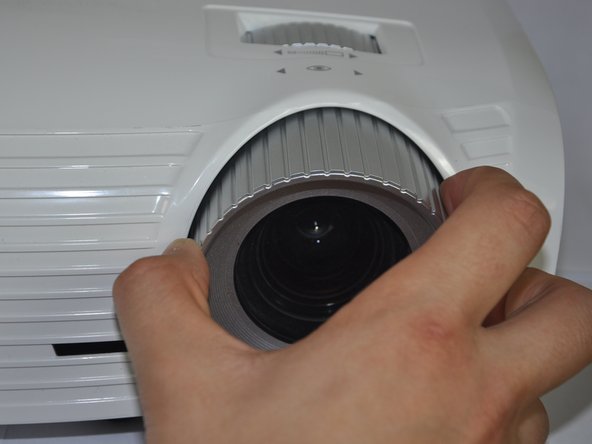
Twist the focal cap clockwise until it is fully extended.
-
Remove the focal cap by pulling it straight out.
 crwdns2952109:0crwdne2952109:0
-
-
-
Use a Phillips #1 screwdriver to remove the three 7.5mm screws on the bottom of the device.
-
-
-
Use a plastic opening tool to gently pry the top cover off of the device.
-
-
-
-
Remove the ribbon by disconnecting it from the main circuit board.
-
Lift up the clip holding it down and pull the ribbon out.
-
-


To reassemble your device, follow these instructions in reverse order.
crwdns2935221:0crwdne2935221:0
crwdns2935229:09crwdne2935229:0

crwdns2935287:0crwdne2935287:0

Cal Poly, Team 21-23, Maness Winter 2015 crwdns2935289:0Cal Poly, Team 21-23, Maness Winter 2015crwdne2935289:0
CPSU-MANESS-W15S21G23
crwdns2931471:04crwdne2931471:0
crwdns2935297:072crwdne2935297:0
