crwdns2933423:0crwdne2933423:0
crwdns2947577:0crwdnd2947577:0crwdne2947577:0

Disassembling Nokia E61i Volume Control Buttons

crwdns2942213:0crwdne2942213:0

    1. Disassembling Nokia E61i Volume Control Buttons, Battery: crwdns2935265:01crwdnd2935265:01crwdnd2935265:02crwdne2935265:0 Disassembling Nokia E61i Volume Control Buttons, Battery: crwdns2935265:01crwdnd2935265:02crwdnd2935265:02crwdne2935265:0
      • First, gather all necessary tools.

      • Remove the back cover to access the battery by pushing the tab on the bottom of the cover.

      • Slide the back cover downwards off of the phone while pressing down on the tab.

      crwdns2952109:0crwdne2952109:0

      crwdns2917038:0crwdne2917038:0

    2. Disassembling Nokia E61i Volume Control Buttons: crwdns2935265:02crwdnd2935265:01crwdnd2935265:01crwdne2935265:0
      • Locate the bottom-left corner of the phone where there is a spot to remove the battery.

      crwdns2952109:0crwdne2952109:0

      crwdns2917038:0crwdne2917038:0

    3. Disassembling Nokia E61i Volume Control Buttons: crwdns2935265:03crwdnd2935265:01crwdnd2935265:01crwdne2935265:0
      • Lift the battery out using your finger.

      • The E61i uses a Nokia BP-4L standard battery.

      crwdns2952109:0crwdne2952109:0

      crwdns2917038:0crwdne2917038:0

    1. Disassembling Nokia E61i Volume Control Buttons, Front Cover: crwdns2935265:04crwdnd2935265:01crwdnd2935265:02crwdne2935265:0 Disassembling Nokia E61i Volume Control Buttons, Front Cover: crwdns2935265:04crwdnd2935265:02crwdnd2935265:02crwdne2935265:0
      • To remove the top of the back cover, pry the sides and pop it off.

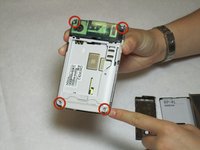
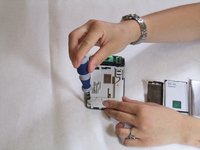
      • Remove the four screws that secure the front cover to the rest of the phone using a T7 screwdriver.

      crwdns2952109:0crwdne2952109:0

      crwdns2917038:0crwdne2917038:0

    2. Disassembling Nokia E61i Volume Control Buttons: crwdns2935265:05crwdnd2935265:01crwdnd2935265:01crwdne2935265:0
      • Remove the cover by pulling it up and off.

      crwdns2952109:0crwdne2952109:0

      crwdns2917038:0crwdne2917038:0

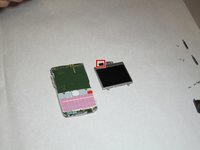
    1. Disassembling Nokia E61i Volume Control Buttons, Display: crwdns2935265:06crwdnd2935265:01crwdnd2935265:02crwdne2935265:0 Disassembling Nokia E61i Volume Control Buttons, Display: crwdns2935265:06crwdnd2935265:02crwdnd2935265:02crwdne2935265:0
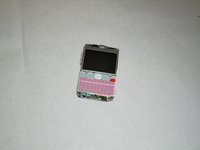
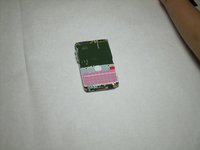
      • Take off the casing and keyboard.

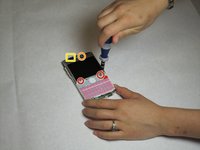
      • Remove the screws while holding the screen in place using a Torx T6 screwdriver.

      • Remove the single screw while holding the screen in place using a Torx T5 screwdriver.

      • Lift the ribbon, disconnecting contact with the motherboard.

      • Firmly press the contacts into place to connect the ribbon and the motherboard when reassembling.

      crwdns2952109:0crwdne2952109:0

      crwdns2917038:0crwdne2917038:0

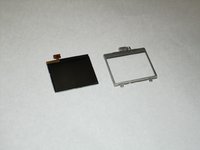
    2. Disassembling Nokia E61i Volume Control Buttons: crwdns2935265:07crwdnd2935265:01crwdnd2935265:02crwdne2935265:0 Disassembling Nokia E61i Volume Control Buttons: crwdns2935265:07crwdnd2935265:02crwdnd2935265:02crwdne2935265:0
      • Gently pull the screen off of the phone.

      • Be sure not to rip the sticker that connects the display and the motherboard.

      • Pull the silver case off to completely free the cracked or damaged screen.

      crwdns2952109:0crwdne2952109:0

      crwdns2917038:0crwdne2917038:0

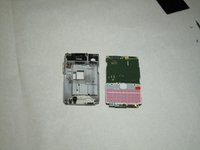
    1. Disassembling Nokia E61i Volume Control Buttons, Motherboard: crwdns2935265:08crwdnd2935265:01crwdnd2935265:03crwdne2935265:0 Disassembling Nokia E61i Volume Control Buttons, Motherboard: crwdns2935265:08crwdnd2935265:02crwdnd2935265:03crwdne2935265:0 Disassembling Nokia E61i Volume Control Buttons, Motherboard: crwdns2935265:08crwdnd2935265:03crwdnd2935265:03crwdne2935265:0
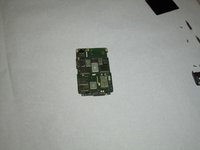
      • Pull the green motherboard from the back casing.

      crwdns2952109:0crwdne2952109:0

      crwdns2917038:0crwdne2917038:0

    1. Disassembling Nokia E61i Volume Control Buttons, Volume Control Buttons: crwdns2935265:09crwdnd2935265:01crwdnd2935265:01crwdne2935265:0
      • The volume control buttons are secured to the frame only by their fit around a small piece of the plastic. Using a small flat-head screwdriver or other flat object, lift the ribbon over this piece of the cover.

      crwdns2952109:0crwdne2952109:0

      crwdns2917038:0crwdne2917038:0

    2. Disassembling Nokia E61i Volume Control Buttons: crwdns2935265:010crwdnd2935265:01crwdnd2935265:01crwdne2935265:0
      • Next, remove the volume control buttons from the cover by pushing or pulling them out away from the interior of the cover.

      crwdns2952109:0crwdne2952109:0

      crwdns2917038:0crwdne2917038:0

crwdns2915888:0crwdne2915888:0

To reassemble your device, follow these instructions in reverse order.

crwdns2935221:0crwdne2935221:0

Christopher Patton

crwdns2935283:004/07/11crwdne2935283:0

208 crwdns2915208:0crwdne2915208:0

crwdns2935297:012crwdne2935297:0

crwdns2935287:0crwdne2935287:0

Cal Poly, Team 9-63, Walters Spring 2011 crwdns2935289:0Cal Poly, Team 9-63, Walters Spring 2011crwdne2935289:0

CPSU-WALTERS-S11S9G63

crwdns2931471:05crwdne2931471:0

crwdns2935297:0144crwdne2935297:0

crwdns2947412:00crwdne2947412:0

crwdns2917038:0crwdne2917038:0

crwdns2936625:0crwdne2936625:0:

crwdns2936751:024crwdne2936751:0 1

crwdns2936753:07crwdne2936753:0 3

crwdns2936753:030crwdne2936753:0 20

crwdns2942667:0crwdne2942667:0 2,029