crwdns2933423:0crwdne2933423:0
crwdns2947577:0crwdnd2947577:0crwdne2947577:0

Disassembling Nokia 6236i Display

crwdns2942213:0crwdne2942213:0

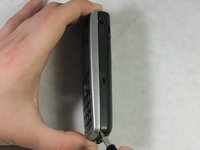
    1. Disassembling Nokia 6236i Display, Battery: crwdns2935265:01crwdnd2935265:01crwdnd2935265:02crwdne2935265:0 Disassembling Nokia 6236i Display, Battery: crwdns2935265:01crwdnd2935265:02crwdnd2935265:02crwdne2935265:0
      • Using your thumb, apply pressure to the battery casing (below the camera). Firmly pull towards the bottom of the phone.

      • Lift the battery case off of the phone.

      crwdns2952109:0crwdne2952109:0

      crwdns2917038:0crwdne2917038:0

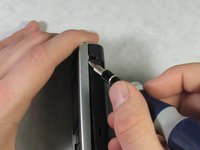
    2. Disassembling Nokia 6236i Display: crwdns2935265:02crwdnd2935265:01crwdnd2935265:03crwdne2935265:0 Disassembling Nokia 6236i Display: crwdns2935265:02crwdnd2935265:02crwdnd2935265:03crwdne2935265:0 Disassembling Nokia 6236i Display: crwdns2935265:02crwdnd2935265:03crwdnd2935265:03crwdne2935265:0
      • Use your thumb to get underneath the battery and pull up and out from the bottom of the battery tray.

      • The battery should lift out with minimal resistance.

      crwdns2952109:0crwdne2952109:0

      crwdns2917038:0crwdne2917038:0

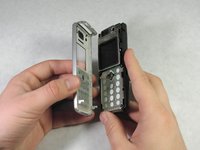
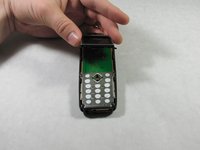
    1. Disassembling Nokia 6236i Display, Front Casing: crwdns2935265:03crwdnd2935265:01crwdnd2935265:03crwdne2935265:0 Disassembling Nokia 6236i Display, Front Casing: crwdns2935265:03crwdnd2935265:02crwdnd2935265:03crwdne2935265:0 Disassembling Nokia 6236i Display, Front Casing: crwdns2935265:03crwdnd2935265:03crwdnd2935265:03crwdne2935265:0
      • Insert a spudger into the indention on the bottom right side of the device.

      • Slide the spudger upward to a second indention at the top of the phone.

      • The front casing will detach from the phone.

      crwdns2952109:0crwdne2952109:0

      crwdns2917038:0crwdne2917038:0

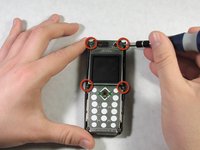
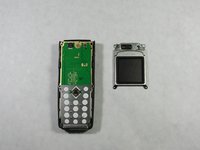
    1. Disassembling Nokia 6236i Display, Disassembling Nokia 6236i Display: crwdns2935265:04crwdnd2935265:01crwdnd2935265:03crwdne2935265:0 Disassembling Nokia 6236i Display, Disassembling Nokia 6236i Display: crwdns2935265:04crwdnd2935265:02crwdnd2935265:03crwdne2935265:0 Disassembling Nokia 6236i Display, Disassembling Nokia 6236i Display: crwdns2935265:04crwdnd2935265:03crwdnd2935265:03crwdne2935265:0
      • Use the flathead screwdriver to remove four screws on the upper half of the phone.

      • Lift the LCD up and off.

      crwdns2952109:0crwdne2952109:0

      crwdns2917038:0crwdne2917038:0

crwdns2915888:0crwdne2915888:0

To reassemble your device, follow these instructions in reverse order.

crwdns2935221:0crwdne2935221:0

crwdns2935229:02crwdne2935229:0

Erik Lindahl

crwdns2935283:004/18/10crwdne2935283:0

63 crwdns2915208:0crwdne2915208:0

crwdns2935297:04crwdne2935297:0

crwdns2935287:0crwdne2935287:0

Cal Poly, Team 10-46, Garner Spring 2010 crwdns2935289:0Cal Poly, Team 10-46, Garner Spring 2010crwdne2935289:0

CPSU-GARNER-S10S10G46

crwdns2931471:04crwdne2931471:0

crwdns2935297:060crwdne2935297:0

crwdns2947412:00crwdne2947412:0

crwdns2917038:0crwdne2917038:0

crwdns2936625:0crwdne2936625:0:

crwdns2936751:024crwdne2936751:0 2

crwdns2936753:07crwdne2936753:0 8

crwdns2936753:030crwdne2936753:0 34

crwdns2942667:0crwdne2942667:0 2,008