crwdns2933423:0crwdne2933423:0
crwdns2947577:0crwdnd2947577:0crwdne2947577:0

Disassembling IBM ThinkPad A30 Display Assembly

crwdns2942213:0crwdne2942213:0

    1. Disassembling IBM ThinkPad A30 Display Assembly, Battery: crwdns2935265:01crwdnd2935265:01crwdnd2935265:02crwdne2935265:0 Disassembling IBM ThinkPad A30 Display Assembly, Battery: crwdns2935265:01crwdnd2935265:02crwdnd2935265:02crwdne2935265:0
      • Flip the ThinkPad over so that it is upside down.

      • Slide the highlighted tab to the left.

      • With your finger on the tab, remove the battery by lifting it upwards away from the laptop.

      crwdns2952109:0crwdne2952109:0

      crwdns2917038:0crwdne2917038:0

    1. Disassembling IBM ThinkPad A30 Display Assembly, Hard Drive: crwdns2935265:02crwdnd2935265:01crwdnd2935265:03crwdne2935265:0 Disassembling IBM ThinkPad A30 Display Assembly, Hard Drive: crwdns2935265:02crwdnd2935265:02crwdnd2935265:03crwdne2935265:0 Disassembling IBM ThinkPad A30 Display Assembly, Hard Drive: crwdns2935265:02crwdnd2935265:03crwdnd2935265:03crwdne2935265:0
      • Remove the highlighted screw with a Phillips #1 screwdriver.

      • Pull the hard drive out.

      crwdns2952109:0crwdne2952109:0

      crwdns2917038:0crwdne2917038:0

    1. Disassembling IBM ThinkPad A30 Display Assembly, Upper Case: crwdns2935265:03crwdnd2935265:01crwdnd2935265:01crwdne2935265:0
      • Make sure the laptop is upside down and oriented in the direction shown.

      • Remove the six 16.7mm screws inside the circled holes.

      crwdns2952109:0crwdne2952109:0

      crwdns2917038:0crwdne2917038:0

    2. Disassembling IBM ThinkPad A30 Display Assembly: crwdns2935265:04crwdnd2935265:01crwdnd2935265:01crwdne2935265:0
      • Rotate the ThinkPad so that the hard drive bay is facing you.

      • Remove the black cover to reveal a 14.8mm screw.

      • Remove the uncovered screw with a Phillips #0 screwdriver.

      crwdns2952109:0crwdne2952109:0

      crwdns2917038:0crwdne2917038:0

    3. Disassembling IBM ThinkPad A30 Display Assembly: crwdns2935265:05crwdnd2935265:01crwdnd2935265:02crwdne2935265:0 Disassembling IBM ThinkPad A30 Display Assembly: crwdns2935265:05crwdnd2935265:02crwdnd2935265:02crwdne2935265:0
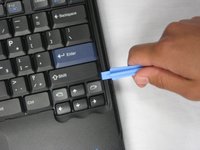
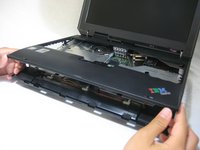
      • Flip the ThinkPad over and open the LCD panel.

      • Pry apart the keyboard with a plastic opening tool or with your fingers.

      crwdns2952109:0crwdne2952109:0

      crwdns2917038:0crwdne2917038:0

    4. Disassembling IBM ThinkPad A30 Display Assembly: crwdns2935265:06crwdnd2935265:01crwdnd2935265:03crwdne2935265:0 Disassembling IBM ThinkPad A30 Display Assembly: crwdns2935265:06crwdnd2935265:02crwdnd2935265:03crwdne2935265:0 Disassembling IBM ThinkPad A30 Display Assembly: crwdns2935265:06crwdnd2935265:03crwdnd2935265:03crwdne2935265:0
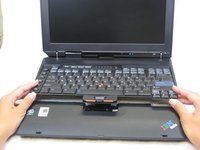
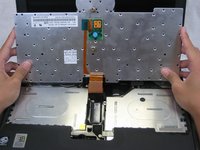
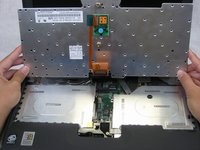
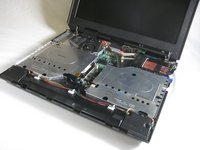
      • Be careful not to pull out the keyboard carelessly; there is a connector underneath it!

      • Lift the front end of the keyboard as shown.

      • Using your fingers, remove the black film cover.

      crwdns2952109:0crwdne2952109:0

      crwdns2917038:0crwdne2917038:0

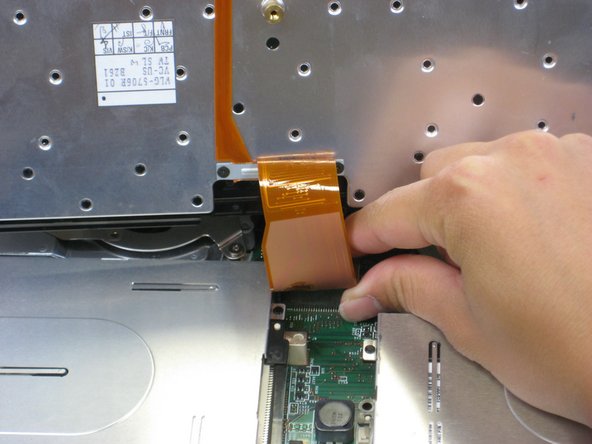
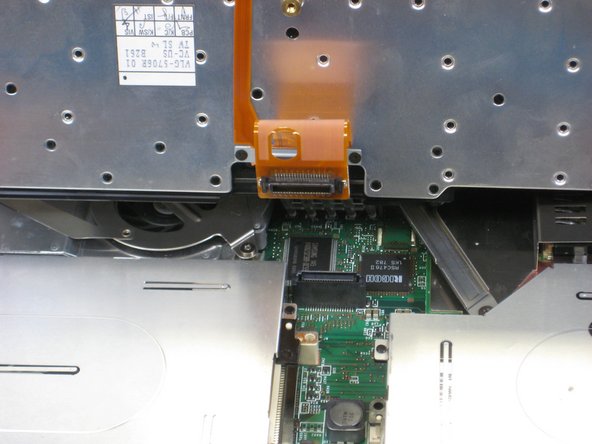
    5. Disassembling IBM ThinkPad A30 Display Assembly: crwdns2935265:07crwdnd2935265:01crwdnd2935265:03crwdne2935265:0 Disassembling IBM ThinkPad A30 Display Assembly: crwdns2935265:07crwdnd2935265:02crwdnd2935265:03crwdne2935265:0 Disassembling IBM ThinkPad A30 Display Assembly: crwdns2935265:07crwdnd2935265:03crwdnd2935265:03crwdne2935265:0
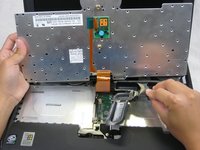
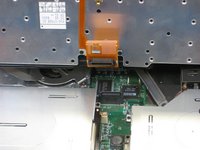
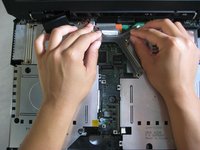
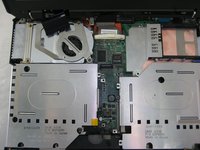
      • Locate the connector attached to the motherboard.

      • Disconnect the ribbon cable by removing the connector.

      crwdns2952109:0crwdne2952109:0

      crwdns2917038:0crwdne2917038:0

    6. Disassembling IBM ThinkPad A30 Display Assembly: crwdns2935265:08crwdnd2935265:01crwdnd2935265:02crwdne2935265:0 Disassembling IBM ThinkPad A30 Display Assembly: crwdns2935265:08crwdnd2935265:02crwdnd2935265:02crwdne2935265:0
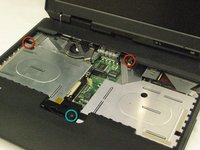
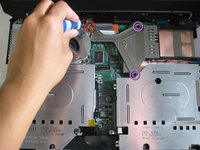
      • Lift and remove the keyboard.

      • Remove the two 5.6mm screws.

      • Remove the 16.7mm screw.

      crwdns2952109:0crwdne2952109:0

      crwdns2917038:0crwdne2917038:0

    7. Disassembling IBM ThinkPad A30 Display Assembly: crwdns2935265:09crwdnd2935265:01crwdnd2935265:03crwdne2935265:0 Disassembling IBM ThinkPad A30 Display Assembly: crwdns2935265:09crwdnd2935265:02crwdnd2935265:03crwdne2935265:0 Disassembling IBM ThinkPad A30 Display Assembly: crwdns2935265:09crwdnd2935265:03crwdnd2935265:03crwdne2935265:0
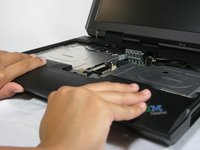
      • You will need to use a little force. Be wary of the tabs.

      • Pry off the upper case with your hands.

      crwdns2952109:0crwdne2952109:0

      crwdns2917038:0crwdne2917038:0

    1. Disassembling IBM ThinkPad A30 Display Assembly, Display Assembly: crwdns2935265:010crwdnd2935265:01crwdnd2935265:01crwdne2935265:0
      • Remove the 5.6mm screw that holds the LCD to the upper case.

      crwdns2952109:0crwdne2952109:0

      crwdns2917038:0crwdne2917038:0

    2. Disassembling IBM ThinkPad A30 Display Assembly: crwdns2935265:011crwdnd2935265:01crwdnd2935265:03crwdne2935265:0 Disassembling IBM ThinkPad A30 Display Assembly: crwdns2935265:011crwdnd2935265:02crwdnd2935265:03crwdne2935265:0 Disassembling IBM ThinkPad A30 Display Assembly: crwdns2935265:011crwdnd2935265:03crwdnd2935265:03crwdne2935265:0
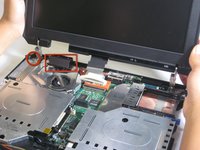
      • Remove the 5.6mm screw on the left side of the three-pronged connector.

      • Remove the other two 16.7mm screws.

      • Lift and remove connector.

      crwdns2952109:0crwdne2952109:0

      crwdns2917038:0crwdne2917038:0

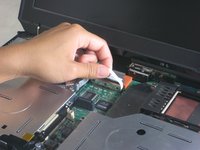
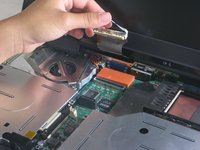
    3. Disassembling IBM ThinkPad A30 Display Assembly: crwdns2935265:012crwdnd2935265:01crwdnd2935265:02crwdne2935265:0 Disassembling IBM ThinkPad A30 Display Assembly: crwdns2935265:012crwdnd2935265:02crwdnd2935265:02crwdne2935265:0
      • Pull out the white tab connecting the LCD to the motherboard.

      crwdns2952109:0crwdne2952109:0

      crwdns2917038:0crwdne2917038:0

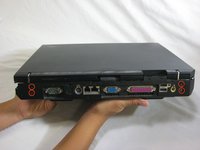
    4. Disassembling IBM ThinkPad A30 Display Assembly: crwdns2935265:013crwdnd2935265:01crwdnd2935265:02crwdne2935265:0 Disassembling IBM ThinkPad A30 Display Assembly: crwdns2935265:013crwdnd2935265:02crwdnd2935265:02crwdne2935265:0
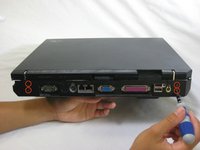
      • Turn the laptop so that the back is facing you.

      • Remove the four 5.6mm long screws.

      crwdns2952109:0crwdne2952109:0

      crwdns2917038:0crwdne2917038:0

    5. Disassembling IBM ThinkPad A30 Display Assembly: crwdns2935265:014crwdnd2935265:01crwdnd2935265:03crwdne2935265:0 Disassembling IBM ThinkPad A30 Display Assembly: crwdns2935265:014crwdnd2935265:02crwdnd2935265:03crwdne2935265:0 Disassembling IBM ThinkPad A30 Display Assembly: crwdns2935265:014crwdnd2935265:03crwdnd2935265:03crwdne2935265:0
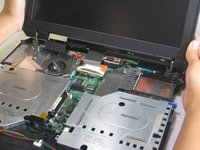
      • Place the laptop so that the LCD is facing you again.

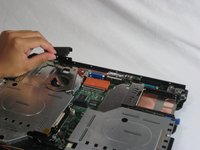
      • Gently lift the LCD monitor up and out.

      • Remove the black plastic tab.

      crwdns2952109:0crwdne2952109:0

      crwdns2917038:0crwdne2917038:0

crwdns2915888:0crwdne2915888:0

To reassemble your device, follow these instructions in reverse order.

crwdns2935221:0crwdne2935221:0

crwdns2935227:0crwdne2935227:0

Jessica

crwdns2935283:010/06/10crwdne2935283:0

162 crwdns2915208:0crwdne2915208:0

crwdns2935297:07crwdne2935297:0

crwdns2935287:0crwdne2935287:0

Cal Poly, Team 4-44, Amido Fall 2010 crwdns2935289:0Cal Poly, Team 4-44, Amido Fall 2010crwdne2935289:0

CPSU-AMIDO-F10S4G44

crwdns2931471:04crwdne2931471:0

crwdns2935297:0155crwdne2935297:0

crwdns2947412:00crwdne2947412:0

crwdns2917038:0crwdne2917038:0

crwdns2936625:0crwdne2936625:0:

crwdns2936751:024crwdne2936751:0 0

crwdns2936753:07crwdne2936753:0 15

crwdns2936753:030crwdne2936753:0 31

crwdns2942667:0crwdne2942667:0 4,047