crwdns2933423:0crwdne2933423:0
crwdns2947577:0crwdnd2947577:0crwdne2947577:0

Disassembling Garmin Nuvi 370 Into Core Components

crwdns2942213:0crwdne2942213:0

  1. Disassembling Garmin Nuvi 370 Into Core Components, Into Core Components: crwdns2935265:01crwdnd2935265:01crwdnd2935265:02crwdne2935265:0 Disassembling Garmin Nuvi 370 Into Core Components, Into Core Components: crwdns2935265:01crwdnd2935265:02crwdnd2935265:02crwdne2935265:0
    • Unscrew the two screws on the antenna unit using a torc-head screwdriver.

    • The Torx-Head Screws' size is T-5, which is about 1.5mm.

    • Gently pry open the antenna unit with your fingers.

    • Be careful and try not to damage the small plastic tab.

    crwdns2952109:0crwdne2952109:0
  2. Disassembling Garmin Nuvi 370 Into Core Components: crwdns2935265:02crwdnd2935265:01crwdnd2935265:03crwdne2935265:0 Disassembling Garmin Nuvi 370 Into Core Components: crwdns2935265:02crwdnd2935265:02crwdnd2935265:03crwdne2935265:0 Disassembling Garmin Nuvi 370 Into Core Components: crwdns2935265:02crwdnd2935265:03crwdnd2935265:03crwdne2935265:0
    crwdns2935267:0crwdne2935267:0
    Tweezers
    $4.99
    • Slide out the inner casing attached to the antenna body.

    • Remove the rotating joint connecting the antenna casing to the main device:

    • Squeeze tweezers into the shown location and compress the spring.

    • Lift out the outer casing while keeping the spring compressed.

    • watch out, as the spring loaded portion may fly out unexpectedly.

    crwdns2952109:0crwdne2952109:0
  3. Disassembling Garmin Nuvi 370 Into Core Components: crwdns2935265:03crwdnd2935265:01crwdnd2935265:01crwdne2935265:0
    • Using a torx-head screwdriver, unscrew the two revealed screws that connect the front and back of the device.

    • The Torx-Head Screws' size is T-5, which is about 1.5mm.

    crwdns2952109:0crwdne2952109:0
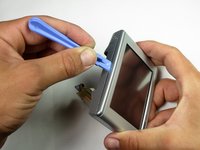
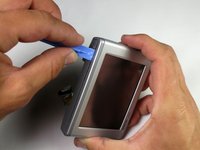
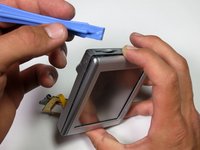
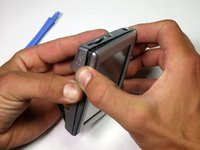
  4. Disassembling Garmin Nuvi 370 Into Core Components: crwdns2935265:04crwdnd2935265:01crwdnd2935265:03crwdne2935265:0 Disassembling Garmin Nuvi 370 Into Core Components: crwdns2935265:04crwdnd2935265:02crwdnd2935265:03crwdne2935265:0 Disassembling Garmin Nuvi 370 Into Core Components: crwdns2935265:04crwdnd2935265:03crwdnd2935265:03crwdne2935265:0
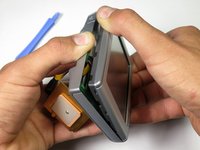
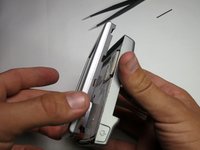
    • Insert the plastic opening tool into the center of the edge as shown in first picture.

    • Slide the plastic opening tool along the central gap of device, making sure that each edge is free, as shown in the second picture.

    crwdns2952109:0crwdne2952109:0
  5. Disassembling Garmin Nuvi 370 Into Core Components: crwdns2935265:05crwdnd2935265:01crwdnd2935265:03crwdne2935265:0 Disassembling Garmin Nuvi 370 Into Core Components: crwdns2935265:05crwdnd2935265:02crwdnd2935265:03crwdne2935265:0 Disassembling Garmin Nuvi 370 Into Core Components: crwdns2935265:05crwdnd2935265:03crwdnd2935265:03crwdne2935265:0
    • Detach the front display from the back panel of the device.

    crwdns2952109:0crwdne2952109:0
  6. Disassembling Garmin Nuvi 370 Into Core Components: crwdns2935265:06crwdnd2935265:01crwdnd2935265:02crwdne2935265:0 Disassembling Garmin Nuvi 370 Into Core Components: crwdns2935265:06crwdnd2935265:02crwdnd2935265:02crwdne2935265:0
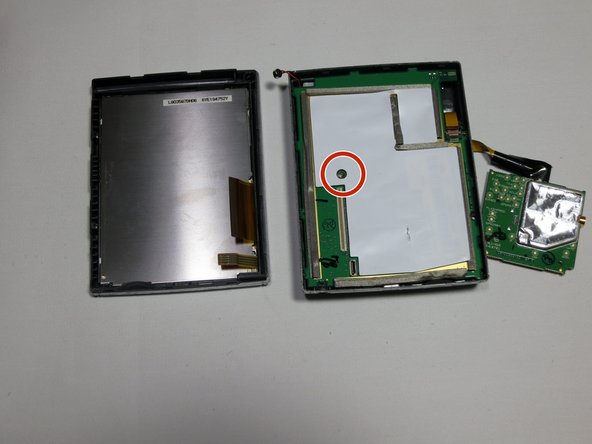
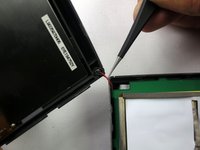
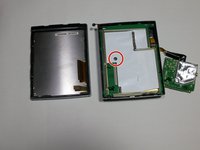
    • Using tweezers, gently lift the microphone from its resting position to fully separate the device into two parts.

    • Finally, remove the screw that connects the motherboard to the back casing with a 3mm head driver.

    crwdns2952109:0crwdne2952109:0
crwdns2915888:0crwdne2915888:0

To reassemble your device, follow these instructions in reverse order.

crwdns2935229:02crwdne2935229:0

Robert

crwdns2935283:004/19/13crwdne2935283:0

80 crwdns2915208:0crwdne2915208:0

crwdns2935295:0crwdne2935295:0

crwdns2935287:0crwdne2935287:0

Cal Poly, Team 13-65, Johann Spring 2013 crwdns2935289:0Cal Poly, Team 13-65, Johann Spring 2013crwdne2935289:0

CPSU-JOHANN-S13S13G65

crwdns2931471:03crwdne2931471:0

crwdns2935297:06crwdne2935297:0

crwdns2947412:00crwdne2947412:0

crwdns2917038:0crwdne2917038:0

crwdns2936625:0crwdne2936625:0:

crwdns2936751:024crwdne2936751:0 6

crwdns2936753:07crwdne2936753:0 19

crwdns2936753:030crwdne2936753:0 81

crwdns2942667:0crwdne2942667:0 1,733