crwdns2933423:0crwdne2933423:0
crwdns2947577:0crwdnd2947577:0crwdne2947577:0

Disassembling 8BitDo Ultimate Wireless Case

crwdns2942213:0crwdne2942213:0

  1. Disassembling 8BitDo Ultimate Wireless Case, Case: crwdns2935265:01crwdnd2935265:01crwdnd2935265:02crwdne2935265:0 Disassembling 8BitDo Ultimate Wireless Case, Case: crwdns2935265:01crwdnd2935265:02crwdnd2935265:02crwdne2935265:0
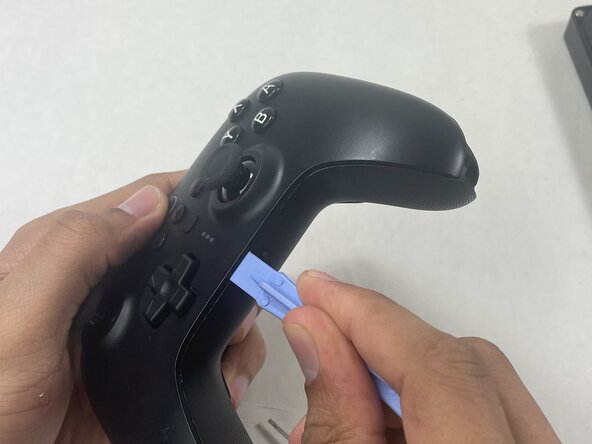
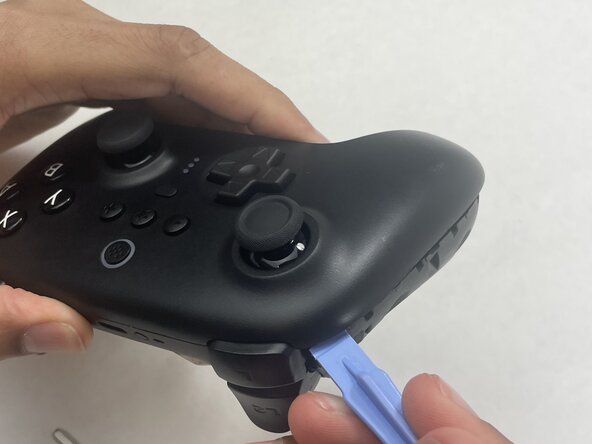
    • Insert an opening pick into the seam between the left controller grip and main controller body.

    • Pry the grip off.

    • Repeat for the right grip.

    crwdns2952109:0crwdne2952109:0

    crwdns2917038:0crwdne2917038:0

  2. Disassembling 8BitDo Ultimate Wireless Case: crwdns2935265:02crwdnd2935265:01crwdnd2935265:02crwdne2935265:0 Disassembling 8BitDo Ultimate Wireless Case: crwdns2935265:02crwdnd2935265:02crwdnd2935265:02crwdne2935265:0
    • Remove the six 8 mm T6 Torx screws securing the rear case to the front case.

    crwdns2952109:0crwdne2952109:0

    crwdns2917038:0crwdne2917038:0

  3. Disassembling 8BitDo Ultimate Wireless Case: crwdns2935265:03crwdnd2935265:01crwdnd2935265:03crwdne2935265:0 Disassembling 8BitDo Ultimate Wireless Case: crwdns2935265:03crwdnd2935265:02crwdnd2935265:03crwdne2935265:0 Disassembling 8BitDo Ultimate Wireless Case: crwdns2935265:03crwdnd2935265:03crwdnd2935265:03crwdne2935265:0
    • Insert an opening tool into seam at the bottom of the device and carefully pry the front and back shells apart.

    • Set the halves next to each other with care not to strain the connected ribbon cables.

    crwdns2952109:0crwdne2952109:0

    crwdns2917038:0crwdne2917038:0

  4. Disassembling 8BitDo Ultimate Wireless Case: crwdns2935265:04crwdnd2935265:01crwdnd2935265:03crwdne2935265:0 Disassembling 8BitDo Ultimate Wireless Case: crwdns2935265:04crwdnd2935265:02crwdnd2935265:03crwdne2935265:0 Disassembling 8BitDo Ultimate Wireless Case: crwdns2935265:04crwdnd2935265:03crwdnd2935265:03crwdne2935265:0
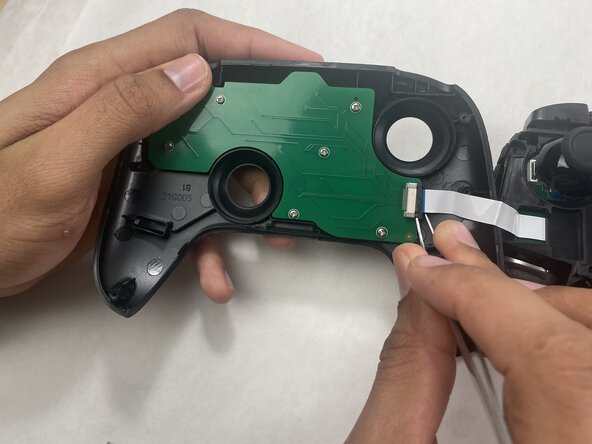
    • The ribbon cable is secured with a locking tab connector.

    • Use tweezers to unlock the locking tab on the ribbon cable connector, then gently disconnect the ribbon cable.

    crwdns2952109:0crwdne2952109:0

    crwdns2917038:0crwdne2917038:0

crwdns2915888:0crwdne2915888:0

To reassemble your device, follow these instructions in reverse order.

crwdns2935221:0crwdne2935221:0

Connor Bassolino

crwdns2935283:003/29/22crwdne2935283:0

24,246 crwdns2915208:0crwdne2915208:0

crwdns2935297:0121crwdne2935297:0

crwdns2947412:00crwdne2947412:0

crwdns2917038:0crwdne2917038:0

crwdns2936625:0crwdne2936625:0:

crwdns2936751:024crwdne2936751:0 0

crwdns2936753:07crwdne2936753:0 12

crwdns2936753:030crwdne2936753:0 76

crwdns2942667:0crwdne2942667:0 83