crwdns2933423:0crwdne2933423:0
crwdns2947577:0crwdnd2947577:0crwdne2947577:0

Dell XPS M1730 Keyboard Replacement

crwdns2942213:0crwdne2942213:0

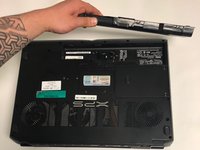
    1. Dell XPS M1730 Keyboard Replacement, Battery: crwdns2935265:01crwdnd2935265:01crwdnd2935265:01crwdne2935265:0
      • Push the sliding button near the battery compartment.

      crwdns2952109:0crwdne2952109:0

      crwdns2917038:0crwdne2917038:0

    2. Dell XPS M1730 Keyboard Replacement: crwdns2935265:02crwdnd2935265:01crwdnd2935265:01crwdne2935265:0
      • Slide the button next to the battery and lift up on the lip of the battery edge.

      crwdns2952109:0crwdne2952109:0

      crwdns2917038:0crwdne2917038:0

    3. Dell XPS M1730 Keyboard Replacement: crwdns2935265:03crwdnd2935265:01crwdnd2935265:02crwdne2935265:0 Dell XPS M1730 Keyboard Replacement: crwdns2935265:03crwdnd2935265:02crwdnd2935265:02crwdne2935265:0
      • Lift and remove the battery.

      crwdns2952109:0crwdne2952109:0

      crwdns2917038:0crwdne2917038:0

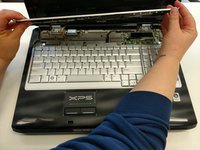
    1. Dell XPS M1730 Keyboard Replacement, Keyboard: crwdns2935265:04crwdnd2935265:01crwdnd2935265:03crwdne2935265:0 Dell XPS M1730 Keyboard Replacement, Keyboard: crwdns2935265:04crwdnd2935265:02crwdnd2935265:03crwdne2935265:0 Dell XPS M1730 Keyboard Replacement, Keyboard: crwdns2935265:04crwdnd2935265:03crwdnd2935265:03crwdne2935265:0
      • Remove the plastic trim at the base of the screen screen. Start from the tab on the right side and work to the left side.

      crwdns2952109:0crwdne2952109:0

      crwdns2917038:0crwdne2917038:0

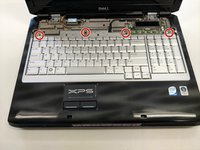
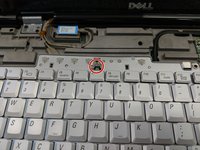
    2. Dell XPS M1730 Keyboard Replacement: crwdns2935265:05crwdnd2935265:01crwdnd2935265:02crwdne2935265:0 Dell XPS M1730 Keyboard Replacement: crwdns2935265:05crwdnd2935265:02crwdnd2935265:02crwdne2935265:0
      • Remove the four screws from the top of the keyboard bracket.

      crwdns2952109:0crwdne2952109:0

      crwdns2917038:0crwdne2917038:0

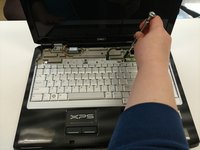
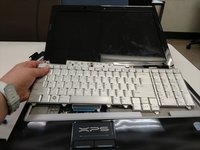
    3. Dell XPS M1730 Keyboard Replacement: crwdns2935265:06crwdnd2935265:01crwdnd2935265:03crwdne2935265:0 Dell XPS M1730 Keyboard Replacement: crwdns2935265:06crwdnd2935265:02crwdnd2935265:03crwdne2935265:0 Dell XPS M1730 Keyboard Replacement: crwdns2935265:06crwdnd2935265:03crwdnd2935265:03crwdne2935265:0
      • Remove the keyboard by sliding it forward, off of the clips, and then lifting up.

      crwdns2952109:0crwdne2952109:0

      crwdns2917038:0crwdne2917038:0

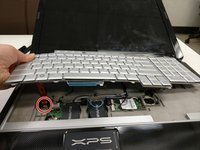
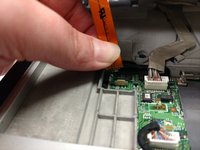
    4. Dell XPS M1730 Keyboard Replacement: crwdns2935265:07crwdnd2935265:01crwdnd2935265:03crwdne2935265:0 Dell XPS M1730 Keyboard Replacement: crwdns2935265:07crwdnd2935265:02crwdnd2935265:03crwdne2935265:0 Dell XPS M1730 Keyboard Replacement: crwdns2935265:07crwdnd2935265:03crwdnd2935265:03crwdne2935265:0
      • Lift the keyboard about 2 inches up from the laptop platform.

      • From this angle the keyboard ribbon connector can be seen and disconnected.

      crwdns2952109:0crwdne2952109:0

      crwdns2917038:0crwdne2917038:0

crwdns2915888:0crwdne2915888:0

To reassemble your device, follow these instructions in reverse order.

crwdns2935221:0crwdne2935221:0

Nikki Meyer

crwdns2935283:002/08/18crwdne2935283:0

113 crwdns2915208:0crwdne2915208:0

crwdns2935295:0crwdne2935295:0

crwdns2935287:0crwdne2935287:0

University of North Texas, Team S2-G6, Thomas Spring 2018 crwdns2935289:0University of North Texas, Team S2-G6, Thomas Spring 2018crwdne2935289:0

UNT-THOMAS-S18S2G6

crwdns2931471:05crwdne2931471:0

crwdns2935297:060crwdne2935297:0

crwdns2947412:00crwdne2947412:0

crwdns2917038:0crwdne2917038:0

crwdns2936625:0crwdne2936625:0:

crwdns2936751:024crwdne2936751:0 0

crwdns2936753:07crwdne2936753:0 3

crwdns2936753:030crwdne2936753:0 26

crwdns2942667:0crwdne2942667:0 1,185