crwdns2933423:0crwdne2933423:0
crwdns2947577:0crwdnd2947577:0crwdne2947577:0

Dell Precision M4700 Memory Module Replacement

crwdns2942213:0crwdne2942213:0

  1. Dell Precision M4700 Memory Module Replacement, Battery: crwdns2935265:01crwdnd2935265:01crwdnd2935265:02crwdne2935265:0 Dell Precision M4700 Memory Module Replacement, Battery: crwdns2935265:01crwdnd2935265:02crwdnd2935265:02crwdne2935265:0
    • Slide the release latch to unlock the battery.

    • Flip and remove the battery from the computer.

    crwdns2952109:0crwdne2952109:0

    crwdns2917038:0crwdne2917038:0

  2. Dell Precision M4700 Memory Module Replacement, Base Cover: crwdns2935265:02crwdnd2935265:01crwdnd2935265:02crwdne2935265:0 Dell Precision M4700 Memory Module Replacement, Base Cover: crwdns2935265:02crwdnd2935265:02crwdnd2935265:02crwdne2935265:0
    • Remove the screws that secure the base cover to the computer. Press the rubber tabs towards the rear of the computer to disengage the base cover.

    • Flip and remove the base cover from the computer.

    crwdns2952109:0crwdne2952109:0

    crwdns2917038:0crwdne2917038:0

  3. Dell Precision M4700 Memory Module Replacement, Keyboard Trim: crwdns2935265:03crwdnd2935265:01crwdnd2935265:02crwdne2935265:0 Dell Precision M4700 Memory Module Replacement, Keyboard Trim: crwdns2935265:03crwdnd2935265:02crwdnd2935265:02crwdne2935265:0
    • Pry up the keyboard trim starting from the top-inner edge.

    • Pry up the bottom edge of the keyboard trim from the top-inner edge.

    crwdns2952109:0crwdne2952109:0

    crwdns2917038:0crwdne2917038:0

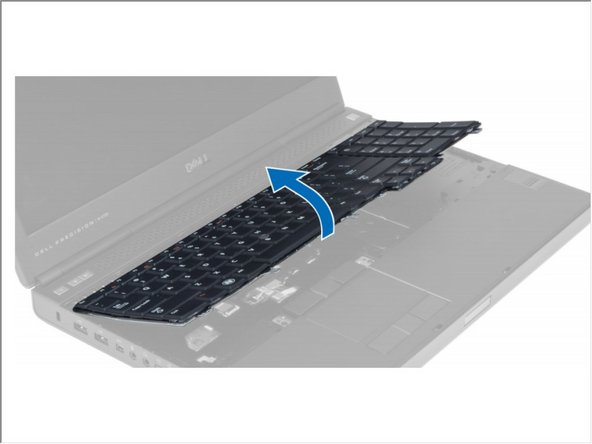
  4. Dell Precision M4700 Memory Module Replacement, Keyboard: crwdns2935265:04crwdnd2935265:01crwdnd2935265:03crwdne2935265:0 Dell Precision M4700 Memory Module Replacement, Keyboard: crwdns2935265:04crwdnd2935265:02crwdnd2935265:03crwdne2935265:0 Dell Precision M4700 Memory Module Replacement, Keyboard: crwdns2935265:04crwdnd2935265:03crwdnd2935265:03crwdne2935265:0
    • Remove the screws that secure the keyboard to the computer.

    • Starting from the bottom of the keyboard, separate the keyboard from the computer and flip the keyboard over.

    • Disconnect the keyboard-data cable from the system board and remove the keyboard.

    crwdns2952109:0crwdne2952109:0

    crwdns2917038:0crwdne2917038:0

  5. Dell Precision M4700 Memory Module Replacement, Memory Module: crwdns2935265:05crwdnd2935265:01crwdnd2935265:01crwdne2935265:0
    • Flip Computer To its Back.

    • Pry the retention clips away from the memory module until it pops up. Lift up the memory module and remove it from the computer.

    crwdns2952109:0crwdne2952109:0

    crwdns2917038:0crwdne2917038:0

  6. Dell Precision M4700 Memory Module Replacement: crwdns2935265:06crwdnd2935265:01crwdnd2935265:01crwdne2935265:0
    • Flip the Computer To its Top.

    • Pry the retention clips away from the memory module until it pops up. Lift up the memory module and remove it from the computer.

    crwdns2952109:0crwdne2952109:0

    crwdns2917038:0crwdne2917038:0

crwdns2915888:0crwdne2915888:0

To reassemble your device, follow these instructions in reverse order.

crwdns2935221:0crwdne2935221:0

Johnathan Hammond

crwdns2935283:002/28/18crwdne2935283:0

46.149 crwdns2915208:0crwdne2915208:0

crwdns2935297:0408crwdne2935297:0

crwdns2935287:0crwdne2935287:0

RampUP America, Inc. crwdns2935289:0RampUP America, Inc.crwdne2935289:0

Community

crwdns2931471:045crwdne2931471:0

crwdns2935297:02.003crwdne2935297:0

crwdns2947412:00crwdne2947412:0

crwdns2917038:0crwdne2917038:0

crwdns2936625:0crwdne2936625:0:

crwdns2936751:024crwdne2936751:0 0

crwdns2936753:07crwdne2936753:0 4

crwdns2936753:030crwdne2936753:0 18

crwdns2942667:0crwdne2942667:0 1,348