crwdns2933423:0crwdne2933423:0
crwdns2947577:0crwdnd2947577:0crwdne2947577:0

Dell Precision M4600 Memory Module Replacement

crwdns2942213:0crwdne2942213:0

    1. Dell Precision M4600 Memory Module Replacement, Battery: crwdns2935265:01crwdnd2935265:01crwdnd2935265:02crwdne2935265:0 Dell Precision M4600 Memory Module Replacement, Battery: crwdns2935265:01crwdnd2935265:02crwdnd2935265:02crwdne2935265:0
      • Slide the battery release latch into the unlock position.

      • Remove the battery from the system.

      crwdns2952109:0crwdne2952109:0

      crwdns2917038:0crwdne2917038:0

    1. Dell Precision M4600 Memory Module Replacement, Base Cover: crwdns2935265:02crwdnd2935265:01crwdnd2935265:03crwdne2935265:0 Dell Precision M4600 Memory Module Replacement, Base Cover: crwdns2935265:02crwdnd2935265:02crwdnd2935265:03crwdne2935265:0 Dell Precision M4600 Memory Module Replacement, Base Cover: crwdns2935265:02crwdnd2935265:03crwdnd2935265:03crwdne2935265:0
      • Remove the screws that secure the base cover to the computer.

      • Press the rubber feet towards the rear of the system to disengage the bottom door.

      • Remove the base cover from the computer.

      crwdns2952109:0crwdne2952109:0

      crwdns2917038:0crwdne2917038:0

    1. Dell Precision M4600 Memory Module Replacement, Keyboard Trim: crwdns2935265:03crwdnd2935265:01crwdnd2935265:03crwdne2935265:0 Dell Precision M4600 Memory Module Replacement, Keyboard Trim: crwdns2935265:03crwdnd2935265:02crwdnd2935265:03crwdne2935265:0 Dell Precision M4600 Memory Module Replacement, Keyboard Trim: crwdns2935265:03crwdnd2935265:03crwdnd2935265:03crwdne2935265:0
      • Using a plastic scribe, pry under the keyboard trim to release it from the computer.

      • Work your way around the sides and bottom edge of the keyboard trim.

      • Lift up to remove the keyboard trim from the unit.

      crwdns2952109:0crwdne2952109:0

      crwdns2917038:0crwdne2917038:0

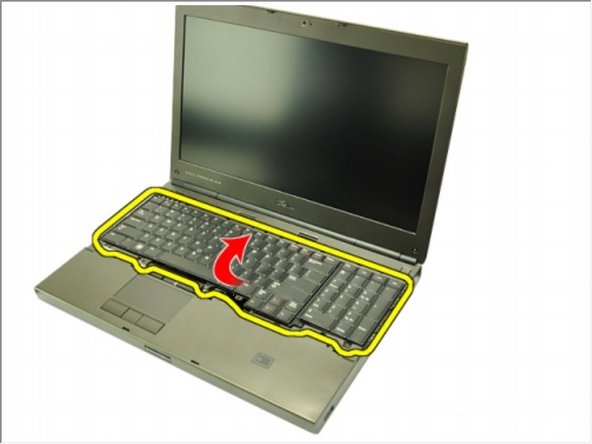
    1. Dell Precision M4600 Memory Module Replacement, KeyBoard: crwdns2935265:04crwdnd2935265:01crwdnd2935265:03crwdne2935265:0 Dell Precision M4600 Memory Module Replacement, KeyBoard: crwdns2935265:04crwdnd2935265:02crwdnd2935265:03crwdne2935265:0 Dell Precision M4600 Memory Module Replacement, KeyBoard: crwdns2935265:04crwdnd2935265:03crwdnd2935265:03crwdne2935265:0
      • Remove the screws securing the keyboard in place.

      • Starting from the bottom of the keyboard, separate the keyboard from the system and turn the keyboard over.

      • Disconnect the keyboard data cable from the system board.

      crwdns2952109:0crwdne2952109:0

      crwdns2917038:0crwdne2917038:0

    2. Dell Precision M4600 Memory Module Replacement: crwdns2935265:05crwdnd2935265:01crwdnd2935265:03crwdne2935265:0 Dell Precision M4600 Memory Module Replacement: crwdns2935265:05crwdnd2935265:02crwdnd2935265:03crwdne2935265:0 Dell Precision M4600 Memory Module Replacement: crwdns2935265:05crwdnd2935265:03crwdnd2935265:03crwdne2935265:0
      • Remove the keyboard.

      • Peel back the adhesive tape securing the keyboard data cable to the back of the keyboard.

      • Disconnect the keyboard data cable from the back of the keyboard.

      crwdns2952109:0crwdne2952109:0

      crwdns2917038:0crwdne2917038:0

    3. Dell Precision M4600 Memory Module Replacement: crwdns2935265:06crwdnd2935265:01crwdnd2935265:01crwdne2935265:0
      • Peel the keyboard data cable away from the keyboard and remove.

      crwdns2952109:0crwdne2952109:0

      crwdns2917038:0crwdne2917038:0

    1. Dell Precision M4600 Memory Module Replacement, Memory Module: crwdns2935265:07crwdnd2935265:01crwdnd2935265:02crwdne2935265:0 Dell Precision M4600 Memory Module Replacement, Memory Module: crwdns2935265:07crwdnd2935265:02crwdnd2935265:02crwdne2935265:0
      • Flip the the Bottom

      • Gently pry the retention clips away from the memory modules.

      • Remove the memory modules from the computer.

      crwdns2952109:0crwdne2952109:0

      crwdns2917038:0crwdne2917038:0

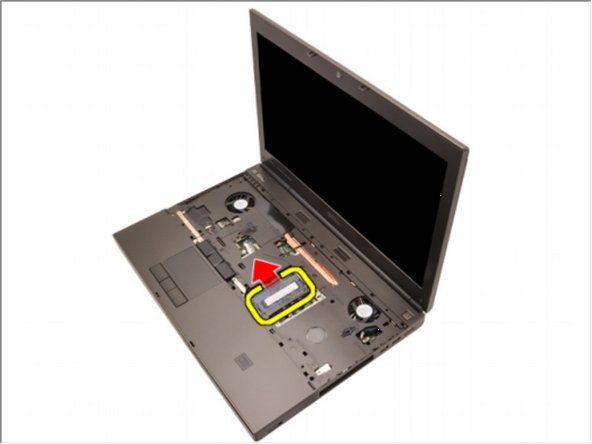
    2. Dell Precision M4600 Memory Module Replacement: crwdns2935265:08crwdnd2935265:01crwdnd2935265:02crwdne2935265:0 Dell Precision M4600 Memory Module Replacement: crwdns2935265:08crwdnd2935265:02crwdnd2935265:02crwdne2935265:0
      • Flip to the Top.

      • Gently pry the retention clips away from the memory module.

      • Remove the memory module from the computer.

      crwdns2952109:0crwdne2952109:0

      crwdns2917038:0crwdne2917038:0

crwdns2915888:0crwdne2915888:0

To reassemble your device, follow these instructions in reverse order.

crwdns2935221:0crwdne2935221:0

Johnathan Hammond

crwdns2935283:002/28/18crwdne2935283:0

46,185 crwdns2915208:0crwdne2915208:0

crwdns2935297:0408crwdne2935297:0

crwdns2935287:0crwdne2935287:0

RampUP America, Inc. crwdns2935289:0RampUP America, Inc.crwdne2935289:0

Community

crwdns2931471:045crwdne2931471:0

crwdns2935297:012,235crwdne2935297:0

crwdns2947412:00crwdne2947412:0

crwdns2917038:0crwdne2917038:0

crwdns2936625:0crwdne2936625:0:

crwdns2936751:024crwdne2936751:0 0

crwdns2936753:07crwdne2936753:0 7

crwdns2936753:030crwdne2936753:0 39

crwdns2942667:0crwdne2942667:0 1,720