crwdns2933423:0crwdne2933423:0
crwdns2947577:0crwdnd2947577:0crwdne2947577:0

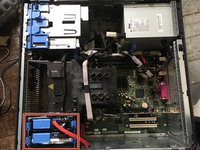
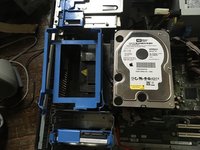
Dell Optiplex GX620 Hard Drive

crwdns2942213:0crwdne2942213:0

  1. Dell Optiplex GX620 Hard Drive, How to unplug and discharge before repair: crwdns2935265:01crwdnd2935265:01crwdnd2935265:02crwdne2935265:0 Dell Optiplex GX620 Hard Drive, How to unplug and discharge before repair: crwdns2935265:01crwdnd2935265:02crwdnd2935265:02crwdne2935265:0
    • Power down your PC and remove the power cord from the back.

    crwdns2952109:0crwdne2952109:0

    crwdns2917038:0crwdne2917038:0

  2. Dell Optiplex GX620 Hard Drive: crwdns2935265:02crwdnd2935265:01crwdnd2935265:02crwdne2935265:0 Dell Optiplex GX620 Hard Drive: crwdns2935265:02crwdnd2935265:02crwdnd2935265:02crwdne2935265:0
    • Press and hold the power button for about 10 seconds, then release.

    • This helps drain any remaining power stored in the capacitors, so that you can safely work on the internal components.

    crwdns2952109:0crwdne2952109:0

    crwdns2917038:0crwdne2917038:0

  3. Dell Optiplex GX620 Hard Drive, Dell Optiplex GX620 Side Panel Disassembly: crwdns2935265:03crwdnd2935265:01crwdnd2935265:01crwdne2935265:0
    • With the computer standing upright, firmly pull on the tab at the back of the computer.

    • When the side panel pops free, gently pull the panel away from the computer.

    • If you have trouble freeing the side panel from the case, you may need to pull the tab a bit harder.

    crwdns2952109:0crwdne2952109:0

    crwdns2917038:0crwdne2917038:0

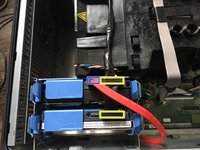
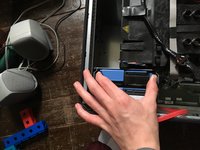
  4. Dell Optiplex GX620 Hard Drive, Disconnect hard drive.: crwdns2935265:04crwdnd2935265:01crwdnd2935265:03crwdne2935265:0 Dell Optiplex GX620 Hard Drive, Disconnect hard drive.: crwdns2935265:04crwdnd2935265:02crwdnd2935265:03crwdne2935265:0 Dell Optiplex GX620 Hard Drive, Disconnect hard drive.: crwdns2935265:04crwdnd2935265:03crwdnd2935265:03crwdne2935265:0
    • Remove the power and SATA data cables.

    • SATA power

    • SATA data

    crwdns2952109:0crwdne2952109:0

    crwdns2917038:0crwdne2917038:0

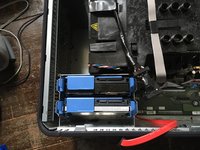
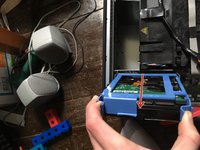
  5. Dell Optiplex GX620 Hard Drive, Take hard drive out of the slot.: crwdns2935265:05crwdnd2935265:01crwdnd2935265:03crwdne2935265:0 Dell Optiplex GX620 Hard Drive, Take hard drive out of the slot.: crwdns2935265:05crwdnd2935265:02crwdnd2935265:03crwdne2935265:0 Dell Optiplex GX620 Hard Drive, Take hard drive out of the slot.: crwdns2935265:05crwdnd2935265:03crwdnd2935265:03crwdne2935265:0
    • Pull the two tabs on the hard drive and pull up

    crwdns2952109:0crwdne2952109:0

    crwdns2917038:0crwdne2917038:0

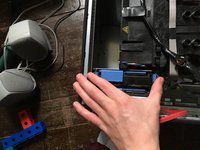
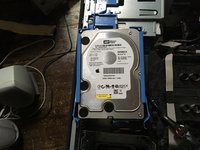
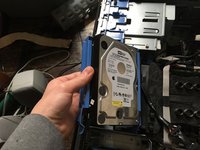
  6. Dell Optiplex GX620 Hard Drive, Remove hard drive from slot enclosure.: crwdns2935265:06crwdnd2935265:01crwdnd2935265:03crwdne2935265:0 Dell Optiplex GX620 Hard Drive, Remove hard drive from slot enclosure.: crwdns2935265:06crwdnd2935265:02crwdnd2935265:03crwdne2935265:0 Dell Optiplex GX620 Hard Drive, Remove hard drive from slot enclosure.: crwdns2935265:06crwdnd2935265:03crwdnd2935265:03crwdne2935265:0
    • Now take the tray off of the hard drive.

    crwdns2952109:0crwdne2952109:0

    crwdns2917038:0crwdne2917038:0

crwdns2915888:0crwdne2915888:0

To reassemble your device, follow these instructions in reverse order.

crwdns2935221:0crwdne2935221:0

crwdns2935229:02crwdne2935229:0

Padraic Hoselton

crwdns2935283:008/22/17crwdne2935283:0

4,420 crwdns2915208:0crwdne2915208:0

crwdns2935297:012crwdne2935297:0

crwdns2947412:00crwdne2947412:0

crwdns2917038:0crwdne2917038:0

crwdns2936625:0crwdne2936625:0:

crwdns2936751:024crwdne2936751:0 0

crwdns2936753:07crwdne2936753:0 27

crwdns2936753:030crwdne2936753:0 73

crwdns2942667:0crwdne2942667:0 2,978