crwdns2933423:0crwdne2933423:0
crwdns2947577:0crwdnd2947577:0crwdne2947577:0

Dell Latitude D620 Display Replacement

crwdns2942213:0crwdne2942213:0

    1. Dell Latitude D620 Display Replacement, Keyboard: crwdns2935265:01crwdnd2935265:01crwdnd2935265:01crwdne2935265:0
      • Power down the laptop and remove the battery.

      • Open the laptop cover all of the way.

      crwdns2952109:0crwdne2952109:0

      crwdns2917038:0crwdne2917038:0

    2. Dell Latitude D620 Display Replacement: crwdns2935265:02crwdnd2935265:01crwdnd2935265:03crwdne2935265:0 Dell Latitude D620 Display Replacement: crwdns2935265:02crwdnd2935265:02crwdnd2935265:03crwdne2935265:0 Dell Latitude D620 Display Replacement: crwdns2935265:02crwdnd2935265:03crwdnd2935265:03crwdne2935265:0
      • Locate the notch under the cover at the top of the keyboard

      • Using the spudger as a lever, lift the plastic covering

      • Carefully remove the rest of the covering from right to left

      crwdns2952109:0crwdne2952109:0

      crwdns2917038:0crwdne2917038:0

    3. Dell Latitude D620 Display Replacement: crwdns2935265:03crwdnd2935265:01crwdnd2935265:01crwdne2935265:0
      • Unscrew the top portion of the keyboard using a #00 screwdriver

      crwdns2952109:0crwdne2952109:0

      crwdns2917038:0crwdne2917038:0

    4. Dell Latitude D620 Display Replacement: crwdns2935265:04crwdnd2935265:01crwdnd2935265:01crwdne2935265:0
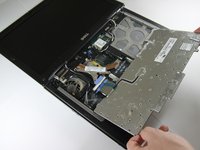
      • Hold keyboard from the top and gently pull towards the LCD screen to remove the keyboard from the case

      • Don't pull on the keyboard too forcefully because it is attached to the motherboard with a short, thin ribbon cable

      crwdns2952109:0crwdne2952109:0

      crwdns2917038:0crwdne2917038:0

    5. Dell Latitude D620 Display Replacement: crwdns2935265:05crwdnd2935265:01crwdnd2935265:02crwdne2935265:0 Dell Latitude D620 Display Replacement: crwdns2935265:05crwdnd2935265:02crwdnd2935265:02crwdne2935265:0
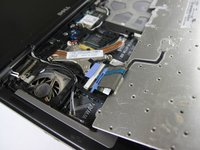
      • Once keyboard is out of the case, lay it face-down on the track pad

      crwdns2952109:0crwdne2952109:0

      crwdns2917038:0crwdne2917038:0

    6. Dell Latitude D620 Display Replacement: crwdns2935265:06crwdnd2935265:01crwdnd2935265:02crwdne2935265:0 Dell Latitude D620 Display Replacement: crwdns2935265:06crwdnd2935265:02crwdnd2935265:02crwdne2935265:0
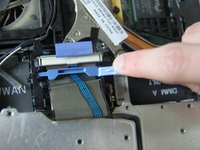
      • Using a small spudger, pull back on the black bar to release the blue lever

      crwdns2952109:0crwdne2952109:0

      crwdns2917038:0crwdne2917038:0

    7. Dell Latitude D620 Display Replacement: crwdns2935265:07crwdnd2935265:01crwdnd2935265:01crwdne2935265:0
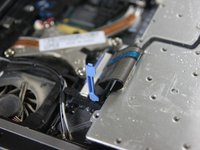
      • Pull up on the metal bar connected to the socket to detach the ribbon cable

      crwdns2952109:0crwdne2952109:0

      crwdns2917038:0crwdne2917038:0

    1. Dell Latitude D620 Display Replacement, Display: crwdns2935265:08crwdnd2935265:01crwdnd2935265:01crwdne2935265:0
      • Detach cables that connect the display to the body of the laptop

      crwdns2952109:0crwdne2952109:0

      crwdns2917038:0crwdne2917038:0

    2. Dell Latitude D620 Display Replacement: crwdns2935265:09crwdnd2935265:01crwdnd2935265:01crwdne2935265:0
      • Disconnect the black cable attached to the motherboard

      crwdns2952109:0crwdne2952109:0

      crwdns2917038:0crwdne2917038:0

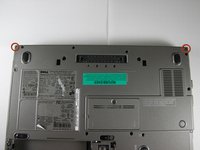
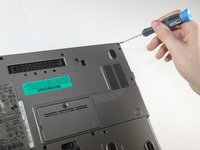
    3. Dell Latitude D620 Display Replacement: crwdns2935265:010crwdnd2935265:01crwdnd2935265:02crwdne2935265:0 Dell Latitude D620 Display Replacement: crwdns2935265:010crwdnd2935265:02crwdnd2935265:02crwdne2935265:0
      • Close the laptop lid

      • Turn the laptop over onto its backside

      • Unscrew the two screws shown in the picture using a #00 screwdriver

      crwdns2952109:0crwdne2952109:0

      crwdns2917038:0crwdne2917038:0

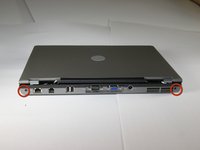
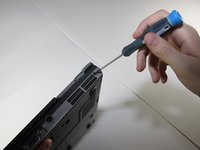
    4. Dell Latitude D620 Display Replacement: crwdns2935265:011crwdnd2935265:01crwdnd2935265:02crwdne2935265:0 Dell Latitude D620 Display Replacement: crwdns2935265:011crwdnd2935265:02crwdnd2935265:02crwdne2935265:0
      • Face the laptop's back ports towards you

      • Unscrew the two screws labeled in the picture using a #00 screwdriver

      crwdns2952109:0crwdne2952109:0

      crwdns2917038:0crwdne2917038:0

    5. Dell Latitude D620 Display Replacement: crwdns2935265:012crwdnd2935265:01crwdnd2935265:01crwdne2935265:0
      • Turn the laptop over again so it's right-side up

      • Open the display, and pull the display up and out of the laptop's body

      crwdns2952109:0crwdne2952109:0

      crwdns2917038:0crwdne2917038:0

    6. Dell Latitude D620 Display Replacement: crwdns2935265:013crwdnd2935265:01crwdnd2935265:01crwdne2935265:0
      • Remove the circular rubber pads as outlined in the picture using a spudger

      crwdns2952109:0crwdne2952109:0

      crwdns2917038:0crwdne2917038:0

    7. Dell Latitude D620 Display Replacement: crwdns2935265:014crwdnd2935265:01crwdnd2935265:01crwdne2935265:0
      • Unscrew the screws that were under the rubber circles using the #00 screwdriver

      crwdns2952109:0crwdne2952109:0

      crwdns2917038:0crwdne2917038:0

    8. Dell Latitude D620 Display Replacement: crwdns2935265:015crwdnd2935265:01crwdnd2935265:01crwdne2935265:0
      • Carefully use a spudger to work around the edge of the screen to lift off the plastic cover

      • Be very careful while doing this as the plastic snaps easily

      crwdns2952109:0crwdne2952109:0

      crwdns2917038:0crwdne2917038:0

    9. Dell Latitude D620 Display Replacement: crwdns2935265:016crwdnd2935265:01crwdnd2935265:01crwdne2935265:0
      • Remove the screws outlined in the picture

      crwdns2952109:0crwdne2952109:0

      crwdns2917038:0crwdne2917038:0

    10. Dell Latitude D620 Display Replacement: crwdns2935265:017crwdnd2935265:01crwdnd2935265:01crwdne2935265:0
      • Carefully lift the LCD screen out of its casing

      crwdns2952109:0crwdne2952109:0

      crwdns2917038:0crwdne2917038:0

crwdns2915888:0crwdne2915888:0

To reassemble your device, follow these instructions in reverse order.

crwdns2935221:0crwdne2935221:0

crwdns2935229:019crwdne2935229:0

Miguel Wong

crwdns2935283:004/15/10crwdne2935283:0

565 crwdns2915208:0crwdne2915208:0

crwdns2935297:03crwdne2935297:0

crwdns2935287:0crwdne2935287:0

Cal Poly, Team 24-35, Regan Spring 2010 crwdns2935289:0Cal Poly, Team 24-35, Regan Spring 2010crwdne2935289:0

CPSU-REGAN-S10S24G35

crwdns2931471:04crwdne2931471:0

crwdns2935297:048crwdne2935297:0

crwdns2947410:01crwdne2947410:0

Check out this replacement screen at a great price on bcdelectrostore.com

http://www.bcdelectrostore.com/magento/l...

bob harris - crwdns2934203:0crwdne2934203:0 crwdns2950251:0crwdne2950251:0

crwdns2917038:0crwdne2917038:0

crwdns2936625:0crwdne2936625:0:

crwdns2936751:024crwdne2936751:0 7

crwdns2936753:07crwdne2936753:0 22

crwdns2936753:030crwdne2936753:0 81

crwdns2942667:0crwdne2942667:0 34,081