crwdns2933423:0crwdne2933423:0
crwdns2947577:0crwdnd2947577:0crwdne2947577:0

Dell Latitude 5500 Fan Replacement

crwdns2942213:0crwdne2942213:0

  1. Dell Latitude 5500 Fan Replacement, Battery: crwdns2935265:01crwdnd2935265:01crwdnd2935265:02crwdne2935265:0 Dell Latitude 5500 Fan Replacement, Battery: crwdns2935265:01crwdnd2935265:02crwdnd2935265:02crwdne2935265:0
    • Caution: Ensure that the battery is fully drained before disassembly. Piercing a charged battery may result in a spark or a shock.

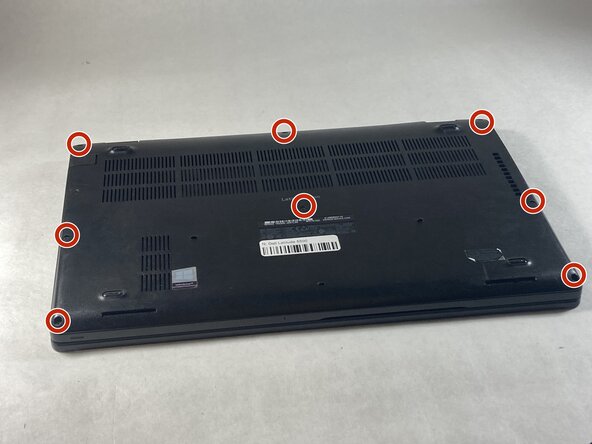
    • Use a Phillips #0 screwdriver to loosen the eight captive screws on the back panel.

    crwdns2952109:0crwdne2952109:0
  2. Dell Latitude 5500 Fan Replacement: crwdns2935265:02crwdnd2935265:01crwdnd2935265:02crwdne2935265:0 Dell Latitude 5500 Fan Replacement: crwdns2935265:02crwdnd2935265:02crwdnd2935265:02crwdne2935265:0
    • Using an opening tool, pry off the back panel.

    crwdns2952109:0crwdne2952109:0
  3. Dell Latitude 5500 Fan Replacement: crwdns2935265:03crwdnd2935265:01crwdnd2935265:01crwdne2935265:0
    • For clarity, ensure your device is rotated the same way as in the picture to the left.

    • Use a Phillips #0 screwdriver to remove the single 6 mm screw on the right side of the battery.

    crwdns2952109:0crwdne2952109:0
  4. Dell Latitude 5500 Fan Replacement: crwdns2935265:04crwdnd2935265:01crwdnd2935265:02crwdne2935265:0 Dell Latitude 5500 Fan Replacement: crwdns2935265:04crwdnd2935265:02crwdnd2935265:02crwdne2935265:0
    • Using hands or plastic prying tools, remove the flat-topped (low-profile) connector at the top of the battery.

    • Remove the battery.

    crwdns2952109:0crwdne2952109:0
  5. Dell Latitude 5500 Fan Replacement, Fan: crwdns2935265:05crwdnd2935265:01crwdnd2935265:01crwdne2935265:0
    • Remove the two 5 mm screws on the fan using a Phillips #0 screwdriver.

    crwdns2952109:0crwdne2952109:0
  6. Dell Latitude 5500 Fan Replacement: crwdns2935265:06crwdnd2935265:01crwdnd2935265:01crwdne2935265:0
    • Unplug the wire connecting the fan to the motherboard by pulling to the side.

    crwdns2952109:0crwdne2952109:0
  7. Dell Latitude 5500 Fan Replacement: crwdns2935265:07crwdnd2935265:01crwdnd2935265:02crwdne2935265:0 Dell Latitude 5500 Fan Replacement: crwdns2935265:07crwdnd2935265:02crwdnd2935265:02crwdne2935265:0
    • Remove the fan from the laptop by pulling straight up.

    crwdns2952109:0crwdne2952109:0
crwdns2915888:0crwdne2915888:0

To reassemble your device, follow these instructions in reverse order.

Mark L

crwdns2935283:003/09/26crwdne2935283:0

181 crwdns2915208:0crwdne2915208:0

crwdns2935297:02crwdne2935297:0

crwdns2935287:0crwdne2935287:0

UMass Dartmouth, Team 6-6, Botvin Spring 2026 crwdns2935289:0UMass Dartmouth, Team 6-6, Botvin Spring 2026crwdne2935289:0

UMASSD-BOTVIN-S26S6G6

crwdns2931471:03crwdne2931471:0

crwdns2935297:06crwdne2935297:0

crwdns2947412:00crwdne2947412:0

crwdns2917038:0crwdne2917038:0

crwdns2936625:0crwdne2936625:0:

crwdns2936751:024crwdne2936751:0 2

crwdns2936753:07crwdne2936753:0 2

crwdns2936753:030crwdne2936753:0 24

crwdns2942667:0crwdne2942667:0 31