Dell Latitude 3450 RAM Replacement

crwdns2959934:0crwdnd2959934:0Mattcrwdnd2959934:0crwdnd2959934:0crwdne2959934:0
crwdns2959936:0Mha 15, 2019crwdne2959936:0
crwdns2869540:0crwdne2869540:0: 4.2K
crwdns2959988:0crwdne2959988:0
- crwdns2959990:0crwdne2959990:0
- 2
- crwdns2959992:0crwdne2959992:0
- 18
- crwdns2959994:0crwdne2959994:0
- 95
- crwdns2959996:0crwdne2959996:0
- 4,203
crwdns2955950:0crwdne2955950:0: 0
crwdns2959998:0crwdne2959998:0
crwdns2960000:0crwdne2960000:0crwdns2959984:0crwdne2959984:0: 2 3
crwdns2959974:02crwdne2959974:0
crwdns2959970:03crwdne2959970:0
crwdns2959986:0crwdne2959986:0: 0 1
crwdns2959958:0crwdne2959958:0
crwdns2959976:01crwdne2959976:0
crwdns2944444:0crwdne2944444:0
crwdns2944446:0crwdne2944446:0
crwdns2959930:0crwdne2959930:0
crwdns2943213:0crwdne2943213:0
-
×2RAM (DDR3)
This laptop supports up to 8GB per RAM slot, with 2 RAM slots
crwdns2943215:0crwdne2943215:0
-
Spudger4.9


crwdns2936621:0crwdne2936621:0
-
-
-
Ensure the laptop is powered off .
-
Flip the laptop over.
 crwdns2952109:0crwdne2952109:0
-
-
-
Loosen the two Phillips head screws.
-
These screws should back out, but should not actually be removable.
-
Locate the indent on the rear cover half way between the two Phillips head screws.
-
Insert your spudger to help pry up the rear cover.
-
It may be necessary to run the spudger along the side with the indent to help release the clips
-
Lift off the rear cover.
-
-
-
-
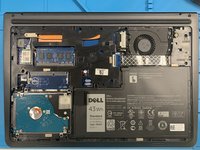
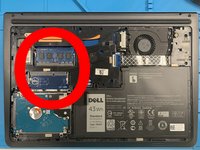
The RAM slots are in line with the hard drive, and on the right side if the cover was opened away from you.
-
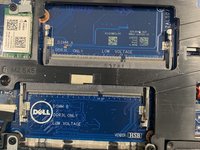
Please note that there are A and B RAM Slots. There must be a RAM chip in the A Slot, or the laptop will not load normally.
-
The Slots are labeled on the board, under where the chips would normally be seated.
-
-
-
Ensure that the space in the RAM chip lines up with alignment pin on the slot.
-
Insert the RAM chip at approximately at 45° angle.
-
Once the chip bottoms out on the slot, push down on the opposite side from the pins until the RAM chip seats on the board.
-
-
-
Depending on your machines current configuration, you may need to remove a RAM chip before you can insert your new ones.
-
Using your finger nail or a spudger, push the lock clips off the RAM chip.
-
Normally the clips can be done one at a time, but may require you to release both at once.
-
Once released, the chip should spring up and can be removed.
-
-


To reassemble your device, follow these instructions in reverse order.
crwdns2935221:0crwdne2935221:0
crwdns2935229:02crwdne2935229:0