
Dell Inspiron 9100 Memory Replacement

crwdns2959932:0crwdnd2959932:0charlierefvemcrwdnd2959932:0crwdnd2959932:0crwdnd2959932:08crwdnd2959932:0crwdne2959932:0
crwdns2959936:0Nhl 16, 2015crwdne2959936:0
crwdns2869540:0crwdne2869540:0: 4141
crwdns2959988:0crwdne2959988:0
- crwdns2959990:0crwdne2959990:0
- 2
- crwdns2959992:0crwdne2959992:0
- 27
- crwdns2959994:0crwdne2959994:0
- 100
- crwdns2959996:0crwdne2959996:0
- 4,141
crwdns2955950:0crwdne2955950:0: 0
crwdns2959998:0crwdne2959998:0
crwdns2960000:0crwdne2960000:0crwdns2959984:0crwdne2959984:0: 0 1
crwdns2959956:0crwdne2959956:0
crwdns2959968:01crwdne2959968:0
crwdns2959986:0crwdne2959986:0: 3 4
crwdns2959982:03crwdne2959982:0
crwdns2959978:04crwdne2959978:0
crwdns2862629:0crwdne2862629:0
crwdns2862630:0crwdne2862630:0
crwdns2915892:0crwdne2915892:0
crwdns2959928:0crwdne2959928:0 ↓This guide will help you replace the RAM (memory module) on your Dell Inspiron 9100. It is useful to replace the RAM if your computer runs slower than normal or if your programs constantly freeze.
This guide requires a Phillips #00 screwdriver.
crwdns2959930:0crwdne2959930:0
crwdns2943215:0crwdne2943215:0

-
-
-
Unplug the laptop from the power adapter and turn the power off.
 crwdns2952109:0crwdne2952109:0
-
-
-
Slide the battery-lock tab and hold.
-
Flip the battery away from the chassis to remove it.
-
-
-
-
-
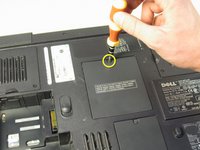
Using the Philips #00 screwdriver, undo the screw on the memory module cover, labeled "M."
-
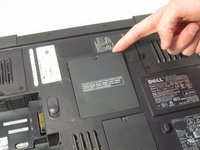
Pull the cover away from the laptop using your finger.
-
-
-
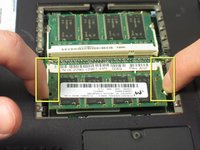
Use your fingertips to carefully spread apart the plastic white tabs.
-
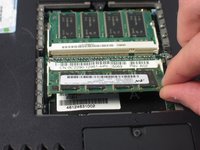
Flip the RAM up at a 45 degree angle and remove it.
-
-
-
-
Repeat step four with the second RAM.
-
-




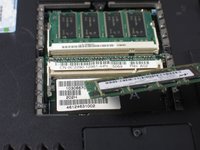

To reassemble your device, follow these instructions in reverse order.

crwdns2935287:0crwdne2935287:0

Cal Poly, Team 13-2, Forte Winter 2011 crwdns2935289:0Cal Poly, Team 13-2, Forte Winter 2011crwdne2935289:0
CPSU-FORTE-W11S13G2
crwdns2931471:05crwdne2931471:0
crwdns2935297:096crwdne2935297:0
