crwdns2933423:0crwdne2933423:0
crwdns2947577:0crwdnd2947577:0crwdne2947577:0

Dell Inspiron 1525 RAM Replacement

crwdns2942213:0crwdne2942213:0

    1. Dell Inspiron 1525 RAM Replacement, Battery: crwdns2935265:01crwdnd2935265:01crwdnd2935265:01crwdne2935265:0
      • Locate the battery release switch on the bottom of the laptop.

      crwdns2952109:0crwdne2952109:0

      crwdns2917038:0crwdne2917038:0

    2. Dell Inspiron 1525 RAM Replacement: crwdns2935265:02crwdnd2935265:01crwdnd2935265:02crwdne2935265:0 Dell Inspiron 1525 RAM Replacement: crwdns2935265:02crwdnd2935265:02crwdnd2935265:02crwdne2935265:0
      • Slide the battery release switch away from the lock symbol until you hear the battery click.

      • Slide the battery towards the back of the laptop until it comes free.

      crwdns2952109:0crwdne2952109:0

      crwdns2917038:0crwdne2917038:0

    1. Dell Inspiron 1525 RAM Replacement, Bottom Cover: crwdns2935265:03crwdnd2935265:01crwdnd2935265:02crwdne2935265:0 Dell Inspiron 1525 RAM Replacement, Bottom Cover: crwdns2935265:03crwdnd2935265:02crwdnd2935265:02crwdne2935265:0
      • Remove/loosen the eight 4.80 mm Phillips #1 screws securing the bottom panel.

      • The screws may only need to be loosened, as they are generally retained by plastic washers.

      • Remove the bottom panel.

      crwdns2952109:0crwdne2952109:0

      crwdns2917038:0crwdne2917038:0

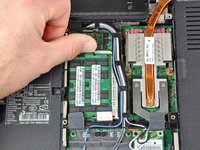
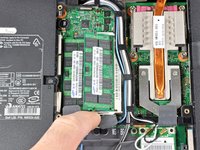
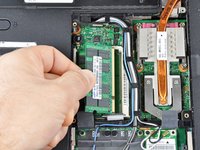
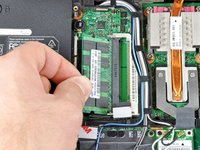
    1. Dell Inspiron 1525 RAM Replacement, RAM: crwdns2935265:04crwdnd2935265:01crwdnd2935265:03crwdne2935265:0 Dell Inspiron 1525 RAM Replacement, RAM: crwdns2935265:04crwdnd2935265:02crwdnd2935265:03crwdne2935265:0 Dell Inspiron 1525 RAM Replacement, RAM: crwdns2935265:04crwdnd2935265:03crwdnd2935265:03crwdne2935265:0
      • Push the white tabs on either side of the RAM chip outward. The chip should pop up a little.

      • Carefully remove the RAM chip by pulling it out at a slight vertical angle.

      crwdns2952109:0crwdne2952109:0

      crwdns2917038:0crwdne2917038:0

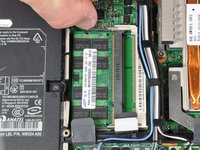
    2. Dell Inspiron 1525 RAM Replacement: crwdns2935265:05crwdnd2935265:01crwdnd2935265:02crwdne2935265:0 Dell Inspiron 1525 RAM Replacement: crwdns2935265:05crwdnd2935265:02crwdnd2935265:02crwdne2935265:0
      • Remove the lower RAM chip in the same fashion as the upper one.

      crwdns2952109:0crwdne2952109:0

      crwdns2917038:0crwdne2917038:0

crwdns2915888:0crwdne2915888:0

To reassemble your device, follow these instructions in reverse order.

crwdns2935221:0crwdne2935221:0

crwdns2935229:05crwdne2935229:0

crwdns2947412:00crwdne2947412:0

crwdns2917038:0crwdne2917038:0

crwdns2936625:0crwdne2936625:0:

crwdns2936751:024crwdne2936751:0 4

crwdns2936753:07crwdne2936753:0 10

crwdns2936753:030crwdne2936753:0 32

crwdns2942667:0crwdne2942667:0 11,379