
Dell Inspiron 15 Memory Module Replacement

crwdns2959934:0crwdnd2959934:0Terrence15crwdnd2959934:0crwdnd2959934:0crwdne2959934:0
crwdns2959936:0Maw 11, 2018crwdne2959936:0
crwdns2869540:0crwdne2869540:0: 1297
crwdns2959988:0crwdne2959988:0
- crwdns2959990:0crwdne2959990:0
- 8
- crwdns2959992:0crwdne2959992:0
- 19
- crwdns2959994:0crwdne2959994:0
- 70
- crwdns2959996:0crwdne2959996:0
- 1,297
crwdns2955950:0crwdne2955950:0: 0
crwdns2959998:0crwdne2959998:0
crwdns2960000:0crwdne2960000:0crwdns2959984:0crwdne2959984:0: 1 2
crwdns2959972:01crwdne2959972:0
crwdns2959970:02crwdne2959970:0
crwdns2959986:0crwdne2959986:0: 0 1
crwdns2959958:0crwdne2959958:0
crwdns2959976:01crwdne2959976:0
crwdns2944444:0crwdne2944444:0
crwdns2944446:0crwdne2944446:0
crwdns2915892:0crwdne2915892:0
crwdns2959928:0crwdne2959928:0 ↓In this guide, we will be showing you how to remove and replace the Memory Module.
-
-
-
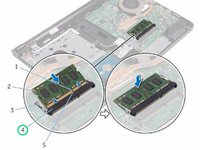
Using your fingertips, spread apart the securing clips at each end of the memory-module slot until the memory module pops up.
 crwdns2952109:0crwdne2952109:0
-
-
-
Slide and remove the memory module from the memory-module slot.
-
-
-
-
Align the notch on the NEW memory module with the tab on the memory-module slot.
-
-
-
Slide the memory module firmly into the slot at an angle and press the memory module down until it clicks into place.
-
-


crwdns2935221:0crwdne2935221:0
crwdns2935227:0crwdne2935227:0

crwdns2935287:0crwdne2935287:0

RampUP America, Inc. crwdns2935289:0RampUP America, Inc.crwdne2935289:0
Community
crwdns2931471:045crwdne2931471:0
crwdns2935297:012,349crwdne2935297:0
