crwdns2933423:0crwdne2933423:0
crwdns2947577:0crwdnd2947577:0crwdne2947577:0

Dell Inspiron 15 5584 RAM Replacement

crwdns2942213:0crwdne2942213:0

  1. Dell Inspiron 15 5584 RAM Replacement, Bottom Cover: crwdns2935265:01crwdnd2935265:01crwdnd2935265:01crwdne2935265:0
    • Make sure to turn off and unplug your laptop before starting.

    • Turn over the laptop so that the bottom is facing upwards, and the Inspiron logo is upside-down.

    crwdns2952109:0crwdne2952109:0
  2. Dell Inspiron 15 5584 RAM Replacement: crwdns2935265:02crwdnd2935265:01crwdnd2935265:03crwdne2935265:0 Dell Inspiron 15 5584 RAM Replacement: crwdns2935265:02crwdnd2935265:02crwdnd2935265:03crwdne2935265:0 Dell Inspiron 15 5584 RAM Replacement: crwdns2935265:02crwdnd2935265:03crwdnd2935265:03crwdne2935265:0
    • Remove the seven 7 mm screws from the bottom using a Phillips #0 screwdriver.

    • Loosen the two captive back corner screws using a Phillips #0 screwdriver.

    • The two corner screws are not removable. A clicking sounds indicates that the screw is fully loosened.

    crwdns2952109:0crwdne2952109:0
  3. Dell Inspiron 15 5584 RAM Replacement: crwdns2935265:03crwdnd2935265:01crwdnd2935265:02crwdne2935265:0 Dell Inspiron 15 5584 RAM Replacement: crwdns2935265:03crwdnd2935265:02crwdnd2935265:02crwdne2935265:0
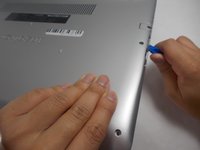
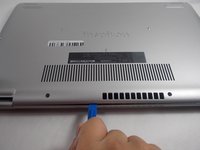
    • Slide an iFixit opening tool underneath the right side USB port and the keyboard.

    • Gently trace the iFixit opening tool along the entire outer rim of the laptop, carefully applying an upwards pressure.

    • Be careful not to force open the plate or push too much off without loosening the other sides. This can cause the bottom cover to crack.

    crwdns2952109:0crwdne2952109:0
  4. Dell Inspiron 15 5584 RAM Replacement: crwdns2935265:04crwdnd2935265:01crwdnd2935265:02crwdne2935265:0 Dell Inspiron 15 5584 RAM Replacement: crwdns2935265:04crwdnd2935265:02crwdnd2935265:02crwdne2935265:0
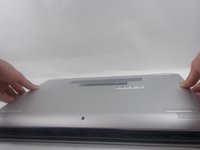
    • Gently pry off the bottom cover from the laptop.

    • Use the iFixit opening tool to loosen any spots you may have missed from Step 3.

    crwdns2952109:0crwdne2952109:0
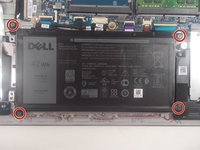
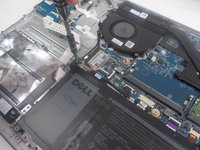
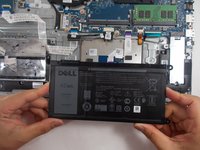
  5. Dell Inspiron 15 5584 RAM Replacement, Battery: crwdns2935265:05crwdnd2935265:01crwdnd2935265:02crwdne2935265:0 Dell Inspiron 15 5584 RAM Replacement, Battery: crwdns2935265:05crwdnd2935265:02crwdnd2935265:02crwdne2935265:0
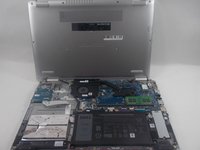
    • Remove the four 3.5 mm screws holding the battery down with a JIS #0 screwdriver.

    • Official iFixit PH000-PH1 Phillips screwdrivers and bits are designed to be compatible with JIS screws, so they are safe to use.

    crwdns2952109:0crwdne2952109:0
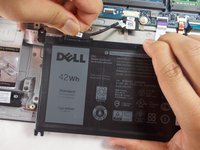
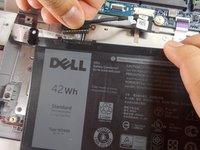
  6. Dell Inspiron 15 5584 RAM Replacement: crwdns2935265:06crwdnd2935265:01crwdnd2935265:03crwdne2935265:0 Dell Inspiron 15 5584 RAM Replacement: crwdns2935265:06crwdnd2935265:02crwdnd2935265:03crwdne2935265:0 Dell Inspiron 15 5584 RAM Replacement: crwdns2935265:06crwdnd2935265:03crwdnd2935265:03crwdne2935265:0
    • Detach the motherboard connector tab from the top left of the battery.

    • Remove the battery from the device.

    • Be sure to carefully wiggle the connector out from the battery socket. Ripping it out too forcefully could damage the socket.

    crwdns2952109:0crwdne2952109:0
  7. Dell Inspiron 15 5584 RAM Replacement, RAM: crwdns2935265:07crwdnd2935265:01crwdnd2935265:01crwdne2935265:0
    • Firmly apply pressure on the two latches to the right and left of the RAM stick.

    crwdns2952109:0crwdne2952109:0
  8. Dell Inspiron 15 5584 RAM Replacement: crwdns2935265:08crwdnd2935265:01crwdnd2935265:01crwdne2935265:0
    • At an angle, gently pull the RAM stick out of the socket.

    • Remove the RAM stick from the motherboard socket.

    crwdns2952109:0crwdne2952109:0
crwdns2915888:0crwdne2915888:0

To reassemble your device, follow these instructions in reverse order.

crwdns2935227:0crwdne2935227:0

Sam Vorn

crwdns2935283:003/29/22crwdne2935283:0

1 015 crwdns2915208:0crwdne2915208:0

crwdns2935297:09crwdne2935297:0

crwdns2935287:0crwdne2935287:0

UMass Dartmouth, Team 1-1, Mellen Spring 2022 crwdns2935289:0UMass Dartmouth, Team 1-1, Mellen Spring 2022crwdne2935289:0

UMASSD-MELLEN-S22S1G1

crwdns2931471:03crwdne2931471:0

crwdns2935297:010crwdne2935297:0

crwdns2947412:00crwdne2947412:0

crwdns2917038:0crwdne2917038:0

crwdns2936625:0crwdne2936625:0:

crwdns2936751:024crwdne2936751:0 0

crwdns2936753:07crwdne2936753:0 4

crwdns2936753:030crwdne2936753:0 46

crwdns2942667:0crwdne2942667:0 678