crwdns2933423:0crwdne2933423:0
crwdns2947577:0crwdnd2947577:0crwdne2947577:0

Dell Inspiron 11-3152 Screen Replacement

crwdns2942213:0crwdne2942213:0

  1. Dell Inspiron 11-3152 Screen Replacement, Back Panel: crwdns2935265:01crwdnd2935265:01crwdnd2935265:02crwdne2935265:0 Dell Inspiron 11-3152 Screen Replacement, Back Panel: crwdns2935265:01crwdnd2935265:02crwdnd2935265:02crwdne2935265:0
    • Flip the computer over.

    crwdns2952109:0crwdne2952109:0
  2. Dell Inspiron 11-3152 Screen Replacement: crwdns2935265:02crwdnd2935265:01crwdnd2935265:02crwdne2935265:0 Dell Inspiron 11-3152 Screen Replacement: crwdns2935265:02crwdnd2935265:02crwdnd2935265:02crwdne2935265:0
    • Remove all nine 5mm Phillips head screws from the back cover using #0 Phillips head.

    crwdns2952109:0crwdne2952109:0
  3. Dell Inspiron 11-3152 Screen Replacement: crwdns2935265:03crwdnd2935265:01crwdnd2935265:01crwdne2935265:0
    • Gently use a spudger to pull the cover away from the rest of the laptop. The cover will come off after you use the tool on two or three sides.

    crwdns2952109:0crwdne2952109:0
  4. Dell Inspiron 11-3152 Screen Replacement, Battery: crwdns2935265:04crwdnd2935265:01crwdnd2935265:01crwdne2935265:0
    • Make sure that the power is off.

    • After taking off the back panel, you will see the battery located at the bottom of the computer system. It's black and is clearly labeled "dell battery".

    crwdns2952109:0crwdne2952109:0
  5. Dell Inspiron 11-3152 Screen Replacement: crwdns2935265:05crwdnd2935265:01crwdnd2935265:02crwdne2935265:0 Dell Inspiron 11-3152 Screen Replacement: crwdns2935265:05crwdnd2935265:02crwdnd2935265:02crwdne2935265:0
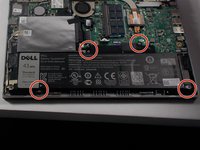
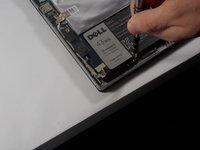
    • Locate the battery at the bottom of the computer and remove the four 3mm screws with a Phillips #0 head that hold the battery down.

    crwdns2952109:0crwdne2952109:0
  6. Dell Inspiron 11-3152 Screen Replacement: crwdns2935265:06crwdnd2935265:01crwdnd2935265:01crwdne2935265:0
    • Remove the Solid State Drive wire from the battery clip by detaching the wire.

    • This can be done by gently pulling the connector away from the battery clip.

    crwdns2952109:0crwdne2952109:0
  7. Dell Inspiron 11-3152 Screen Replacement: crwdns2935265:07crwdnd2935265:01crwdnd2935265:01crwdne2935265:0
    • Remove the battery from the computer system by gently lifting it from the side.

    crwdns2952109:0crwdne2952109:0
  8. Dell Inspiron 11-3152 Screen Replacement, Screen: crwdns2935265:08crwdnd2935265:01crwdnd2935265:01crwdne2935265:0
    • Unscrew the brackets in the top right and top left of the laptop. Unscrew the two 1mm screw from both of the brackets on both sides with #0 phillips head.

    crwdns2952109:0crwdne2952109:0
  9. Dell Inspiron 11-3152 Screen Replacement: crwdns2935265:09crwdnd2935265:01crwdnd2935265:01crwdne2935265:0
    • Disconnect the aerial cables from the wireless controller by pulling them away from the laptop.

    crwdns2952109:0crwdne2952109:0
  10. Dell Inspiron 11-3152 Screen Replacement: crwdns2935265:010crwdnd2935265:01crwdnd2935265:01crwdne2935265:0
    • Push the brackets up on both sides with your hands or spudger.

    crwdns2952109:0crwdne2952109:0
  11. Dell Inspiron 11-3152 Screen Replacement: crwdns2935265:011crwdnd2935265:01crwdnd2935265:02crwdne2935265:0 Dell Inspiron 11-3152 Screen Replacement: crwdns2935265:011crwdnd2935265:02crwdnd2935265:02crwdne2935265:0
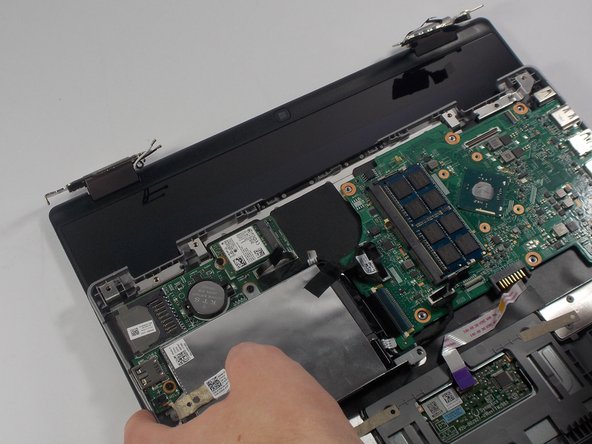
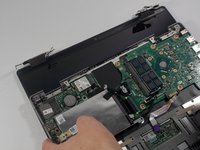
    • At this point you can pull the bottom half of the computer away from the screen.

    • The screen is now fully detached and ready to be replaced!

    crwdns2952109:0crwdne2952109:0
crwdns2915888:0crwdne2915888:0

To reassemble your device, follow these instructions in reverse order.

crwdns2935227:0crwdne2935227:0

Matthew Duncan

crwdns2935283:003/10/16crwdne2935283:0

481 crwdns2915208:0crwdne2915208:0

crwdns2935297:04crwdne2935297:0

crwdns2935287:0crwdne2935287:0

UMass Dartmouth, Team 4-6, Catania Spring 2016 crwdns2935289:0UMass Dartmouth, Team 4-6, Catania Spring 2016crwdne2935289:0

UMASSD-CATANIA-S16S4G6

crwdns2931471:03crwdne2931471:0

crwdns2935297:06crwdne2935297:0

crwdns2947412:00crwdne2947412:0

crwdns2917038:0crwdne2917038:0

crwdns2936625:0crwdne2936625:0:

crwdns2936751:024crwdne2936751:0 0

crwdns2936753:07crwdne2936753:0 4

crwdns2936753:030crwdne2936753:0 42

crwdns2942667:0crwdne2942667:0 715