
Dell Dimension 4600 Sound Card Replacement

crwdns2959932:0crwdnd2959932:0Arvindcrwdnd2959932:0crwdnd2959932:0crwdnd2959932:05crwdnd2959932:0crwdne2959932:0
crwdns2959936:0Kul 7, 2024crwdne2959936:0
crwdns2869540:0crwdne2869540:0: 5924
crwdns2959988:0crwdne2959988:0
- crwdns2959990:0crwdne2959990:0
- 1
- crwdns2959992:0crwdne2959992:0
- 24
- crwdns2959994:0crwdne2959994:0
- 104
- crwdns2959996:0crwdne2959996:0
- 5,924
crwdns2955950:0crwdne2955950:0: 0
crwdns2959998:0crwdne2959998:0
crwdns2960000:0crwdne2960000:0crwdns2959984:0crwdne2959984:0: 6 7
crwdns2959974:06crwdne2959974:0
crwdns2959970:07crwdne2959970:0
crwdns2959986:0crwdne2959986:0: 4 5
crwdns2959982:04crwdne2959982:0
crwdns2959978:05crwdne2959978:0
crwdns2862611:0crwdne2862611:0
crwdns2862612:0crwdne2862612:0
crwdns2915892:0crwdne2915892:0
crwdns2959928:0crwdne2959928:0 ↓Use this guide to replace the sound card in your computer.
crwdns2959930:0crwdne2959930:0
crwdns2943215:0crwdne2943215:0

-
-
-
Locate the case cover latch on the back of the computer.
 crwdns2952109:0crwdne2952109:0
-
-
-
Using your index finger, slide and hold the cover latch down.
-
While holding the latch down, place your other hand flat on the side of the case and firmly shift the side panel to the left until it disengages.
-
-
-
Grab the edge of the panel and slide it away from the case until it is removed.
-
-
-
-
crwdns2935267:0crwdne2935267:0Anti-Static Wrist Strap$7.95
-
-
Locate the Sound Card and the screw attached to the Sound Card as shown in the picture.
-
-
-
Remove the 8.9 mm screw by using a Phillips #2 screw-driver.
-
-
-
-
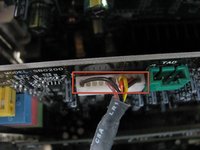
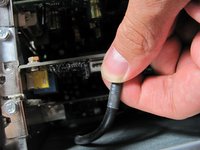
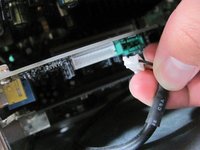
Locate and remove the white connector on the sound card by pulling on the black cable.
-
-
-
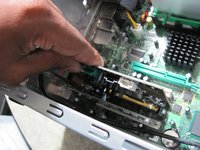
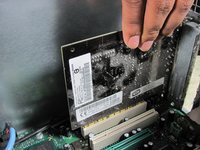
Grasp the Sound Card and pull it up and out of it's slot.
-
-




To reassemble your device, follow these instructions in reverse order.
crwdns2935221:0crwdne2935221:0
crwdns2935229:06crwdne2935229:0

crwdns2935287:0crwdne2935287:0

Cal Poly, Team 6-10, Regan Fall 2011 crwdns2935289:0Cal Poly, Team 6-10, Regan Fall 2011crwdne2935289:0
CPSU-REGAN-F11S6G10
crwdns2931471:04crwdne2931471:0
crwdns2935297:072crwdne2935297:0
