
Connect Four Electronic Handheld Back Casing Replacement

crwdns2959932:0crwdnd2959932:0Wilcrwdnd2959932:0crwdnd2959932:0crwdnd2959932:03crwdnd2959932:0crwdne2959932:0
crwdns2959936:0Sun 10, 2015crwdne2959936:0
crwdns2869540:0crwdne2869540:0: 660
crwdns2959988:0crwdne2959988:0
- crwdns2959990:0crwdne2959990:0
- 1
- crwdns2959992:0crwdne2959992:0
- 20
- crwdns2959994:0crwdne2959994:0
- 96
- crwdns2959996:0crwdne2959996:0
- 660
crwdns2955950:0crwdne2955950:0: 0
crwdns2959998:0crwdne2959998:0
crwdns2960000:0crwdne2960000:0crwdns2959984:0crwdne2959984:0: 0 1
crwdns2959956:0crwdne2959956:0
crwdns2959968:01crwdne2959968:0
crwdns2959986:0crwdne2959986:0: 0 1
crwdns2959958:0crwdne2959958:0
crwdns2959976:01crwdne2959976:0
crwdns2915892:0crwdne2915892:0
crwdns2959928:0crwdne2959928:0 ↓To access any of the internal components of the Connect Four Electronic Handheld, you will need to remove the back casing.
crwdns2959930:0crwdne2959930:0
crwdns2943215:0crwdne2943215:0

-
-
-
Make sure the Connect Four Electronic Handheld is off by allowing it to shut off automatically.
 crwdns2952109:0crwdne2952109:0
-
-
-
Using a Phillips head screwdriver, remove the (9.1mm length) #2 screw in the middle of the battery casing.
-
Slide the cover off and remove the battery.
-
-
-
-
-
-
Using a Phillips head screwdriver, remove the four (7.1mm- length) #3 screws that hold the back casing in place.
-
Carefully remove the back casing.
-
-


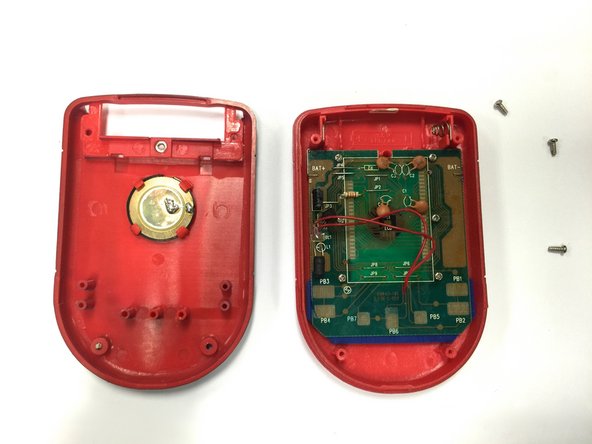
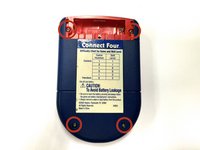
To reassemble your device, follow these instructions in reverse order.

crwdns2935287:0crwdne2935287:0

Baylor, Team 8-11, Williams Fall 2014 crwdns2935289:0Baylor, Team 8-11, Williams Fall 2014crwdne2935289:0
BU-WILLIAMS-F14S8G11
crwdns2931471:03crwdne2931471:0
crwdns2935297:072crwdne2935297:0
