crwdns2933423:0crwdne2933423:0
crwdns2947577:0crwdnd2947577:0crwdne2947577:0

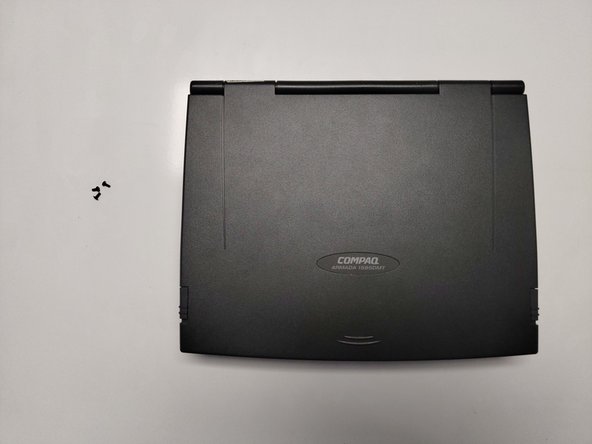
Compaq Armada 1585DMT RAM Replacement

crwdns2869540:0crwdne2869540:0: 803

crwdns2959988:0crwdne2959988:0

crwdns2959990:0crwdne2959990:0
0
crwdns2959992:0crwdne2959992:0
16
crwdns2959994:0crwdne2959994:0
73
crwdns2959996:0crwdne2959996:0
803
crwdns2955950:0crwdne2955950:0: 0

crwdns2959998:0crwdne2959998:0

crwdns2960000:0crwdne2960000:0
crwdns2959984:0crwdne2959984:0: 1

crwdns2959972:01crwdne2959972:0

crwdns2959986:0crwdne2959986:0: 0

crwdns2959958:0crwdne2959958:0

crwdns2955944:0crwdne2955944:0: 10 - 30 crwdns2931279:0crwdne2931279:0
crwdns2955970:0crwdne2955970:0: crwdns2937801:0crwdne2937801:0
Compaq Armada 1585DMT RAM Replacement

crwdns2915892:0crwdne2915892:0

crwdns2959928:0crwdne2959928:0 ↓

If your Compaq Armada 1585DMT Laptop is functioning slowly, or if you have witnessed the nefarious “blue screen of death,” it is likely time to replace your random-access memory (RAM). RAM functions to store temporary data and is a crucial part of any computer. Replacing your RAM using this guide will improve the speed and performance of your laptop.

Before beginning, be sure to power off your laptop and disconnect it from any power sources or external cables/devices.

Remember: Always take care when disconnecting and reconnecting cable pins and RAM sticks, as any damage to the pins and/or connectors can cause the device to not work properly.

crwdns2959930:0crwdne2959930:0

crwdns2943213:0crwdne2943213:0

crwdns2943215:0crwdne2943215:0

    1. Compaq Armada 1585DMT RAM Replacement, Random Access Memory (RAM): crwdns2935265:01crwdnd2935265:01crwdnd2935265:02crwdne2935265:0 Compaq Armada 1585DMT RAM Replacement, Random Access Memory (RAM): crwdns2935265:01crwdnd2935265:02crwdnd2935265:02crwdne2935265:0
      • Turn the laptop over on its backside.

      crwdns2952109:0crwdne2952109:0

      crwdns2917038:0crwdne2917038:0

    2. Compaq Armada 1585DMT RAM Replacement: crwdns2935265:02crwdnd2935265:01crwdnd2935265:02crwdne2935265:0 Compaq Armada 1585DMT RAM Replacement: crwdns2935265:02crwdnd2935265:02crwdnd2935265:02crwdne2935265:0
      • Push down the battery pack clamp located on the right side of the laptop.

      • Pull the battery pack outwards and away from the laptop.

      crwdns2952109:0crwdne2952109:0

      crwdns2917038:0crwdne2917038:0

    3. Compaq Armada 1585DMT RAM Replacement: crwdns2935265:03crwdnd2935265:01crwdnd2935265:03crwdne2935265:0 Compaq Armada 1585DMT RAM Replacement: crwdns2935265:03crwdnd2935265:02crwdnd2935265:03crwdne2935265:0 Compaq Armada 1585DMT RAM Replacement: crwdns2935265:03crwdnd2935265:03crwdnd2935265:03crwdne2935265:0
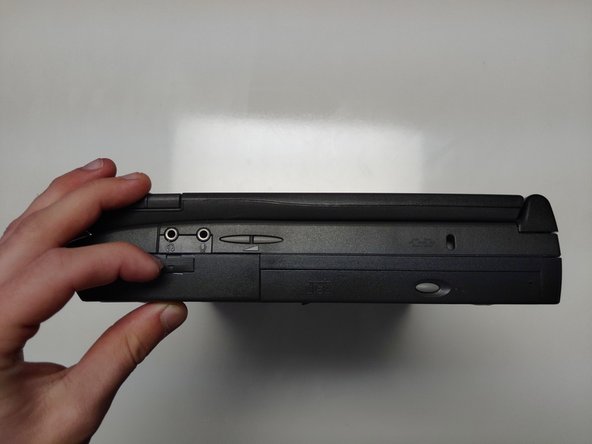
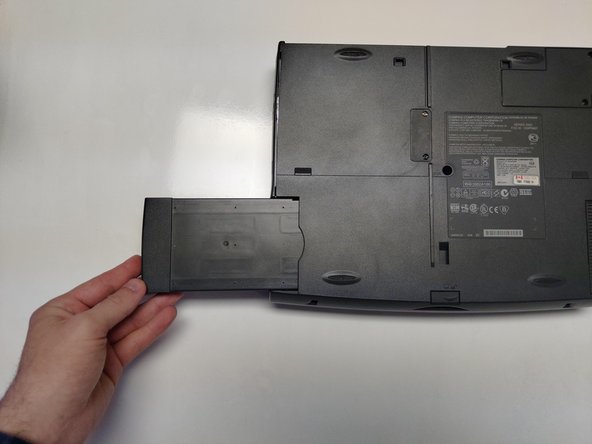
      • Push down the floppy disk drive clamp located on left side of laptop.

      • Pull the floppy disk drive outwards and away from the laptop.

      crwdns2952109:0crwdne2952109:0

      crwdns2917038:0crwdne2917038:0

    4. Compaq Armada 1585DMT RAM Replacement: crwdns2935265:04crwdnd2935265:01crwdnd2935265:02crwdne2935265:0 Compaq Armada 1585DMT RAM Replacement: crwdns2935265:04crwdnd2935265:02crwdnd2935265:02crwdne2935265:0
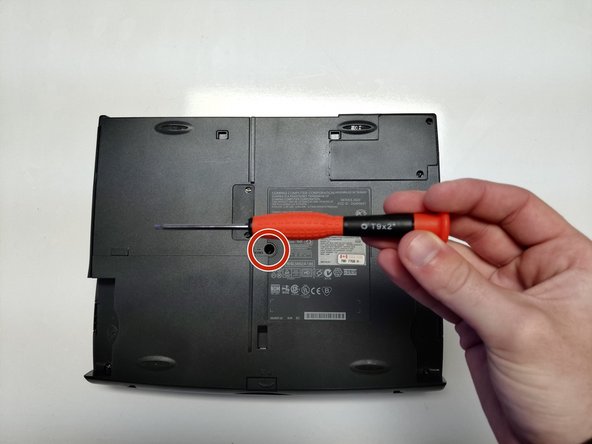
      • Remove the single 4mm Torx screw from the bottom center of the laptop.

      crwdns2952109:0crwdne2952109:0

      crwdns2917038:0crwdne2917038:0

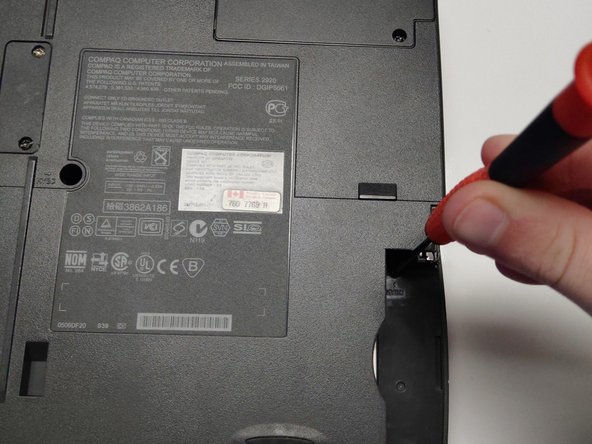
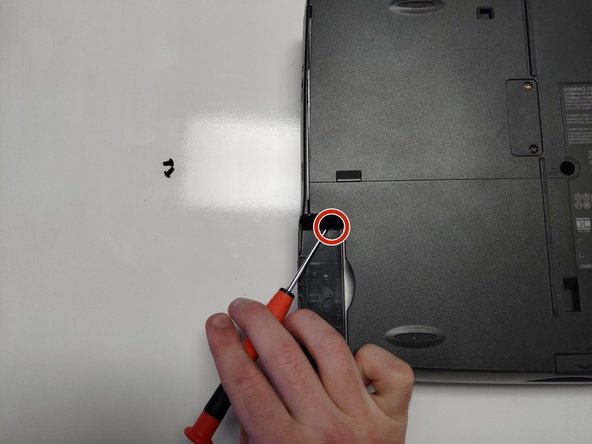
    5. Compaq Armada 1585DMT RAM Replacement: crwdns2935265:05crwdnd2935265:01crwdnd2935265:02crwdne2935265:0 Compaq Armada 1585DMT RAM Replacement: crwdns2935265:05crwdnd2935265:02crwdnd2935265:02crwdne2935265:0
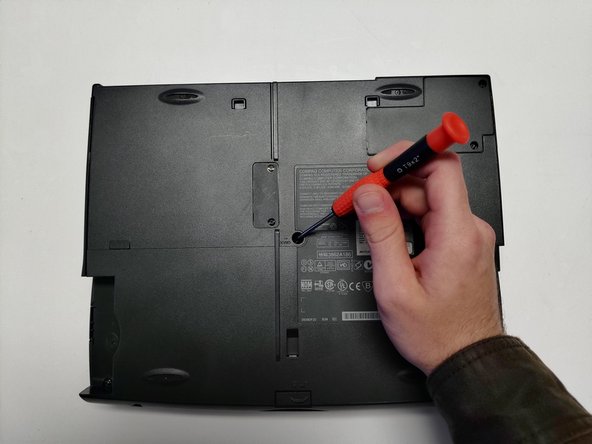
      • Remove the single 4mm Torx screw, located beneath the floppy disk drive bay.

      crwdns2952109:0crwdne2952109:0

      crwdns2917038:0crwdne2917038:0

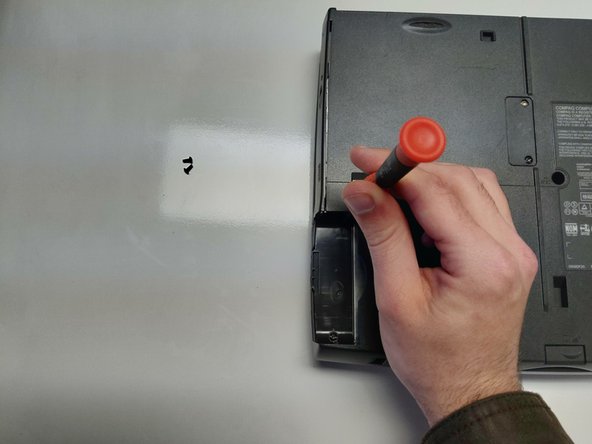
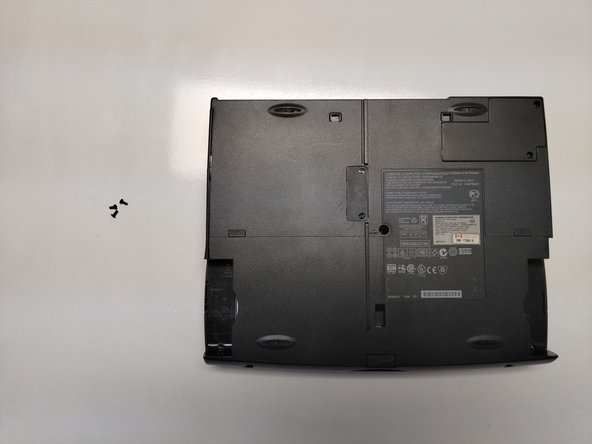
    6. Compaq Armada 1585DMT RAM Replacement: crwdns2935265:06crwdnd2935265:01crwdnd2935265:02crwdne2935265:0 Compaq Armada 1585DMT RAM Replacement: crwdns2935265:06crwdnd2935265:02crwdnd2935265:02crwdne2935265:0
      • Remove the single 4mm Torx screw from beneath the battery pack bay.

      crwdns2952109:0crwdne2952109:0

      crwdns2917038:0crwdne2917038:0

    7. Compaq Armada 1585DMT RAM Replacement: crwdns2935265:07crwdnd2935265:01crwdnd2935265:03crwdne2935265:0 Compaq Armada 1585DMT RAM Replacement: crwdns2935265:07crwdnd2935265:02crwdnd2935265:03crwdne2935265:0 Compaq Armada 1585DMT RAM Replacement: crwdns2935265:07crwdnd2935265:03crwdnd2935265:03crwdne2935265:0
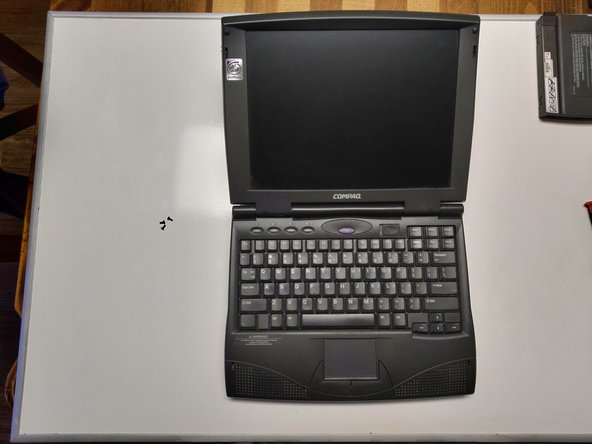
      • Flip the laptop right-side up.

      • Open the laptop, exposing the screen and keyboard.

      crwdns2952109:0crwdne2952109:0

      crwdns2917038:0crwdne2917038:0

    8. Compaq Armada 1585DMT RAM Replacement: crwdns2935265:08crwdnd2935265:01crwdnd2935265:02crwdne2935265:0 Compaq Armada 1585DMT RAM Replacement: crwdns2935265:08crwdnd2935265:02crwdnd2935265:02crwdne2935265:0
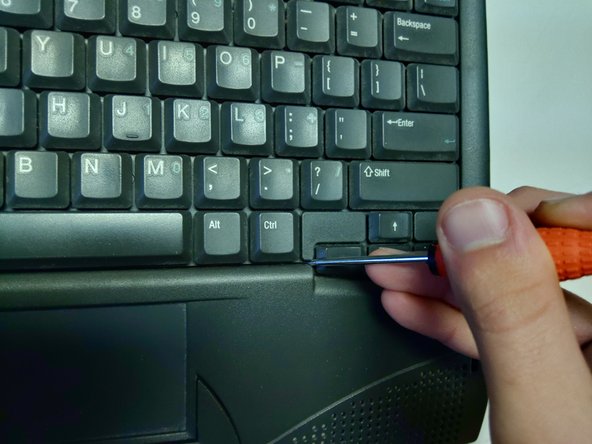
      • Gently wedge the flat end of a spudger between the keyboard and laptop chassis.

      • The easiest place to start a wedge is the non-clickable part of the keyboard between the right-control and arrow keys.

      crwdns2952109:0crwdne2952109:0

      crwdns2917038:0crwdne2917038:0

    9. Compaq Armada 1585DMT RAM Replacement: crwdns2935265:09crwdnd2935265:01crwdnd2935265:03crwdne2935265:0 Compaq Armada 1585DMT RAM Replacement: crwdns2935265:09crwdnd2935265:02crwdnd2935265:03crwdne2935265:0 Compaq Armada 1585DMT RAM Replacement: crwdns2935265:09crwdnd2935265:03crwdnd2935265:03crwdne2935265:0
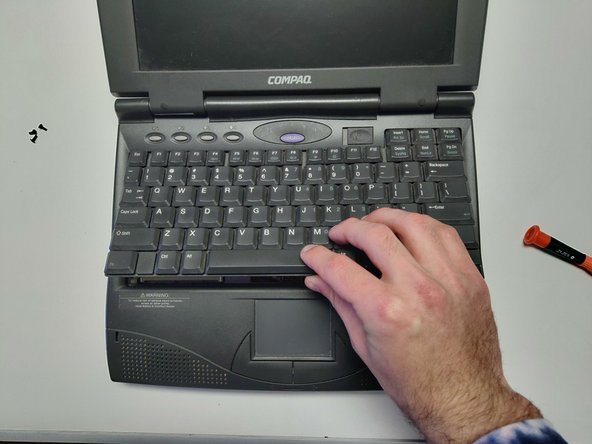
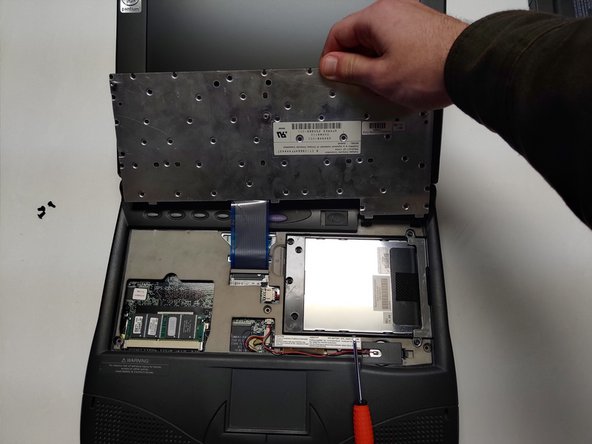
      • Pry the keyboard away from the laptop chassis.

      • Lift the keyboard up and away.

      crwdns2952109:0crwdne2952109:0

      crwdns2917038:0crwdne2917038:0

    10. Compaq Armada 1585DMT RAM Replacement: crwdns2935265:010crwdnd2935265:01crwdnd2935265:03crwdne2935265:0 Compaq Armada 1585DMT RAM Replacement: crwdns2935265:010crwdnd2935265:02crwdnd2935265:03crwdne2935265:0 Compaq Armada 1585DMT RAM Replacement: crwdns2935265:010crwdnd2935265:03crwdnd2935265:03crwdne2935265:0
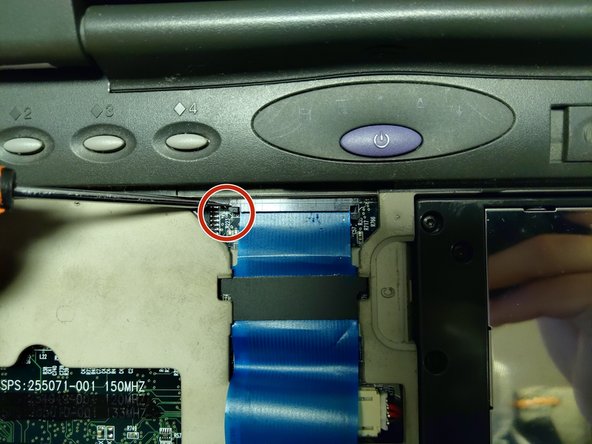
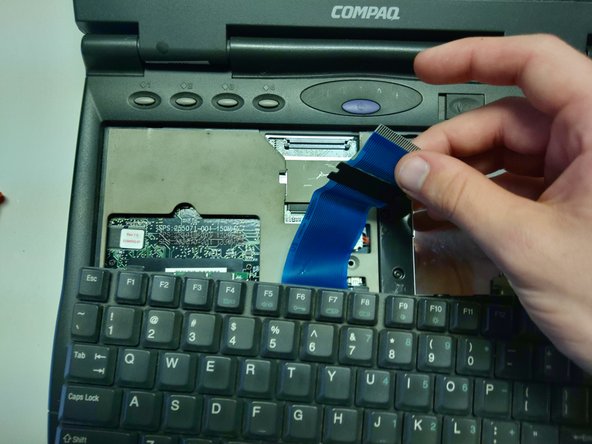
      • Move the keyboard away from the blue ribbon connector.

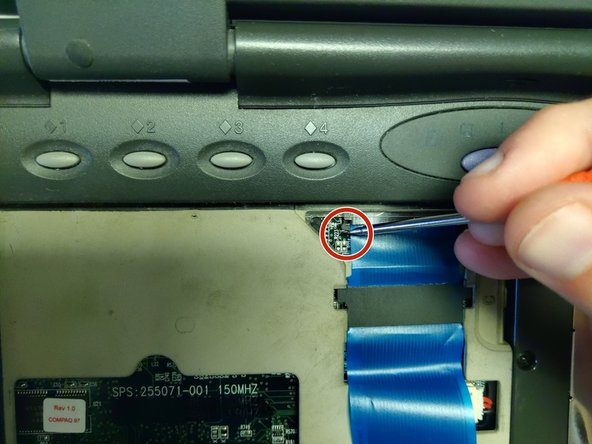
      • Using a spudger, pull the two small tabs connecting the cable to the motherboard away from the cable's connector bay.

      crwdns2952109:0crwdne2952109:0

      crwdns2917038:0crwdne2917038:0

    11. Compaq Armada 1585DMT RAM Replacement: crwdns2935265:011crwdnd2935265:01crwdnd2935265:03crwdne2935265:0 Compaq Armada 1585DMT RAM Replacement: crwdns2935265:011crwdnd2935265:02crwdnd2935265:03crwdne2935265:0 Compaq Armada 1585DMT RAM Replacement: crwdns2935265:011crwdnd2935265:03crwdnd2935265:03crwdne2935265:0
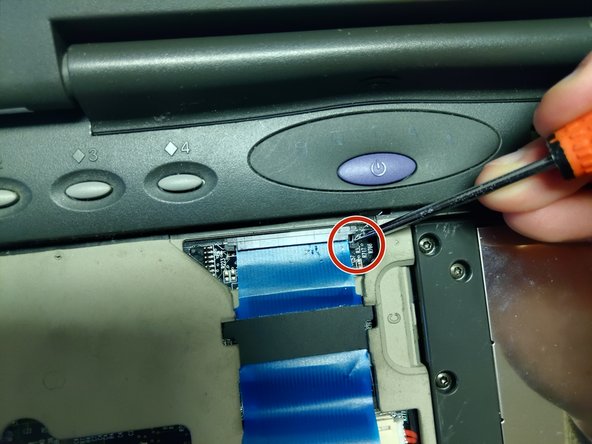
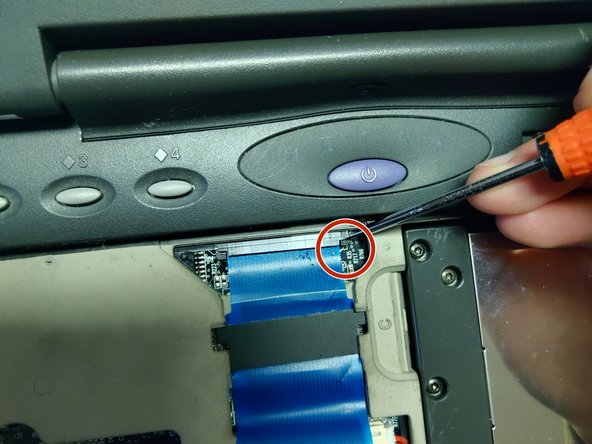
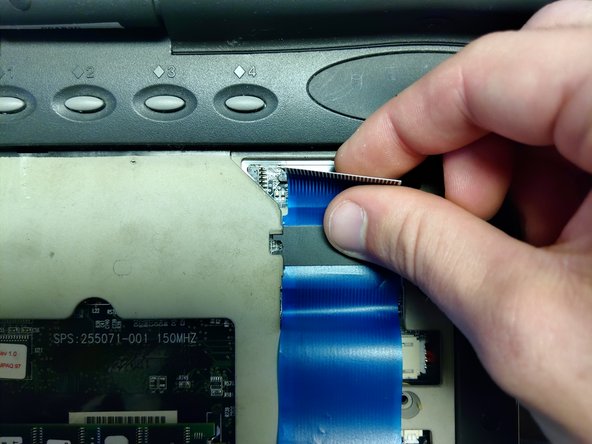
      • Pull back both the black tabs until the tabs are completely extended.

      • Pull the connector away from its bay.

      crwdns2952109:0crwdne2952109:0

      crwdns2917038:0crwdne2917038:0

    12. Compaq Armada 1585DMT RAM Replacement: crwdns2935265:012crwdnd2935265:01crwdnd2935265:03crwdne2935265:0 Compaq Armada 1585DMT RAM Replacement: crwdns2935265:012crwdnd2935265:02crwdnd2935265:03crwdne2935265:0 Compaq Armada 1585DMT RAM Replacement: crwdns2935265:012crwdnd2935265:03crwdnd2935265:03crwdne2935265:0
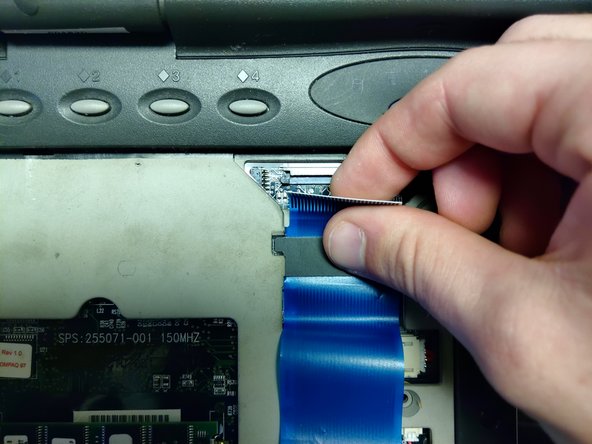
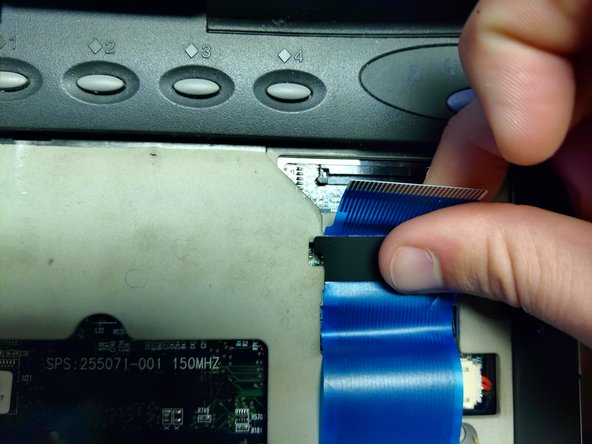
      • The blue ribbon cable has a large black tab with plastic indicators sticking out.

      • Slide the cable down until the indicators are visible under the open slot of the motherboard casing.

      • Pull the cable out and away from the motherboard.

      crwdns2952109:0crwdne2952109:0

      crwdns2917038:0crwdne2917038:0

    13. Compaq Armada 1585DMT RAM Replacement: crwdns2935265:013crwdnd2935265:01crwdnd2935265:01crwdne2935265:0
      • Completely remove the keyboard.

      crwdns2952109:0crwdne2952109:0

      crwdns2917038:0crwdne2917038:0

    14. Compaq Armada 1585DMT RAM Replacement: crwdns2935265:014crwdnd2935265:01crwdnd2935265:02crwdne2935265:0 Compaq Armada 1585DMT RAM Replacement: crwdns2935265:014crwdnd2935265:02crwdnd2935265:02crwdne2935265:0
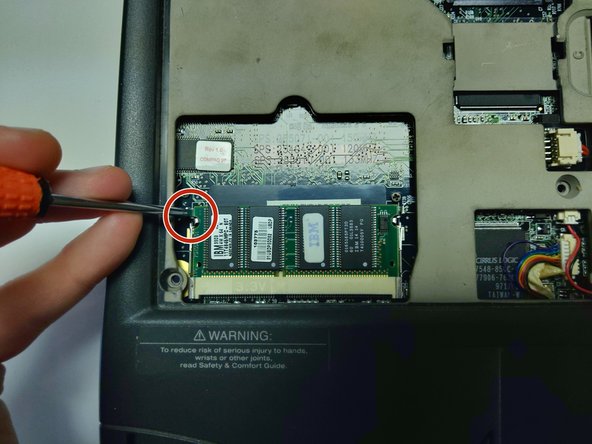
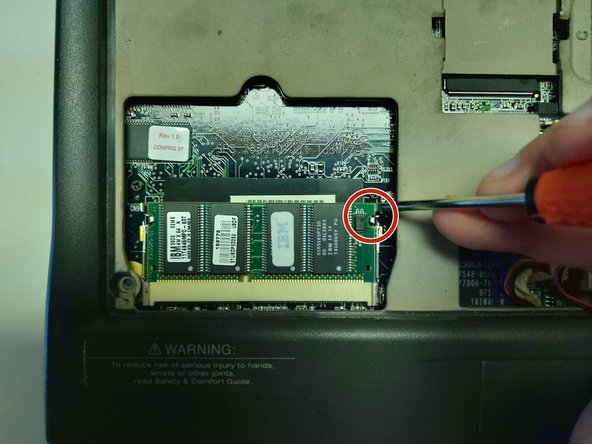
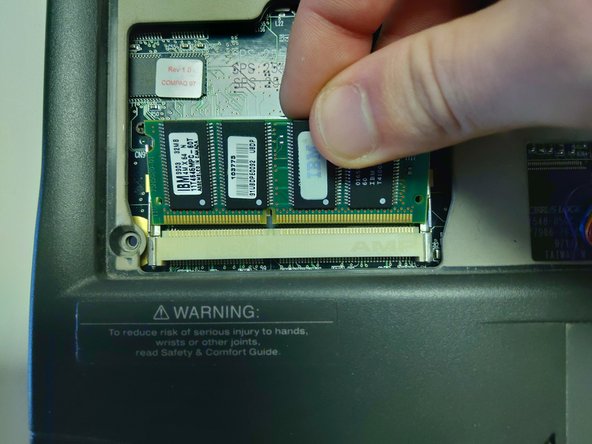
      • Using a spudger, pull back the two metal tabs holding the RAM in place until the RAM pops out of its socket.

      • The RAM stick is located on the lower left hand side of the laptop base, beneath where the left-shift key would be.

      crwdns2952109:0crwdne2952109:0

      crwdns2917038:0crwdne2917038:0

    15. Compaq Armada 1585DMT RAM Replacement: crwdns2935265:015crwdnd2935265:01crwdnd2935265:02crwdne2935265:0 Compaq Armada 1585DMT RAM Replacement: crwdns2935265:015crwdnd2935265:02crwdnd2935265:02crwdne2935265:0
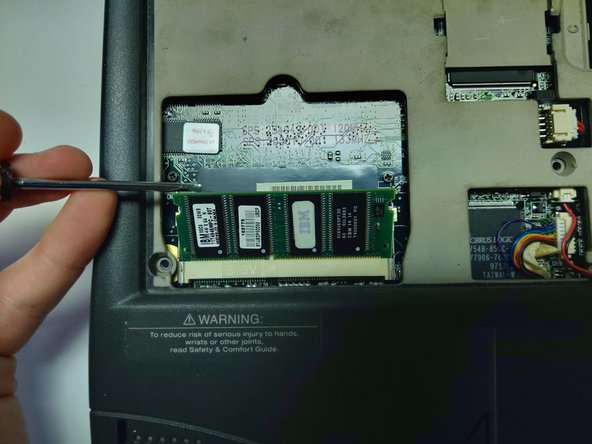
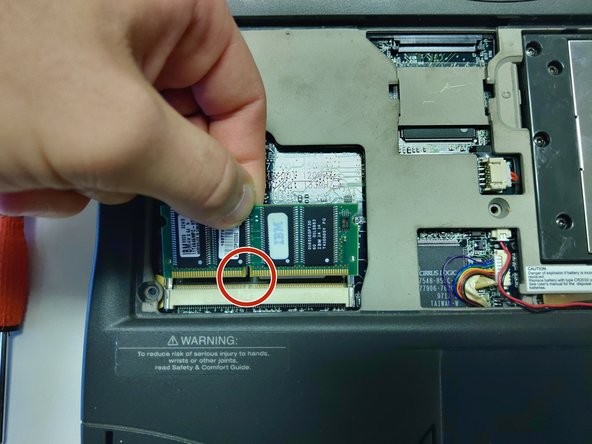
      • Lift the RAM stick gently with your spudger.

      • Use your hand to gently press the RAM stick back, towards the laptop, without reattaching it to the metal tabs.

      • Pull the RAM stick outwards and away from the connector it was previously attached to.

      crwdns2952109:0crwdne2952109:0

      crwdns2917038:0crwdne2917038:0

    16. Compaq Armada 1585DMT RAM Replacement: crwdns2935265:016crwdnd2935265:01crwdnd2935265:03crwdne2935265:0 Compaq Armada 1585DMT RAM Replacement: crwdns2935265:016crwdnd2935265:02crwdnd2935265:03crwdne2935265:0 Compaq Armada 1585DMT RAM Replacement: crwdns2935265:016crwdnd2935265:03crwdnd2935265:03crwdne2935265:0
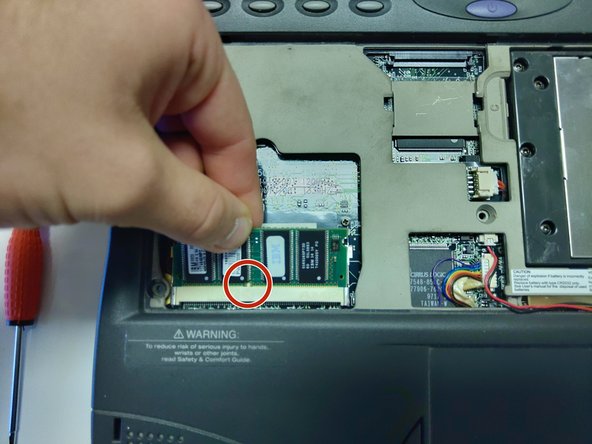
      • Align the replacement stick's connector notch to the notch seen on the motherboard connector.

      • Slide the stick in at an upwards angle.

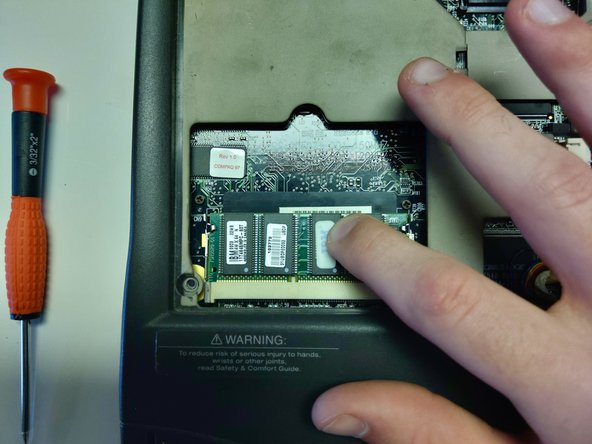
      • Firmly press down on the stick until it locks back in to the metal pins.

      crwdns2952109:0crwdne2952109:0

      crwdns2917038:0crwdne2917038:0

crwdns2915888:0crwdne2915888:0

To reassemble your device, follow these instructions in reverse order.

When reattaching the keyboard, slide the board in topside first, then lay the bottom down to secure.

crwdns2935221:0crwdne2935221:0

crwdns2935227:0crwdne2935227:0

Tyler Parks

crwdns2935283:001/14/20crwdne2935283:0

253 crwdns2915208:0crwdne2915208:0

crwdns2935295:0crwdne2935295:0

crwdns2935287:0crwdne2935287:0

University of North Texas, Team S1-G7, Raign Spring 2020 crwdns2935289:0University of North Texas, Team S1-G7, Raign Spring 2020crwdne2935289:0

UNT-RAIGN-S20S1G7

crwdns2931471:02crwdne2931471:0

crwdns2935297:012crwdne2935297:0

crwdns2947412:00crwdne2947412:0

crwdns2917038:0crwdne2917038:0

crwdns2936625:0crwdne2936625:0:

crwdns2936751:024crwdne2936751:0 0

crwdns2936753:07crwdne2936753:0 16

crwdns2936753:030crwdne2936753:0 73

crwdns2959996:0crwdne2959996:0 803