crwdns2933423:0crwdne2933423:0
crwdns2947577:0crwdnd2947577:0crwdne2947577:0

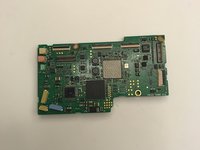
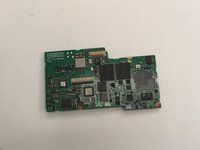
Canon Powershot Pro1 Motherboard Replacement

crwdns2942213:0crwdne2942213:0

    1. Canon Powershot Pro1 Motherboard  Replacement, Battery: crwdns2935265:01crwdnd2935265:01crwdnd2935265:01crwdne2935265:0
      • Locate the battery compartment cover on the right hand side of the camera. The cover features the text: “CF/BATT.OPEN”.

      crwdns2952109:0crwdne2952109:0

      crwdns2917038:0crwdne2917038:0

    2. Canon Powershot Pro1 Motherboard  Replacement: crwdns2935265:02crwdnd2935265:01crwdnd2935265:01crwdne2935265:0
      • There is an arrow beside the text. Using your hands, slide the cover in the direction of this arrow.

      crwdns2952109:0crwdne2952109:0

      crwdns2917038:0crwdne2917038:0

    3. Canon Powershot Pro1 Motherboard  Replacement: crwdns2935265:03crwdnd2935265:01crwdnd2935265:01crwdne2935265:0
      • Pull the cover toward you. After doing so you will see the battery sitting inside the compartment.

      crwdns2952109:0crwdne2952109:0

      crwdns2917038:0crwdne2917038:0

    4. Canon Powershot Pro1 Motherboard  Replacement: crwdns2935265:04crwdnd2935265:01crwdnd2935265:01crwdne2935265:0
      • Press the orange battery lock inside the compartment.

      • Remove the battery.

      • This photo show the battery compartment after the battery has been removed.

      crwdns2952109:0crwdne2952109:0

      crwdns2917038:0crwdne2917038:0

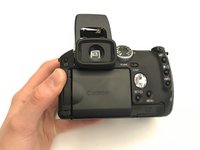
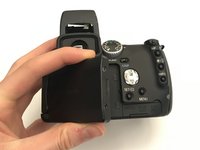
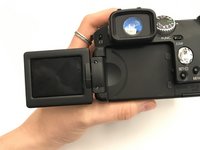
    1. Canon Powershot Pro1 Motherboard  Replacement, Motherboard: crwdns2935265:05crwdnd2935265:01crwdnd2935265:03crwdne2935265:0 Canon Powershot Pro1 Motherboard  Replacement, Motherboard: crwdns2935265:05crwdnd2935265:02crwdnd2935265:03crwdne2935265:0 Canon Powershot Pro1 Motherboard  Replacement, Motherboard: crwdns2935265:05crwdnd2935265:03crwdnd2935265:03crwdne2935265:0
      • Open the screen to access the underside of the camera.

      crwdns2952109:0crwdne2952109:0

      crwdns2917038:0crwdne2917038:0

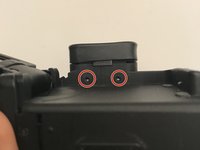
    2. Canon Powershot Pro1 Motherboard  Replacement: crwdns2935265:06crwdnd2935265:01crwdnd2935265:03crwdne2935265:0 Canon Powershot Pro1 Motherboard  Replacement: crwdns2935265:06crwdnd2935265:02crwdnd2935265:03crwdne2935265:0 Canon Powershot Pro1 Motherboard  Replacement: crwdns2935265:06crwdnd2935265:03crwdnd2935265:03crwdne2935265:0
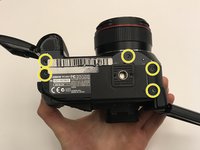
      • Using the Phillips #000 screwdriver:

      • Remove two 1.00 mm screws under the viewfinder.

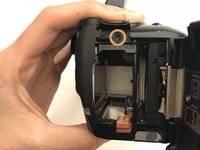
      • Remove one screw in the battery compartment.

      • Remove five screws on the bottom of the camera.

      • Remove one screw on the left side of the camera (opposite the battery compartment).

      crwdns2952109:0crwdne2952109:0

      crwdns2917038:0crwdne2917038:0

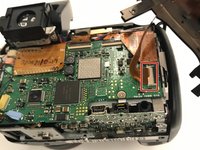
    3. Canon Powershot Pro1 Motherboard  Replacement: crwdns2935265:07crwdnd2935265:01crwdnd2935265:03crwdne2935265:0 Canon Powershot Pro1 Motherboard  Replacement: crwdns2935265:07crwdnd2935265:02crwdnd2935265:03crwdne2935265:0 Canon Powershot Pro1 Motherboard  Replacement: crwdns2935265:07crwdnd2935265:03crwdnd2935265:03crwdne2935265:0
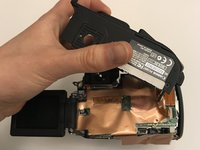
      • Completely detach the cover from the motherboard.

      • Lift the inside cover to reveal the motherboard.

      • Detach the bottom right ribbon cable from the motherboard.

      crwdns2952109:0crwdne2952109:0

      crwdns2917038:0crwdne2917038:0

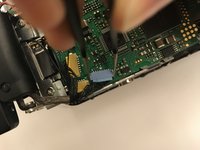
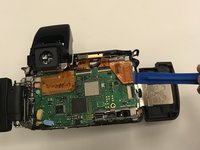
    4. Canon Powershot Pro1 Motherboard  Replacement: crwdns2935265:08crwdnd2935265:01crwdnd2935265:02crwdne2935265:0 Canon Powershot Pro1 Motherboard  Replacement: crwdns2935265:08crwdnd2935265:02crwdnd2935265:02crwdne2935265:0
      crwdns2935267:0crwdne2935267:0
      Tweezers
      $4.99
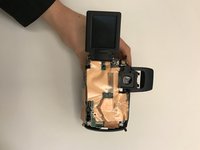
      • Lift up the gold insulation cover to reveal the motherboard.

      • Use tweezers and an iFixit opening tool, detach any wire connectors and ribbon cables from the motherboard.

      crwdns2952109:0crwdne2952109:0

      crwdns2917038:0crwdne2917038:0

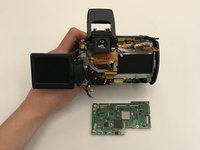
    5. Canon Powershot Pro1 Motherboard  Replacement: crwdns2935265:09crwdnd2935265:01crwdnd2935265:03crwdne2935265:0 Canon Powershot Pro1 Motherboard  Replacement: crwdns2935265:09crwdnd2935265:02crwdnd2935265:03crwdne2935265:0 Canon Powershot Pro1 Motherboard  Replacement: crwdns2935265:09crwdnd2935265:03crwdnd2935265:03crwdne2935265:0
      • Once detached from all connectors and ribbon cables, remove the motherboard.

      crwdns2952109:0crwdne2952109:0

      crwdns2917038:0crwdne2917038:0

crwdns2915888:0crwdne2915888:0

To reassemble your device, follow these instructions in reverse order.

crwdns2935221:0crwdne2935221:0

crwdns2935229:02crwdne2935229:0

Seana Meegan

crwdns2935283:009/06/19crwdne2935283:0

677 crwdns2915208:0crwdne2915208:0

crwdns2935297:05crwdne2935297:0

crwdns2935287:0crwdne2935287:0

University of Alabama, Team S1-G1, Bedsole Fall 2019 crwdns2935289:0University of Alabama, Team S1-G1, Bedsole Fall 2019crwdne2935289:0

UA-BEDSOLE-F19S1G1

crwdns2931471:03crwdne2931471:0

crwdns2935297:060crwdne2935297:0

crwdns2947412:00crwdne2947412:0

crwdns2917038:0crwdne2917038:0

crwdns2936625:0crwdne2936625:0:

crwdns2936751:024crwdne2936751:0 2

crwdns2936753:07crwdne2936753:0 11

crwdns2936753:030crwdne2936753:0 37

crwdns2942667:0crwdne2942667:0 1,608