crwdns2915892:0crwdne2915892:0
This guide walks you through how to replace a shutter button on your Canon PowerShot SX160 IS by disassembling a portion of the camera to access the non operational piece.
crwdns2942213:0crwdne2942213:0
-
-
-
Unscrew 2-4.8mm black screws from the front of the camera using a #0 Phillips screwdriver.
-
Unscrew 2-4.8mm black screws from the side of the camera using a #0 Phillips screwdriver.
-
Unscrew 2-4.8mm black screws from the bottom of the camera using a #0 Phillips screwdriver.
 crwdns2952109:0crwdne2952109:0
-
-
-
Using your hands, gently separate the back panel from the camera.
-
Continue to pull the back panel until it completely detaches from the camera.
-
-
-
-
Use your hands to gently separate the front panel from the camera.
-
Continue to pull the front panel until it completely detaches from the camera.
-
-
-
Locate and replace the shutter button on the front panel of the camera.
-
-


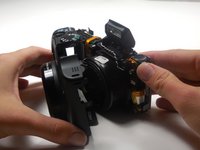
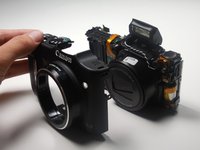

Congratulations, you have successfully replaced your shutter button. To reassemble your device, follow these instructions in reverse order.
crwdns2935221:0crwdne2935221:0
crwdns2935229:02crwdne2935229:0

crwdns2935287:0crwdne2935287:0

Colorado Springs, Team 2-3, Panko Spring 2015 crwdns2935289:0Colorado Springs, Team 2-3, Panko Spring 2015crwdne2935289:0
UCCS-PANKO-S15S2G3
crwdns2931471:03crwdne2931471:0
crwdns2935297:072crwdne2935297:0
crwdns2947412:02crwdne2947412:0
Great guide on how to replace the shutter button. Where can I get the new button?
mess857 - crwdns2934203:0crwdne2934203:0 crwdns2950251:0crwdne2950251:0
did you ever figure out where to get a new button?
christinapayne1@icloud.com - crwdns2934203:0crwdne2934203:0 crwdns2950251:0crwdne2950251:0
