crwdns2933423:0crwdne2933423:0
crwdns2947577:0crwdnd2947577:0crwdne2947577:0

Canon PowerShot SD1200 IS Lens Assembly Replacement

crwdns2942213:0crwdne2942213:0

  1. Canon PowerShot SD1200 IS Lens Assembly Replacement, Front and Rear Covers: crwdns2935265:01crwdnd2935265:01crwdnd2935265:01crwdne2935265:0
    • Remove the battery.

    crwdns2952109:0crwdne2952109:0
  2. Canon PowerShot SD1200 IS Lens Assembly Replacement: crwdns2935265:02crwdnd2935265:01crwdnd2935265:03crwdne2935265:0 Canon PowerShot SD1200 IS Lens Assembly Replacement: crwdns2935265:02crwdnd2935265:02crwdnd2935265:03crwdne2935265:0 Canon PowerShot SD1200 IS Lens Assembly Replacement: crwdns2935265:02crwdnd2935265:03crwdnd2935265:03crwdne2935265:0
    • Remove the two screws from the side of the camera casing with the strap. (4mm Phillips 00)

    • Remove the two screws from the bottom of the camera. (4mm Phillips 00)

    • Remove the two screws from the right side of the camera opposite the strap. (2mm Phillips 00)

    crwdns2952109:0crwdne2952109:0
  3. Canon PowerShot SD1200 IS Lens Assembly Replacement: crwdns2935265:03crwdnd2935265:01crwdnd2935265:02crwdne2935265:0 Canon PowerShot SD1200 IS Lens Assembly Replacement: crwdns2935265:03crwdnd2935265:02crwdnd2935265:02crwdne2935265:0
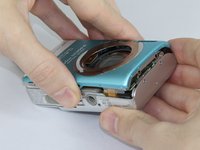
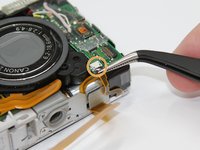
    • Pull off the front cover.

    • If the top of the cover sticks, use gentle downward pressure on the retention clips above the lens to release.

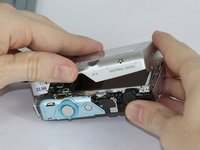
    • Remove the back cover.

    crwdns2952109:0crwdne2952109:0
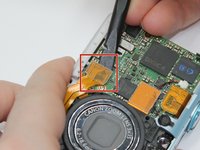
  4. Canon PowerShot SD1200 IS Lens Assembly Replacement, LCD: crwdns2935265:04crwdnd2935265:01crwdnd2935265:03crwdne2935265:0 Canon PowerShot SD1200 IS Lens Assembly Replacement, LCD: crwdns2935265:04crwdnd2935265:02crwdnd2935265:03crwdne2935265:0 Canon PowerShot SD1200 IS Lens Assembly Replacement, LCD: crwdns2935265:04crwdnd2935265:03crwdnd2935265:03crwdne2935265:0
    crwdns2935267:0crwdne2935267:0
    Tweezers
    $4.99
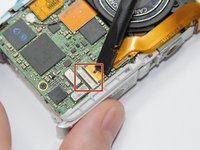
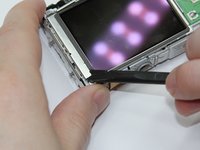
    • Use the spudger to lift the retaining flap on the Zero Insertion Force (ZIF) tab securing the thick ribbon cable.

    • Slide out the ribbon cable using fingers or tweezers.

    • Be sure you are prying up on the hinged retaining flap, not the connector.

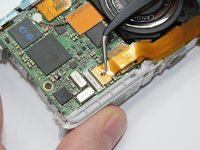
    • Using tweezers, disconnect the small ribbon cable below the flash assembly from the No Fuss Connector by simply pulling the ribbon cable straight out.

    crwdns2952109:0crwdne2952109:0
  5. Canon PowerShot SD1200 IS Lens Assembly Replacement: crwdns2935265:05crwdnd2935265:01crwdnd2935265:03crwdne2935265:0 Canon PowerShot SD1200 IS Lens Assembly Replacement: crwdns2935265:05crwdnd2935265:02crwdnd2935265:03crwdne2935265:0 Canon PowerShot SD1200 IS Lens Assembly Replacement: crwdns2935265:05crwdnd2935265:03crwdnd2935265:03crwdne2935265:0
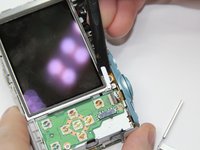
    • Remove the L shaped brackets from the left and right side of the LCD screen with the spudger tool.

    • The Brackets have tabs that need to be pried up.

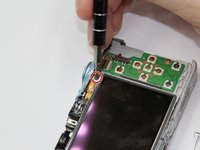
    • Remove the screw below the shutter button. (2.5mm Phillips 00)

    • Holding the sides of the LCD screen, lift the screen up and away to remove.

    crwdns2952109:0crwdne2952109:0
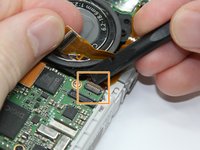
  6. Canon PowerShot SD1200 IS Lens Assembly Replacement, Flash Assembly: crwdns2935265:06crwdnd2935265:01crwdnd2935265:03crwdne2935265:0 Canon PowerShot SD1200 IS Lens Assembly Replacement, Flash Assembly: crwdns2935265:06crwdnd2935265:02crwdnd2935265:03crwdne2935265:0 Canon PowerShot SD1200 IS Lens Assembly Replacement, Flash Assembly: crwdns2935265:06crwdnd2935265:03crwdnd2935265:03crwdne2935265:0
    • Use the spudger to pry up each side of the lens assembly Flat-Topped Connector at the bottom of the motherboard.

    • Holding back the lens assembly ribbon cable, use the spudger to lift the Zero Insertion Force (ZIF) connector tab . Slide out the ribbon cable.

    • Be sure you are prying up on the hinged retaining flap, not the connector itself.

    • Use the spudger to lift the Zero Insertion Force (ZIF) connector tab located on the flash unit. Remove the ribbon cable.

    crwdns2952109:0crwdne2952109:0
  7. Canon PowerShot SD1200 IS Lens Assembly Replacement: crwdns2935265:07crwdnd2935265:01crwdnd2935265:01crwdne2935265:0
    • Remove the two screws (2 mm Phillips 00) along the back edge of the camera frame directly behind the flash assembly.

    crwdns2952109:0crwdne2952109:0
  8. Canon PowerShot SD1200 IS Lens Assembly Replacement: crwdns2935265:08crwdnd2935265:01crwdnd2935265:01crwdne2935265:0
    • Lift out the flash assembly.

    crwdns2952109:0crwdne2952109:0
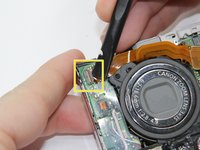
  9. Canon PowerShot SD1200 IS Lens Assembly Replacement, Lens Assembly: crwdns2935265:09crwdnd2935265:01crwdnd2935265:01crwdne2935265:0
    • Use the spudger to gently pry up both sides of the flat-topped connector, then lift the cable directly up out of its socket.

    crwdns2952109:0crwdne2952109:0
  10. Canon PowerShot SD1200 IS Lens Assembly Replacement: crwdns2935265:010crwdnd2935265:01crwdnd2935265:01crwdne2935265:0
    • Remove the 4 corner screws on the back of the camera in silver metal frame surrounding the back of the lens assembly (2.5 mm Phillips 00) .

    crwdns2952109:0crwdne2952109:0
  11. Canon PowerShot SD1200 IS Lens Assembly Replacement: crwdns2935265:011crwdnd2935265:01crwdnd2935265:01crwdne2935265:0
    • Use the spudger to gently lift out the LED at the top of the lens assembly.

    crwdns2952109:0crwdne2952109:0
  12. Canon PowerShot SD1200 IS Lens Assembly Replacement: crwdns2935265:012crwdnd2935265:01crwdnd2935265:01crwdne2935265:0
    • Remove the lens assembly.

    crwdns2952109:0crwdne2952109:0
crwdns2915888:0crwdne2915888:0

To reassemble your device, follow these instructions in reverse order.

crwdns2935229:05crwdne2935229:0

Jeff Casper

crwdns2935283:009/15/16crwdne2935283:0

897 crwdns2915208:0crwdne2915208:0

crwdns2935297:07crwdne2935297:0

crwdns2935287:0crwdne2935287:0

USF Tampa, Team 17-5, Blackwell Fall 2016 crwdns2935289:0USF Tampa, Team 17-5, Blackwell Fall 2016crwdne2935289:0

USFT-BLACKWELL-F16S17G5

crwdns2931471:03crwdne2931471:0

crwdns2935297:07crwdne2935297:0

crwdns2947412:02crwdne2947412:0

i have this same camera, and for me all the sudden it stopped focasing completely. everything else works, and it isnt in any weird modes. when i try to focas especially on auto focas with the half button push, i hear some abnormal clicking like it is trying to auto focas but cant. im not sure what to do!

Katelyn Lehmann - crwdns2934203:0crwdne2934203:0 crwdns2950251:0crwdne2950251:0

I have the same problem after my camera sat unused for a year. Everything functions fine except the camera will not focus.

ROGER - crwdns2934203:0crwdne2934203:0 crwdns2950251:0crwdne2950251:0

crwdns2917038:0crwdne2917038:0

crwdns2936625:0crwdne2936625:0:

crwdns2936751:024crwdne2936751:0 1

crwdns2936753:07crwdne2936753:0 40

crwdns2936753:030crwdne2936753:0 121

crwdns2942667:0crwdne2942667:0 4,108