crwdns2933423:0crwdne2933423:0
crwdns2947577:0crwdnd2947577:0crwdne2947577:0

Canon PowerShot S500 Battery Casing Replacement

crwdns2942213:0crwdne2942213:0

  1. Canon PowerShot S500 Battery Casing Replacement, Front and Rear Casing : crwdns2935265:01crwdnd2935265:01crwdnd2935265:02crwdne2935265:0 Canon PowerShot S500 Battery Casing Replacement, Front and Rear Casing : crwdns2935265:01crwdnd2935265:02crwdnd2935265:02crwdne2935265:0
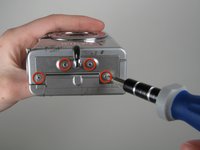
    • Unscrew five Phillips screws using a #0 Phillips screwdriver.

    • One screw is on upper right corner of the back panel.

    • The other four screws are on the bottom of the camera.

    crwdns2952109:0crwdne2952109:0

    crwdns2917038:0crwdne2917038:0

  2. Canon PowerShot S500 Battery Casing Replacement: crwdns2935265:02crwdnd2935265:01crwdnd2935265:01crwdne2935265:0
    • Open the memory card cover by moving the slide switch toward the top end of of the camera.

    • Remove the memory card from the slot.

    crwdns2952109:0crwdne2952109:0

    crwdns2917038:0crwdne2917038:0

  3. Canon PowerShot S500 Battery Casing Replacement: crwdns2935265:03crwdnd2935265:01crwdnd2935265:01crwdne2935265:0
    • Remove the rear cover from the rest of the camera.

    • This may require gentle rocking of the case to free it.

    crwdns2952109:0crwdne2952109:0

    crwdns2917038:0crwdne2917038:0

  4. Canon PowerShot S500 Battery Casing Replacement: crwdns2935265:04crwdnd2935265:01crwdnd2935265:02crwdne2935265:0 Canon PowerShot S500 Battery Casing Replacement: crwdns2935265:04crwdnd2935265:02crwdnd2935265:02crwdne2935265:0
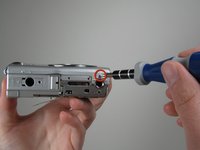
    • Unscrew the four Phillips screws from the side of the casing and one screw from the bottom using a #0 Phillips screwdriver.

    crwdns2952109:0crwdne2952109:0

    crwdns2917038:0crwdne2917038:0

  5. Canon PowerShot S500 Battery Casing Replacement: crwdns2935265:05crwdnd2935265:01crwdnd2935265:01crwdne2935265:0
    • Free the front cover from the rest of the camera.

    • The cover may require gentle rocking to remove.

    crwdns2952109:0crwdne2952109:0

    crwdns2917038:0crwdne2917038:0

  6. Canon PowerShot S500 Battery Casing Replacement, LCD: crwdns2935265:06crwdnd2935265:01crwdnd2935265:01crwdne2935265:0
    • Unscrew two Phillips screws above the LCD using a #0 Phillips screwdriver.

    crwdns2952109:0crwdne2952109:0

    crwdns2917038:0crwdne2917038:0

  7. Canon PowerShot S500 Battery Casing Replacement: crwdns2935265:07crwdnd2935265:01crwdnd2935265:01crwdne2935265:0
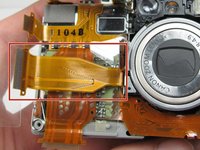
    • Gently separate the top of LCD from the rest of the camera using your thumb.

    • Be careful not pull the LCD too far because of the ribbon cable connection.

    • Place the Spudger in the hole of the electrical ribbon.

    • Gently pull the ribbon down using the Spudger until it is free from the camera but still connected to the LCD.

    • The LCD will still be connected to the rest of the camera

    crwdns2952109:0crwdne2952109:0

    crwdns2917038:0crwdne2917038:0

  8. Canon PowerShot S500 Battery Casing Replacement: crwdns2935265:08crwdnd2935265:01crwdnd2935265:02crwdne2935265:0 Canon PowerShot S500 Battery Casing Replacement: crwdns2935265:08crwdnd2935265:02crwdnd2935265:02crwdne2935265:0
    • Unscrew single Phillips screw with a #0 Phillips screwdriver.

    • Free the bottom panel and attached ribbon from the rest of the camera.

    • Be careful not to damage the ribbon.

    crwdns2952109:0crwdne2952109:0

    crwdns2917038:0crwdne2917038:0

  9. Canon PowerShot S500 Battery Casing Replacement: crwdns2935265:09crwdnd2935265:01crwdnd2935265:01crwdne2935265:0
    • Turn over the camera.

    • Lift the clear plastic from the face of the camera, peeling the adhesive just below the zoom lens.

    • The plastic will still be connected on the left side.

    crwdns2952109:0crwdne2952109:0

    crwdns2917038:0crwdne2917038:0

  10. Canon PowerShot S500 Battery Casing Replacement: crwdns2935265:010crwdnd2935265:01crwdnd2935265:01crwdne2935265:0
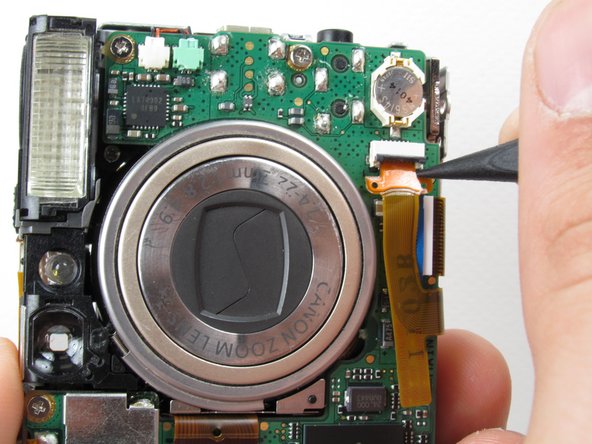
    • Place the Spudger between the orange ribbon and the black ribbon gate.

    • Lift the ribbon gate using the Spudger.

    crwdns2952109:0crwdne2952109:0

    crwdns2917038:0crwdne2917038:0

  11. Canon PowerShot S500 Battery Casing Replacement: crwdns2935265:011crwdnd2935265:01crwdnd2935265:01crwdne2935265:0
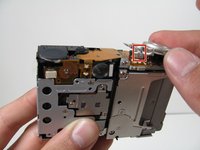
    • Place the Spudger in the corner of the ribbon above the hole.

    • Remove the ribbon from the ribbon gate by pulling the Spudger away from the gate.

    crwdns2952109:0crwdne2952109:0

    crwdns2917038:0crwdne2917038:0

  12. Canon PowerShot S500 Battery Casing Replacement: crwdns2935265:012crwdnd2935265:01crwdnd2935265:01crwdne2935265:0
    • Free this ribbon and the bottom panel from the rest of the camera.

    • Be careful not to damage the ribbon.

    crwdns2952109:0crwdne2952109:0

    crwdns2917038:0crwdne2917038:0

  13. Canon PowerShot S500 Battery Casing Replacement: crwdns2935265:013crwdnd2935265:01crwdnd2935265:01crwdne2935265:0
    • Turn the camera over so you can see the LCD.

    • Remove single Phillips screw below the LCD using a #0 Phillips screwdriver.

    crwdns2952109:0crwdne2952109:0

    crwdns2917038:0crwdne2917038:0

  14. Canon PowerShot S500 Battery Casing Replacement: crwdns2935265:014crwdnd2935265:01crwdnd2935265:01crwdne2935265:0
    • Lift the blue ribbon gate using the Spudger.

    crwdns2952109:0crwdne2952109:0

    crwdns2917038:0crwdne2917038:0

  15. Canon PowerShot S500 Battery Casing Replacement: crwdns2935265:015crwdnd2935265:01crwdnd2935265:01crwdne2935265:0
    • Insert the Spudger into the hole of the ribbon.

    • Move the Spudger away from the gate to fully remove ribbon.

    • Be careful not to damage the ribbon.

    crwdns2952109:0crwdne2952109:0

    crwdns2917038:0crwdne2917038:0

  16. Canon PowerShot S500 Battery Casing Replacement: crwdns2935265:016crwdnd2935265:01crwdnd2935265:01crwdne2935265:0
    • Lift the LCD away from the rest of the camera.

    crwdns2952109:0crwdne2952109:0

    crwdns2917038:0crwdne2917038:0

  17. Canon PowerShot S500 Battery Casing Replacement, Logic Board: crwdns2935265:017crwdnd2935265:01crwdnd2935265:02crwdne2935265:0 Canon PowerShot S500 Battery Casing Replacement, Logic Board: crwdns2935265:017crwdnd2935265:02crwdnd2935265:02crwdne2935265:0
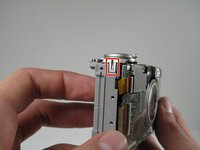
    • Lift off the capture button by wiggling it back and forth while pulling upward.

    • Be careful not to damage the two clips.

    crwdns2952109:0crwdne2952109:0

    crwdns2917038:0crwdne2917038:0

  18. Canon PowerShot S500 Battery Casing Replacement: crwdns2935265:018crwdnd2935265:01crwdnd2935265:02crwdne2935265:0 Canon PowerShot S500 Battery Casing Replacement: crwdns2935265:018crwdnd2935265:02crwdnd2935265:02crwdne2935265:0
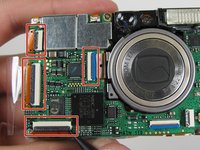
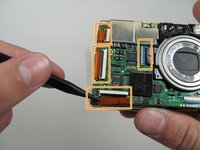
    • Flip open the four ribbon gates using the Spudger.

    • Gently pull out the ribbon cables from the gates using the Spudger.

    crwdns2952109:0crwdne2952109:0

    crwdns2917038:0crwdne2917038:0

  19. Canon PowerShot S500 Battery Casing Replacement: crwdns2935265:019crwdnd2935265:01crwdnd2935265:01crwdne2935265:0
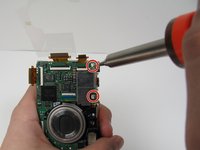
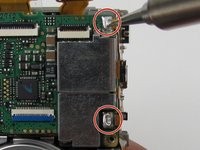
    • Unscrew the four Phillips screws using a #0 Phillips screwdriver.

    crwdns2952109:0crwdne2952109:0

    crwdns2917038:0crwdne2917038:0

  20. Canon PowerShot S500 Battery Casing Replacement: crwdns2935265:020crwdnd2935265:01crwdnd2935265:02crwdne2935265:0 Canon PowerShot S500 Battery Casing Replacement: crwdns2935265:020crwdnd2935265:02crwdnd2935265:02crwdne2935265:0
    • Gently lift the logic board.

    • Be careful not to pull too hard and damage the white ribbon cable.

    • Place the Spudger so that it is between the logic board, the white ribbon cable, and the rest of the camera.

    • Remove the white ribbon cable by pulling the Spudger away from the camera, keeping it parallel to the logic board.

    crwdns2952109:0crwdne2952109:0

    crwdns2917038:0crwdne2917038:0

  21. Canon PowerShot S500 Battery Casing Replacement: crwdns2935265:021crwdnd2935265:01crwdnd2935265:01crwdne2935265:0
    crwdns2935267:0crwdne2935267:0
    Tweezers
    $4.99
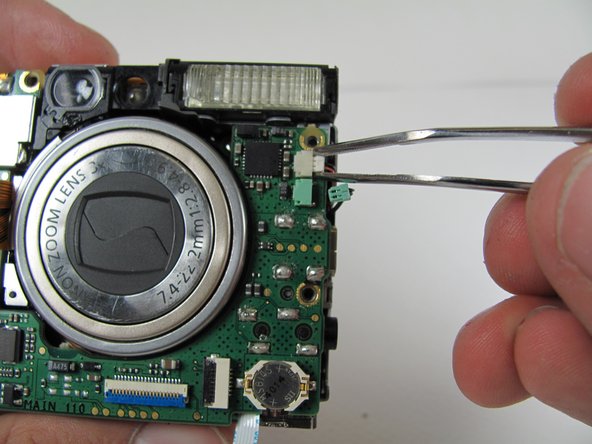
    • Lay the logic board back down so that it is resting on the body of the camera.

    • Pull the two plugs (white and green) out to the right from the logic board using the tweezers.

    crwdns2952109:0crwdne2952109:0

    crwdns2917038:0crwdne2917038:0

  22. Canon PowerShot S500 Battery Casing Replacement: crwdns2935265:022crwdnd2935265:01crwdnd2935265:02crwdne2935265:0 Canon PowerShot S500 Battery Casing Replacement: crwdns2935265:022crwdnd2935265:02crwdnd2935265:02crwdne2935265:0
    • We're now ready to begin the desoldering process. You'll need a soldering iron, solder, and desoldering wick. You should be able to find these items at a Radio Shack if you don't already have them.

    • Please do not perform this step if you are not comfortable or have previous experience with soldering. Doing so, could cause severe damage to your camera.

    • Desolder the two soldered ribbon cables attached to the logic board.

    crwdns2952109:0crwdne2952109:0

    crwdns2917038:0crwdne2917038:0

  23. Canon PowerShot S500 Battery Casing Replacement: crwdns2935265:023crwdnd2935265:01crwdnd2935265:01crwdne2935265:0
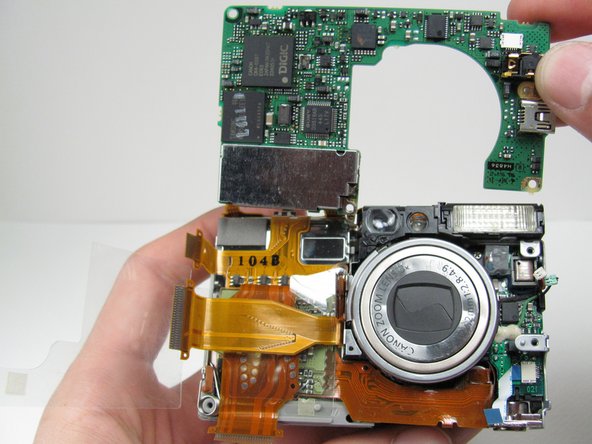
    • Free the logic board from the rest of the camera.

    crwdns2952109:0crwdne2952109:0

    crwdns2917038:0crwdne2917038:0

  24. Canon PowerShot S500 Battery Casing Replacement, Breakdown to Three Parts: crwdns2935265:024crwdnd2935265:01crwdnd2935265:01crwdne2935265:0
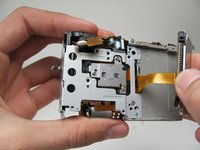
    • Turn the camera over so that the back is facing you.

    • Unscrew the three Phillips screws using a #0 Phillips screwdriver.

    crwdns2952109:0crwdne2952109:0

    crwdns2917038:0crwdne2917038:0

  25. Canon PowerShot S500 Battery Casing Replacement: crwdns2935265:025crwdnd2935265:01crwdnd2935265:02crwdne2935265:0 Canon PowerShot S500 Battery Casing Replacement: crwdns2935265:025crwdnd2935265:02crwdnd2935265:02crwdne2935265:0
    • Lift off the Memory Card casing, sliding the ribbon cable through the camera. Keep pulling until the Memory Card and ribbon cable have been removed from the camera.

    • Note that the ribbon cable is coming from the external front portion of the camera. Make sure that the ribbon cable will not get caught on anything.

    crwdns2952109:0crwdne2952109:0

    crwdns2917038:0crwdne2917038:0

  26. Canon PowerShot S500 Battery Casing Replacement: crwdns2935265:026crwdnd2935265:01crwdnd2935265:02crwdne2935265:0 Canon PowerShot S500 Battery Casing Replacement: crwdns2935265:026crwdnd2935265:02crwdnd2935265:02crwdne2935265:0
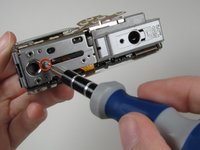
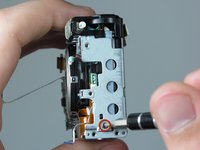
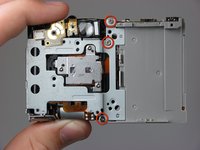
    • Unscrew one Phillips screws from the side and three Phillips screws from the back panel using a #0 Phillips screwdriver.

    crwdns2952109:0crwdne2952109:0

    crwdns2917038:0crwdne2917038:0

  27. Canon PowerShot S500 Battery Casing Replacement: crwdns2935265:027crwdnd2935265:01crwdnd2935265:03crwdne2935265:0 Canon PowerShot S500 Battery Casing Replacement: crwdns2935265:027crwdnd2935265:02crwdnd2935265:03crwdne2935265:0 Canon PowerShot S500 Battery Casing Replacement: crwdns2935265:027crwdnd2935265:03crwdnd2935265:03crwdne2935265:0
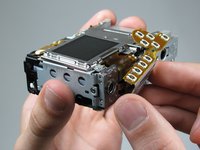
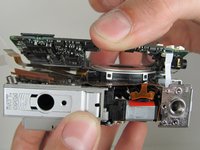
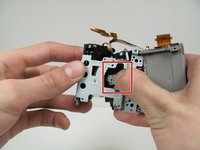
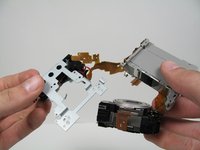
    • Firmly push on the back of the zoom lens, removing it from the left portion of the camera.

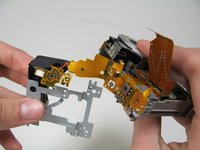
    • Lift the zoom lens away from the left portion of the camera so that there are three components connected by a ribbon cables.

    • Be careful not to tear the ribbon cables.

    crwdns2952109:0crwdne2952109:0

    crwdns2917038:0crwdne2917038:0

  28. Canon PowerShot S500 Battery Casing Replacement: crwdns2935265:028crwdnd2935265:01crwdnd2935265:01crwdne2935265:0
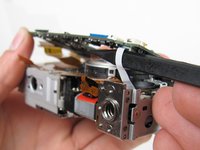
    • The camera should now be able to be set in this orientation without too much stress on the cables.

    • The clear plastic is still attached to the battery casing.

    crwdns2952109:0crwdne2952109:0

    crwdns2917038:0crwdne2917038:0

  29. Canon PowerShot S500 Battery Casing Replacement: crwdns2935265:029crwdnd2935265:01crwdnd2935265:02crwdne2935265:0 Canon PowerShot S500 Battery Casing Replacement: crwdns2935265:029crwdnd2935265:02crwdnd2935265:02crwdne2935265:0
    crwdns2935267:0crwdne2935267:0
    Tweezers
    $4.99
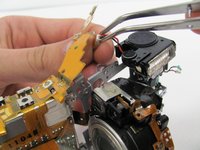
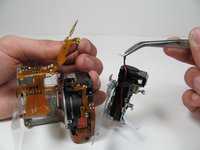
    • Locate the ribbon cable going from the battery case to the flash assembly.

    • Remove the plug from the ribbon cable using the tweezers.

    • The flash assembly is now free from the rest of the camera.

    crwdns2952109:0crwdne2952109:0

    crwdns2917038:0crwdne2917038:0

  30. Canon PowerShot S500 Battery Casing Replacement: crwdns2935265:030crwdnd2935265:01crwdnd2935265:01crwdne2935265:0
    • Pick up the remaining battery casing and zoom lens.

    • Pull off the clear plastic.

    • The clear plastic is secured by adhesive along the bottom edge and a small hook.

    crwdns2952109:0crwdne2952109:0

    crwdns2917038:0crwdne2917038:0

  31. Canon PowerShot S500 Battery Casing Replacement: crwdns2935265:031crwdnd2935265:01crwdnd2935265:01crwdne2935265:0
    • Lift the zoom lens off of the battery casing.

    • The back of the circuits are attached to the battery casing by a light adhesive, which can be removed with a slight pull upwards.

    crwdns2952109:0crwdne2952109:0

    crwdns2917038:0crwdne2917038:0

  32. Canon PowerShot S500 Battery Casing Replacement: crwdns2935265:032crwdnd2935265:01crwdnd2935265:01crwdne2935265:0
    • The remaining pieces from left to right are: the battery casing, zoom lens and flash assembly.

    crwdns2952109:0crwdne2952109:0

    crwdns2917038:0crwdne2917038:0

  33. Canon PowerShot S500 Battery Casing Replacement, Battery Casing: crwdns2935265:033crwdnd2935265:01crwdnd2935265:01crwdne2935265:0
    • Check the battery terminals for any corrosive material or bad connections.

    crwdns2952109:0crwdne2952109:0

    crwdns2917038:0crwdne2917038:0

crwdns2915888:0crwdne2915888:0

To reassemble your device, follow these instructions in reverse order.

crwdns2935221:0crwdne2935221:0

Nathan Balcom

crwdns2935283:001/21/10crwdne2935283:0

102 crwdns2915208:0crwdne2915208:0

crwdns2935297:08crwdne2935297:0

crwdns2935287:0crwdne2935287:0

Cal Poly, Team 16-28, Maness Winter 2010 crwdns2935289:0Cal Poly, Team 16-28, Maness Winter 2010crwdne2935289:0

CPSU-MANESS-W10S16G28

crwdns2931471:04crwdne2931471:0

crwdns2935297:09crwdne2935297:0

crwdns2947412:00crwdne2947412:0

crwdns2917038:0crwdne2917038:0

crwdns2936625:0crwdne2936625:0:

crwdns2936751:024crwdne2936751:0 2

crwdns2936753:07crwdne2936753:0 13

crwdns2936753:030crwdne2936753:0 55

crwdns2942667:0crwdne2942667:0 3,587