crwdns2933423:0crwdne2933423:0
crwdns2947577:0crwdnd2947577:0crwdne2947577:0

Canon PowerShot A630 LCD Screen Replacement

crwdns2942213:0crwdne2942213:0

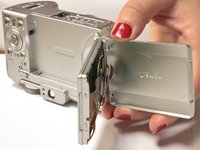
    1. Canon PowerShot A630 LCD Screen Replacement, LCD Screen: crwdns2935265:01crwdnd2935265:01crwdnd2935265:01crwdne2935265:0
      • Open the LCD screen of the camera

      crwdns2952109:0crwdne2952109:0

      crwdns2917038:0crwdne2917038:0

    2. Canon PowerShot A630 LCD Screen Replacement: crwdns2935265:02crwdnd2935265:01crwdnd2935265:02crwdne2935265:0 Canon PowerShot A630 LCD Screen Replacement: crwdns2935265:02crwdnd2935265:02crwdnd2935265:02crwdne2935265:0
      • Rotate the screen so that it is perpendicular to the body of the camera

      • Remove the .2mm screw using a Phillips #00 screwdriver

      • Rotate screen 180 degrees and remove second .2mm screw

      crwdns2952109:0crwdne2952109:0

      crwdns2917038:0crwdne2917038:0

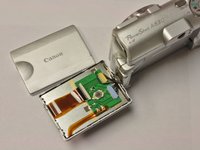
    3. Canon PowerShot A630 LCD Screen Replacement: crwdns2935265:03crwdnd2935265:01crwdnd2935265:02crwdne2935265:0 Canon PowerShot A630 LCD Screen Replacement: crwdns2935265:03crwdnd2935265:02crwdnd2935265:02crwdne2935265:0
      • Gently remove the back panel of the LCD screen

      crwdns2952109:0crwdne2952109:0

      crwdns2917038:0crwdne2917038:0

    4. Canon PowerShot A630 LCD Screen Replacement: crwdns2935265:04crwdnd2935265:01crwdnd2935265:01crwdne2935265:0
      • Once the back panel is removed another .2mm screw will be revealed, remove this screw to remove the front panel of the LCD screen

      crwdns2952109:0crwdne2952109:0

      crwdns2917038:0crwdne2917038:0

    5. Canon PowerShot A630 LCD Screen Replacement: crwdns2935265:05crwdnd2935265:01crwdnd2935265:01crwdne2935265:0
      • Gently remove front panel of the LCD screen

      crwdns2952109:0crwdne2952109:0

      crwdns2917038:0crwdne2917038:0

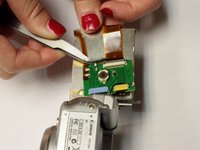
    6. Canon PowerShot A630 LCD Screen Replacement: crwdns2935265:06crwdnd2935265:01crwdnd2935265:02crwdne2935265:0 Canon PowerShot A630 LCD Screen Replacement: crwdns2935265:06crwdnd2935265:02crwdnd2935265:02crwdne2935265:0
      crwdns2935267:0crwdne2935267:0
      Tweezers
      $4.99
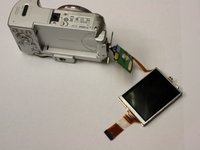
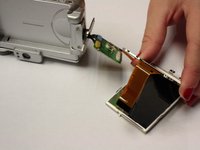
      • Locate the ribbon (orange) and using tweezers gently pull back the retaining clip and pull the ribbon out

      crwdns2952109:0crwdne2952109:0

      crwdns2917038:0crwdne2917038:0

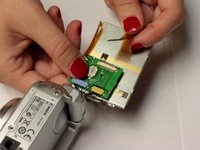
    7. Canon PowerShot A630 LCD Screen Replacement: crwdns2935265:07crwdnd2935265:01crwdnd2935265:03crwdne2935265:0 Canon PowerShot A630 LCD Screen Replacement: crwdns2935265:07crwdnd2935265:02crwdnd2935265:03crwdne2935265:0 Canon PowerShot A630 LCD Screen Replacement: crwdns2935265:07crwdnd2935265:03crwdnd2935265:03crwdne2935265:0
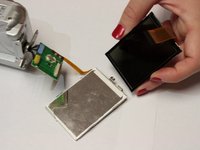
      • Use a spudger to gently remove the LCD screen from the metal backing plate

      crwdns2952109:0crwdne2952109:0

      crwdns2917038:0crwdne2917038:0

crwdns2915888:0crwdne2915888:0

To reassemble your device, follow these instructions in reverse order.

crwdns2935221:0crwdne2935221:0

crwdns2935229:03crwdne2935229:0

Kady Rose

crwdns2935283:010/13/14crwdne2935283:0

219 crwdns2915208:0crwdne2915208:0

crwdns2935295:0crwdne2935295:0

crwdns2935287:0crwdne2935287:0

Clemson, Team 2-5, Benson Fall 2014 crwdns2935289:0Clemson, Team 2-5, Benson Fall 2014crwdne2935289:0

CLEM-BENSON-F14S2G5

crwdns2931471:04crwdne2931471:0

crwdns2935297:0108crwdne2935297:0

crwdns2947412:02crwdne2947412:0

Where can I purchase a replacement LCD screen?

steigw - crwdns2934203:0crwdne2934203:0 crwdns2950251:0crwdne2950251:0

crwdns2917038:0crwdne2917038:0

crwdns2936625:0crwdne2936625:0:

crwdns2936751:024crwdne2936751:0 3

crwdns2936753:07crwdne2936753:0 36

crwdns2936753:030crwdne2936753:0 128

crwdns2942667:0crwdne2942667:0 3,494