crwdns2933423:0crwdne2933423:0
crwdns2947577:0crwdnd2947577:0crwdne2947577:0

Canon PowerShot A540 SD Card Reader Replacement

crwdns2942213:0crwdne2942213:0

    1. Canon PowerShot A540 SD Card Reader Replacement, Back Cover: crwdns2935265:01crwdnd2935265:01crwdnd2935265:02crwdne2935265:0 Canon PowerShot A540 SD Card Reader Replacement, Back Cover: crwdns2935265:01crwdnd2935265:02crwdnd2935265:02crwdne2935265:0
      • Turn off the camera.

      • Turn the camera upside-down and press the tab to release the battery cover. Remove the batteries.

      crwdns2952109:0crwdne2952109:0

      crwdns2917038:0crwdne2917038:0

    2. Canon PowerShot A540 SD Card Reader Replacement: crwdns2935265:02crwdnd2935265:01crwdnd2935265:01crwdne2935265:0
      • Turn the camera upside down to view the "Card/Batt. Open" Cover.

      • Use a Phillips head #000 screwdriver to remove the three (3) 4.0 mm screws.

      crwdns2952109:0crwdne2952109:0

      crwdns2917038:0crwdne2917038:0

    3. Canon PowerShot A540 SD Card Reader Replacement: crwdns2935265:03crwdnd2935265:01crwdnd2935265:01crwdne2935265:0
      • Open "Card/Batt. Open" Cover.

      • Remove the one (1) 5.0 mm screw with the Phillips head #000 screwdriver.

      crwdns2952109:0crwdne2952109:0

      crwdns2917038:0crwdne2917038:0

    4. Canon PowerShot A540 SD Card Reader Replacement: crwdns2935265:04crwdnd2935265:01crwdnd2935265:01crwdne2935265:0
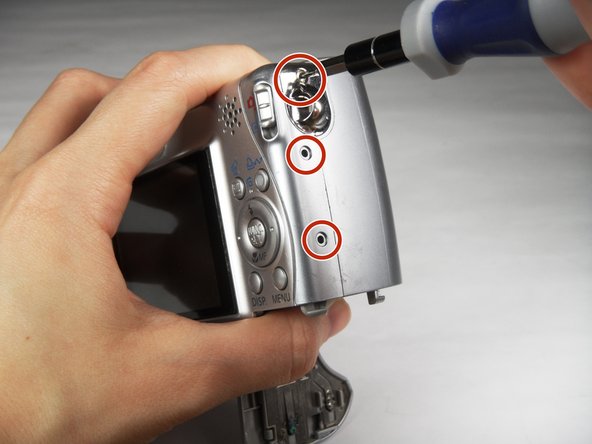
      • Turn the camera to the right side of the LCD screen.

      • Remove the three (3) 4.0 mm screws with the Phillips head #000 screwdriver.

      crwdns2952109:0crwdne2952109:0

      crwdns2917038:0crwdne2917038:0

    5. Canon PowerShot A540 SD Card Reader Replacement: crwdns2935265:05crwdnd2935265:01crwdnd2935265:03crwdne2935265:0 Canon PowerShot A540 SD Card Reader Replacement: crwdns2935265:05crwdnd2935265:02crwdnd2935265:03crwdne2935265:0 Canon PowerShot A540 SD Card Reader Replacement: crwdns2935265:05crwdnd2935265:03crwdnd2935265:03crwdne2935265:0
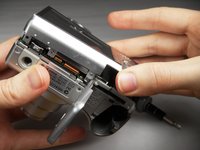
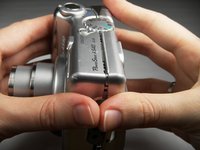
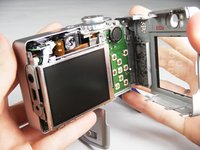
      • Gently remove the back cover.

      • Start at the bottom at the corner of the "Card/Batt. Open" Cover.

      • Then move onto the other edges and the top.

      • It may be tight at the top!

      crwdns2952109:0crwdne2952109:0

      crwdns2917038:0crwdne2917038:0

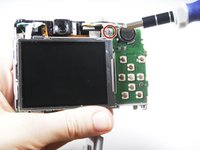
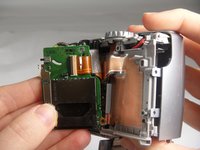
    1. Canon PowerShot A540 SD Card Reader Replacement, SD Card Reader: crwdns2935265:06crwdnd2935265:01crwdnd2935265:02crwdne2935265:0 Canon PowerShot A540 SD Card Reader Replacement, SD Card Reader: crwdns2935265:06crwdnd2935265:02crwdnd2935265:02crwdne2935265:0
      • Turn the camera to view the back.

      • Remove the one (1) 3.0 mm screw on the top right corner of the screen.

      • There is a small metal bar that rests on this frame. Keep it with the screws that have been removed from the camera.

      crwdns2952109:0crwdne2952109:0

      crwdns2917038:0crwdne2917038:0

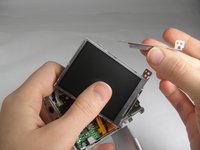
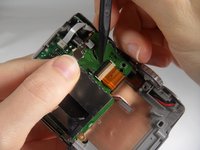
    2. Canon PowerShot A540 SD Card Reader Replacement: crwdns2935265:07crwdnd2935265:01crwdnd2935265:02crwdne2935265:0 Canon PowerShot A540 SD Card Reader Replacement: crwdns2935265:07crwdnd2935265:02crwdnd2935265:02crwdne2935265:0
      crwdns2935267:0crwdne2935267:0
      Tweezers
      $4.99
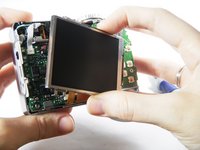
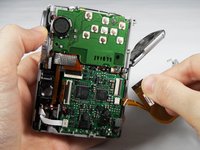
      • Lift the LCD Screen off of the back to view the attached ribbon cables.

      • Use tweezers to flip the black bar up.

      crwdns2952109:0crwdne2952109:0

      crwdns2917038:0crwdne2917038:0

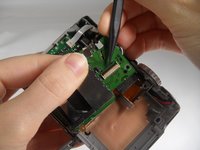
    3. Canon PowerShot A540 SD Card Reader Replacement: crwdns2935265:08crwdnd2935265:01crwdnd2935265:03crwdne2935265:0 Canon PowerShot A540 SD Card Reader Replacement: crwdns2935265:08crwdnd2935265:02crwdnd2935265:03crwdne2935265:0 Canon PowerShot A540 SD Card Reader Replacement: crwdns2935265:08crwdnd2935265:03crwdnd2935265:03crwdne2935265:0
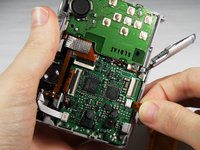
      • Gently pull the big ribbon out.

      • Gently pull the small ribbon out.

      • The small ribbon does not have a bar like the big ribbon.

      crwdns2952109:0crwdne2952109:0

      crwdns2917038:0crwdne2917038:0

    4. Canon PowerShot A540 SD Card Reader Replacement: crwdns2935265:09crwdnd2935265:01crwdnd2935265:02crwdne2935265:0 Canon PowerShot A540 SD Card Reader Replacement: crwdns2935265:09crwdnd2935265:02crwdnd2935265:02crwdne2935265:0
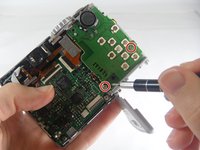
      • Remove the two (2) 3.0 mm screws shown with the Phillips head #000 screwdriver.

      crwdns2952109:0crwdne2952109:0

      crwdns2917038:0crwdne2917038:0

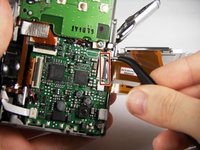
    5. Canon PowerShot A540 SD Card Reader Replacement: crwdns2935265:010crwdnd2935265:01crwdnd2935265:02crwdne2935265:0 Canon PowerShot A540 SD Card Reader Replacement: crwdns2935265:010crwdnd2935265:02crwdnd2935265:02crwdne2935265:0
      • Remove the ribbon from the clamp/bar securing it by using your tweezers to pull the bar up.

      crwdns2952109:0crwdne2952109:0

      crwdns2917038:0crwdne2917038:0

    6. Canon PowerShot A540 SD Card Reader Replacement: crwdns2935265:011crwdnd2935265:01crwdnd2935265:01crwdne2935265:0
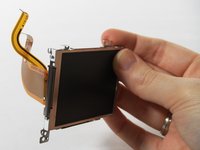
      • Remove the SD Card reader and replace.

      • There is another metal bar that comes off of the SD Card reader when screws are removed.

      crwdns2952109:0crwdne2952109:0

      crwdns2917038:0crwdne2917038:0

crwdns2915888:0crwdne2915888:0

To reassemble your device, follow these instructions in reverse order.

crwdns2935221:0crwdne2935221:0

crwdns2935229:02crwdne2935229:0

Cooper Hale

crwdns2935283:003/22/15crwdne2935283:0

598 crwdns2915208:0crwdne2915208:0

crwdns2935297:03crwdne2935297:0

crwdns2935287:0crwdne2935287:0

Baylor, Team 7-12, Williams Spring 2015 crwdns2935289:0Baylor, Team 7-12, Williams Spring 2015crwdne2935289:0

BU-WILLIAMS-S15S7G12

crwdns2931471:03crwdne2931471:0

crwdns2935297:020crwdne2935297:0

crwdns2947410:01crwdne2947410:0

Hello, does anyone have a replacement Part Number for this SD Card Board? I have multiple A540 cameras that have a faulty sd card board and I am looking for any replacements.

Juan - crwdns2934203:0crwdne2934203:0 crwdns2950251:0crwdne2950251:0

crwdns2917038:0crwdne2917038:0

crwdns2936625:0crwdne2936625:0:

crwdns2936751:024crwdne2936751:0 0

crwdns2936753:07crwdne2936753:0 8

crwdns2936753:030crwdne2936753:0 43

crwdns2942667:0crwdne2942667:0 1,907