crwdns2933423:0crwdne2933423:0
crwdns2947577:0crwdnd2947577:0crwdne2947577:0

Canon PowerShot A3400 LCD Display Replacement

crwdns2942213:0crwdne2942213:0

    1. Canon PowerShot A3400 LCD Display Replacement, Battery: crwdns2935265:01crwdnd2935265:01crwdnd2935265:01crwdne2935265:0
      • Place thumb on area right next to where it says open and slide to the right to open.

      crwdns2952109:0crwdne2952109:0

      crwdns2917038:0crwdne2917038:0

    2. Canon PowerShot A3400 LCD Display Replacement: crwdns2935265:02crwdnd2935265:01crwdnd2935265:01crwdne2935265:0
      • Remove the battery by pushing the orange object outwards; the battery will spring up and out.

      crwdns2952109:0crwdne2952109:0

      crwdns2917038:0crwdne2917038:0

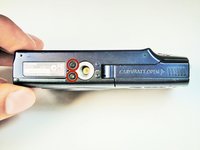
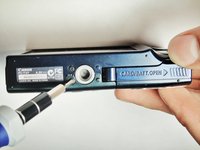
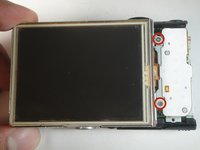
    1. Canon PowerShot A3400 LCD Display Replacement, Plastic Case: crwdns2935265:03crwdnd2935265:01crwdnd2935265:02crwdne2935265:0 Canon PowerShot A3400 LCD Display Replacement, Plastic Case: crwdns2935265:03crwdnd2935265:02crwdnd2935265:02crwdne2935265:0
      • Remove the two 5.00 mm screws in the bottom of the casing with a Philips #000 screwdriver

      crwdns2952109:0crwdne2952109:0

      crwdns2917038:0crwdne2917038:0

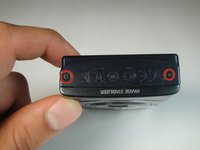
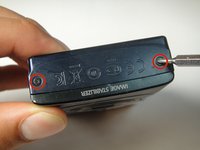
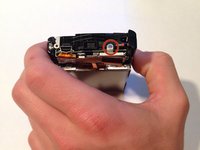
    2. Canon PowerShot A3400 LCD Display Replacement: crwdns2935265:04crwdnd2935265:01crwdnd2935265:02crwdne2935265:0 Canon PowerShot A3400 LCD Display Replacement: crwdns2935265:04crwdnd2935265:02crwdnd2935265:02crwdne2935265:0
      • Place the camera on to the side that has the image stabilizer label.

      • Remove the 5.00 mm screws that are on this side using the screwdriver.

      crwdns2952109:0crwdne2952109:0

      crwdns2917038:0crwdne2917038:0

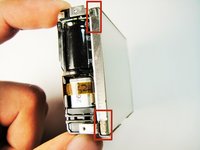
    3. Canon PowerShot A3400 LCD Display Replacement: crwdns2935265:05crwdnd2935265:01crwdnd2935265:01crwdne2935265:0
      • Place camera on to the side with the A/V Out Digital Cover facing up.

      • Remove this visible 5.00 mm screw.

      • Pull the A/V Out Digital cover back to uncover the next step.

      crwdns2952109:0crwdne2952109:0

      crwdns2917038:0crwdne2917038:0

    4. Canon PowerShot A3400 LCD Display Replacement: crwdns2935265:06crwdnd2935265:01crwdnd2935265:01crwdne2935265:0
      • Remove the 5.00 mm screw from behind the cover.

      crwdns2952109:0crwdne2952109:0

      crwdns2917038:0crwdne2917038:0

    5. Canon PowerShot A3400 LCD Display Replacement: crwdns2935265:07crwdnd2935265:01crwdnd2935265:01crwdne2935265:0
      • Make sure the battery cover is open.

      crwdns2952109:0crwdne2952109:0

      crwdns2917038:0crwdne2917038:0

    6. Canon PowerShot A3400 LCD Display Replacement: crwdns2935265:08crwdnd2935265:01crwdnd2935265:02crwdne2935265:0 Canon PowerShot A3400 LCD Display Replacement: crwdns2935265:08crwdnd2935265:02crwdnd2935265:02crwdne2935265:0
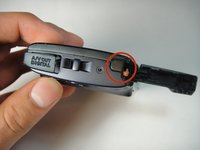
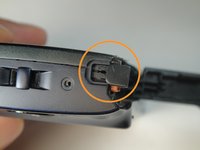
      • Turn the camera onto the side with the A/V out Digital cover.

      • Use your finger to pull this tab to the right.

      crwdns2952109:0crwdne2952109:0

      crwdns2917038:0crwdne2917038:0

    7. Canon PowerShot A3400 LCD Display Replacement: crwdns2935265:09crwdnd2935265:01crwdnd2935265:03crwdne2935265:0 Canon PowerShot A3400 LCD Display Replacement: crwdns2935265:09crwdnd2935265:02crwdnd2935265:03crwdne2935265:0 Canon PowerShot A3400 LCD Display Replacement: crwdns2935265:09crwdnd2935265:03crwdnd2935265:03crwdne2935265:0
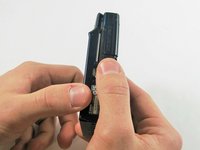
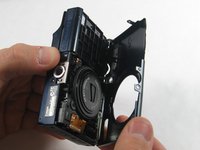
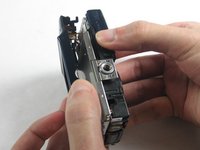
      • Remove the lens side by using your fingers or a spudger to pry it gently open.

      • Try to pry it loose all around that side so that it is easier to pull off.

      crwdns2952109:0crwdne2952109:0

      crwdns2917038:0crwdne2917038:0

    8. Canon PowerShot A3400 LCD Display Replacement: crwdns2935265:010crwdnd2935265:01crwdnd2935265:03crwdne2935265:0 Canon PowerShot A3400 LCD Display Replacement: crwdns2935265:010crwdnd2935265:02crwdnd2935265:03crwdne2935265:0 Canon PowerShot A3400 LCD Display Replacement: crwdns2935265:010crwdnd2935265:03crwdnd2935265:03crwdne2935265:0
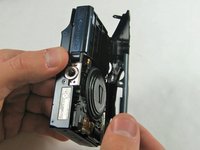
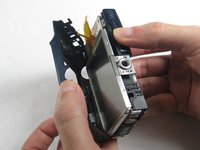
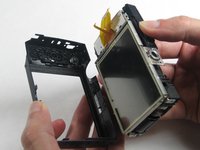
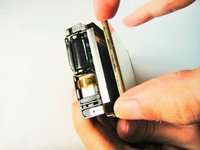
      • Using your fingers, pull the screen side gently off.

      • Try to loosen it all around that side so that it is easier to try and pull it off.

      crwdns2952109:0crwdne2952109:0

      crwdns2917038:0crwdne2917038:0

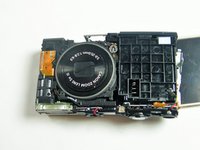
    1. Canon PowerShot A3400 LCD Display Replacement, Lens: crwdns2935265:011crwdnd2935265:01crwdnd2935265:03crwdne2935265:0 Canon PowerShot A3400 LCD Display Replacement, Lens: crwdns2935265:011crwdnd2935265:02crwdnd2935265:03crwdne2935265:0 Canon PowerShot A3400 LCD Display Replacement, Lens: crwdns2935265:011crwdnd2935265:03crwdnd2935265:03crwdne2935265:0
      • Remove the three 5 mm screws

      crwdns2952109:0crwdne2952109:0

      crwdns2917038:0crwdne2917038:0

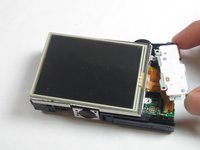
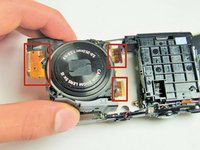
    2. Canon PowerShot A3400 LCD Display Replacement: crwdns2935265:012crwdnd2935265:01crwdnd2935265:03crwdne2935265:0 Canon PowerShot A3400 LCD Display Replacement: crwdns2935265:012crwdnd2935265:02crwdnd2935265:03crwdne2935265:0 Canon PowerShot A3400 LCD Display Replacement: crwdns2935265:012crwdnd2935265:03crwdnd2935265:03crwdne2935265:0
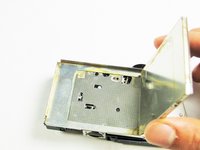
      • Pull the screen away from the main components.

      • Do not pull hard as there are some ribbons still attached to the motherboard that could be damaged if you use too much force.

      crwdns2952109:0crwdne2952109:0

      crwdns2917038:0crwdne2917038:0

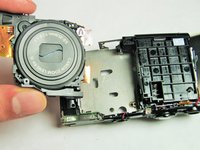
    3. Canon PowerShot A3400 LCD Display Replacement: crwdns2935265:013crwdnd2935265:01crwdnd2935265:02crwdne2935265:0 Canon PowerShot A3400 LCD Display Replacement: crwdns2935265:013crwdnd2935265:02crwdnd2935265:02crwdne2935265:0
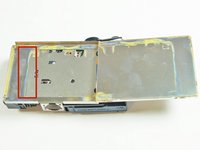
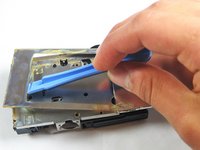
      • Lift the metal plate with the plastic opening tool.

      crwdns2952109:0crwdne2952109:0

      crwdns2917038:0crwdne2917038:0

    4. Canon PowerShot A3400 LCD Display Replacement: crwdns2935265:014crwdnd2935265:01crwdnd2935265:01crwdne2935265:0
      • Remove all of these 5 mm screws

      crwdns2952109:0crwdne2952109:0

      crwdns2917038:0crwdne2917038:0

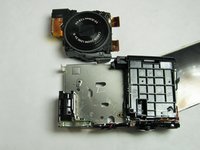
    5. Canon PowerShot A3400 LCD Display Replacement: crwdns2935265:015crwdnd2935265:01crwdnd2935265:03crwdne2935265:0 Canon PowerShot A3400 LCD Display Replacement: crwdns2935265:015crwdnd2935265:02crwdnd2935265:03crwdne2935265:0 Canon PowerShot A3400 LCD Display Replacement: crwdns2935265:015crwdnd2935265:03crwdnd2935265:03crwdne2935265:0
      • Gently remove the lens componenet.

      • The orange flex cables are connected to ZIF connectors. Be sure to disconnect and reconnect them properly by first unlocking the retaining flap on each connector.

      crwdns2952109:0crwdne2952109:0

      crwdns2917038:0crwdne2917038:0

    1. Canon PowerShot A3400 LCD Display Replacement, LCD Display: crwdns2935265:016crwdnd2935265:01crwdnd2935265:03crwdne2935265:0 Canon PowerShot A3400 LCD Display Replacement, LCD Display: crwdns2935265:016crwdnd2935265:02crwdnd2935265:03crwdne2935265:0 Canon PowerShot A3400 LCD Display Replacement, LCD Display: crwdns2935265:016crwdnd2935265:03crwdnd2935265:03crwdne2935265:0
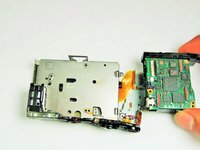
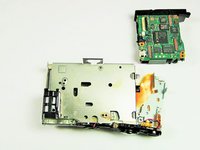
      • Detach the Motherboard, and then gently pull the motherboard away from the screen.

      crwdns2952109:0crwdne2952109:0

      crwdns2917038:0crwdne2917038:0

crwdns2915888:0crwdne2915888:0

To reassemble your device, follow these instructions in reverse order.

crwdns2935221:0crwdne2935221:0

crwdns2935227:0crwdne2935227:0

Matt Mullins

crwdns2935283:001/13/15crwdne2935283:0

104 crwdns2915208:0crwdne2915208:0

crwdns2935295:0crwdne2935295:0

crwdns2935287:0crwdne2935287:0

USF Tampa, Team 1-1, Sullivan Spring 2014 crwdns2935289:0USF Tampa, Team 1-1, Sullivan Spring 2014crwdne2935289:0

USFT-SULLIVAN-S14S1G1

crwdns2934841:01crwdne2934841:0

crwdns2935297:02crwdne2935297:0

crwdns2947410:01crwdne2947410:0

useless if you try to do it reverse.. Don't even try it.

The Heat - crwdns2934203:0crwdne2934203:0 crwdns2950251:0crwdne2950251:0

crwdns2917038:0crwdne2917038:0

crwdns2936625:0crwdne2936625:0:

crwdns2936751:024crwdne2936751:0 2

crwdns2936753:07crwdne2936753:0 21

crwdns2936753:030crwdne2936753:0 40

crwdns2942667:0crwdne2942667:0 1,266